Field operations software categories are the reason your stack can look complete, on paper at least. But when you're people roll out in the morning it still falls apart.
It's also why you're facing dozens of overlapping claims from tools and blurry boundaries when it comes to software capabilities.
That's what makes a tracker sound like a scheduler and a scheduler sound like it runs the whole day.
And why you end up with plenty of software and a nagging sense that something structural is still missing.
But that's why you're here.
Everything in this guide maps to one idea and one execution layer for field operations:
Most organizations don't lack software, they lack the right category of software.
The rest of this article gives you the four categories, how they fit together, and where stacks quietly break.
Key Takeaways
- Field operations software splits into four categories: systems of record, visibility, planning and scheduling, and execution. Each tool does a different job, and fits into a larger operations management software stack.
- You can't judge a tool until you know which job it's built for. Feature lists make different categories look interchangeable, while in reality categories beat features in how important they are to your stack.
- In most field operations, it's the execution layer that's missing from a full software stack. Most stacks cover record, visibility, and planning, then leave planners to run the live day by hand.
- A field operations software stacks doesn't fails structurally because your tools are bad. The common failure is a category that's missing or overloaded, most often execution.
- A missing tool from your operations stack doesn't mean you have to replace existing software. That's why they're layers. When one layer is missing you can simply add a layer that's missing on top of your stack.
- Category clarity is best suited for complex field ops. High-change, SLA-bound, multi-region operations need it most.
Why Categories Matter More Than Features
Field operations software categories describe the job a tool is built to do, and you can't evaluate any tool until you know which job that is.
A feature comparison answers "what can this do?" A category answers "what is this for?" The second question is the one that decides whether your day holds together.
Feature lists mislead because overlapping claims make different categories look interchangeable.
A telematics vendor lists "ETAs." A planning tool lists "ETAs." An ERP does the same.
But that same word has three different meanings and jobs. Buyers end up comparing tools that were never meant to do the same thing.
Tools also fail when overloaded.
A system built for one category buckles when forced to cover another:
- A record system asked to run live dispatch.
- A tracker asked to optimize a route.
- A static planner asked to react in real time.
At 50+ field staff with reactive work and SLAs, the shape of your stack decides whether the day works, not the length of any feature list.
You can't evaluate software until you know what job it's supposed to do.
Category 1: Systems of Record
Systems of record are the tools that store the truth about your operation: jobs, assets, customers, contracts, compliance logs, and billing data. They are the authoritative account of what should happen and what did happen.
Why they matter?
Every other category depends on them for constraints and context.
Their role is to hold the operational backbone:
- Work orders, asset registers, and customer sites.
- SLAs, certificates, and PPM schedules.
- The audit trail that feeds billing and compliance.
These systems are essential and non-negotiable. But they aren't execution engines.
They store what should happen and what did happen. They don't decide what to do next when a technician calls in sick or a job overruns by two hours.
Systems of record tell you what should exist. They don't tell you how the day should run.
Common examples fall into two groups:
- FSM, or field service management software includes: ServiceTitan, BigChange, Joblogic, ServiceMax, Dynamics 365 Field Service, Salesforce Field Service, and ServiceTrade.
- ERP: NetSuite, SAP S4/HANA, Dynamics 365 Business Central, Infor CloudSuite, and Kerridge K8.
Category 2: The Visibility Layer
The visibility layer is the set of tools that show you what is happening in the field right now: GPS, telematics, ETAs, and dashboards. It converts vehicles, drivers, and jobs into live signals you can watch.
Why it matters for field operations?
Its job is to report reality, and provide visibility (clarity) over your operations and what's actually going on.
But it doesn't change that reality.
The role of visibility tools covers:
- Real-time vehicle and asset location.
- Driver behavior and geofencing.
- Live ETAs and operational dashboards that report status.
Visibility tells you what happened.
Seeing that a van is 40 minutes behind is useful, but the tool doesn't resequencing the day, reassign the job, or protect the at-risk SLA. It hands you a signal and waits for a human to act.
Visibility is a signal source. But it isn't a decision-maker, either.
Common examples span a few sub-types (each providing visibility over different area of operations):
Category 3: Planning & Scheduling Tools
Planning and scheduling tools build the day before it starts: daily plans, static route optimization, and pre-day assumptions about who goes where.
Why they matter?
Planning and scheduling tools take a backlog of jobs and turn it into a sequenced, assigned plan based on what you knew the night before or that morning.
But that plan is just the starting position. It isn't your whole day.
The role is to convert intent into a workable schedule.
Good planning is where operations planning and scheduling and route optimization for field operations do real work:
- Assigning jobs to the right people
- Respecting skills and time windows
- Producing an efficient route set for the day ahead
The limits show up the moment reality moves:
- Plans decay as soon as a job overruns, a customer reschedules, or a technician drops out.
- There's no continuous decisioning once the day begins.
- Humans (your planners) fill every gap the tool can't.
A plan is a snapshot; the day is a moving picture. Common examples include dispatch software and tools such as:
- Onfleet, Bringg, OptimoRoute, DispatchTrack, and Track-POD.
- WorkWave, LogiNext, Locus, Descartes, and Ortec.
- Urbantz, Spoke (Circuit), and Maxoptra.
Why Most Operations Stacks Break at This Point
Most stacks break here because they have record, visibility, and planning covered, but nothing to run the day once the plan stops matching reality.
You bought the truth (records), the eyes (visibility), and the starting plan (scheduling). Then the day drifts, and there's no system whose actual job is to keep deciding.
The failure pattern is consistent:
- Planners quietly become middleware, manually reconciling record systems, trackers, and plans in spreadsheets and phone calls.
- The day turns into constant replanning and SLA firefighting.
- Coordination cost rises as you add headcount just to hold the day together.
This is a structural gap:
- Fleet management tools track vehicles, they don't track jobs.
- Record and visibility tools describe the problem accurately, but describing a slipping SLA doesn't resolve it.
When execution complexity rises, planning tools get overwhelmed.
The work of re-deciding lands on people because no category in the stack owns it.
Category 4: The Execution Layer (The Missing Category)
The execution layer is the category that runs the day after the plan is set, continuously re-deciding what should happen next as reality changes.
It's also the only layer whose job is action under live conditions. Where the others describe or prepare, this one decides and adjusts, minute by minute, against your constraints and SLAs.
It does four distinct jobs:
- Continuous re-optimization: Reworking the plan as jobs overrun, cancel, or appear, not once at 6 AM but all day.
- System-initiated decisions: The system proposes and triggers changes, rather than waiting for a planner to notice and intervene.
- SLA-aware trade-offs: When priorities collide, it weighs which SLA to protect and what to sacrifice, deliberately.
- Job-level execution control: Decisions at the level of individual jobs and technicians across the live day.
Set against the other three, the distinction is clean:
Records store → Visibility reports → Planning sets intent → Execution acts.
Execution is what happens after the plan stops being valid.
This is where eLogii route optimization software sits.
As execution-layer infrastructure, eLogii runs alongside your existing systems and never replaces them.
Capabilities like dynamic scheduling for field operations and slot-booking for jobs and appointments live here because they operate on the live day, not the pre-day plan.
The execution layer decides what needs to be done. Every other tool records that decision.
How the Categories Work Together
A healthy field operations stack layers all four categories, with each doing only its own job and feeding the next.
Nothing is overloaded, nothing is asked to cover a category it wasn't built for, and the handoffs are clean.
The stack works because the architecture is right, not because any single tool is heroic.
The ideal flow runs in order:
- Systems of record define the constraints: jobs, SLAs, assets, and contracts.
- Visibility feeds real-time signals: location, delays, and status.
- Planning sets the day's intent: the sequenced, assigned starting plan.
- Execution runs the day: continuous decisions that push outcomes back into the record.
Here's how each category maps against its job and its boundary.
| Category |
Core Job |
What It Answers |
Where It Stops |
| Systems of Record |
Store the truth |
What should exist? What happened? |
Doesn't decide what to do next |
| Visibility Layer |
Report live status |
What's happening right now? |
Doesn't resolve or act |
| Planning & Scheduling |
Build the day |
Who goes where, in what order? |
Doesn't adapt once the day starts |
| Execution Layer |
Run the live day |
What should happen next? |
Relies on records for constraints |
Common Category Mistakes Buyers Make
Most stack failures come from expecting a tool to do a job its category was never built for.
Your tools aren't broken. They're being asked to operate outside their category, and they buckle under the load at exactly the scale where you need them most.
Three misuses show up again and again:
- Expecting FSM or record systems to execute: The symptom is planner overload and manual coordination, because a record system stores the day, it doesn't run it. What you need is an execution layer.
- Expecting telematics or visibility to optimize: The symptom is missed SLAs while everyone watches delays unfold live, because a tracker signals, it doesn't decide. What you need is execution-level decisioning.
- Expecting static planning tools to adapt: The symptom is endless manual replanning as the plan decays, because a scheduler builds the day, it doesn't re-decide it. What you need is continuous re-optimization.
These are reasonable assumptions that break at scale, not errors of judgment.
Each tool does its own job well. The gap appears when no tool owns the next job.
How eLogii Helps You Build a Full Field Operations Stack
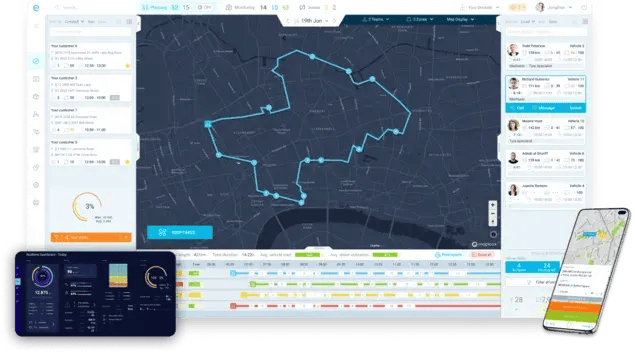
eLogii is execution-layer infrastructure, the category most stacks are missing, designed specifically for live field operations. It doesn't try to be your record system or your tracker.
eLogii's role is to runs the day, which is the job nothing else in the stack was built to own.
The fit is deliberately additive:
- Sits alongside existing systems: Works with your FSM, CAFM, ERP, telematics, and CRM rather than replacing them.
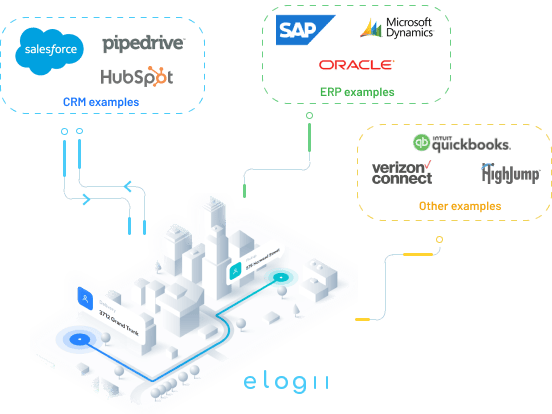
- Runs the live day: Continuous re-optimization and SLA-aware decisions as reality changes.
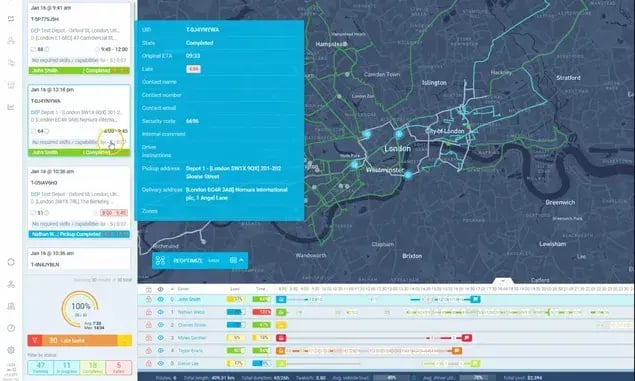
- Reduces planner dependency: Removes the constant manual replanning that turns planners into middleware.
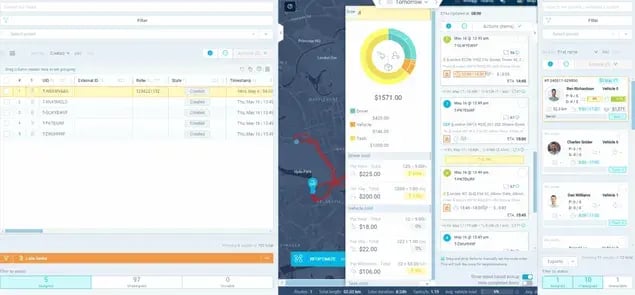
The layering principle holds throughout.
Your record systems stay the system of record. Your visibility tools stay the signal source. eLogii becomes the execution engine those systems never had, so each category keeps doing its own job and the day actually runs.
Who Needs This Category Clarity (and Who Doesn't)
Category clarity matters most for complex, high-change, SLA-bound operations, and matters least for simple, predictable, single-drop work.
The more your day drifts from its morning plan, the more the missing execution layer costs you. The more static your routes, the less any of this applies.
Here's a straight read on which profiles need to think in categories.
| Operation Profile |
Needs Category Clarity? |
Why |
| Complex multi-trade field service |
Yes |
High job variety and constant live change |
| Compliance-driven or safety-critical ops (fire, electrical, PPM) |
Yes |
SLA and penalty exposure makes execution critical |
| PE-backed multi-site platforms scaling fast |
Yes |
Growth exposes structural gaps quickly |
| High reactive-to-planned job mix |
Yes |
Plans decay fast; the day needs re-deciding |
| Multi-region operations with 50+ field staff |
Yes |
Coordination cost compounds across territories |
| Operations drowning in planner headcount |
Yes |
A sign execution work is being done by hand |
| Simple single-drop delivery |
No |
Little to re-decide once routes are set |
| Static, predictable routes |
No |
The morning plan stays valid all day |
| Small fleets |
No |
Coordination is manageable manually |
| First-time ops software buyers |
No |
Start with a system of record first |
If you land mostly in the "No" column, you can stop here without guilt. Your operation doesn't need most of these categories yet.
The Bottom Line: Rethink Your Software Stack to Match Your Operations
Field operations stacks fail when a category is missing or overloaded, so the fix is architectural, not another feature comparison. Adding a tool to a stack with a structural gap just adds cost.
The question isn't which product is best. It's which category you're missing.
Your next step is a short audit.
Map your current stack against the four categories, then check two things:
- Which layer is missing, or carrying work it wasn't built for.
- Whether you have a real execution layer, or planners standing in for one.
If that audit surfaces the gap, explore execution-first field operations and see how the execution layer runs the live day alongside the systems you already own.
Match the stack to the operation. Don't match your operation to the stack.
And if you're looking to do just that, we can help.
FAQ about Field Operations Software Categories
What are the categories of field operations software?
Field operations software splits into four categories. Systems of record store the truth (jobs, assets, customers, billing). The visibility layer shows live status (GPS, telematics, ETAs). Planning and scheduling tools build the day before it starts. The execution layer runs the day as reality changes.
What is the difference between FSM and field operations software?
Field service management (FSM) is a system of record. It holds job data, work orders, assets, and compliance history. Field operations software is the broader, multi-category stack that includes records, visibility, planning, and execution. FSM is one layer inside that stack, not the whole thing, and it doesn't run the live day.
What is the execution layer in field operations?
The execution layer is the category that continuously decides what should happen next after the plan stops being valid. It handles re-optimization, system-initiated decisions, and SLA-aware trade-offs across the live day. Planning sets the day's intent once; execution keeps re-deciding as jobs overrun, cancel, or appear.
Why do complete-looking field operations stacks still fail?
They fail because a category is usually missing or overloaded, most often execution. A stack can have records, visibility, and planning fully covered and still have nothing that runs the day once the plan drifts. That work falls on planners, who become manual middleware, and coordination cost rises as the day turns into firefighting.
Do telematics or GPS tools optimize routes?
No. Telematics and GPS tools provide visibility and signals, such as location, driver behavior, and live ETAs. They show you what's happening, but they don't perform job-level optimization or make live decisions. Seeing a delay is not the same as resequencing the day to resolve it, which is an execution-layer job.
Does an execution layer replace my FSM, CAFM, or ERP?
No. An execution layer layers alongside your existing systems and runs the live day. Your FSM, CAFM, or ERP stays the system of record, holding jobs, assets, and compliance data. The execution layer reads those constraints, makes live decisions, and pushes outcomes back into the record.
Which businesses don't need to worry about these categories?
Simple, predictable operations don't need most of these categories. That includes single-drop delivery, static or predictable routes, and small fleets where coordination is manageable by hand. First-time ops software buyers should start with a system of record before thinking about execution. If your morning plan stays valid all day, you don't need an execution layer.