Get A Demo

You're viewing eLogii for Field Service. Distribution business? Switch to Distribution →

Planning & Scheduling

Dynamic Scheduling: Re-optimize live when jobs slip or customers reschedule

Skills, vehicles, and time windows are respected on every recalc. Your people in the field see the change instantly. Dispatchers handle exceptions, not building (and re-building) routes from scratch.

The plan you built at 7am rarely survives lunch

Jobs overrun. Customers reschedule. Priority jobs land. A static morning plan forces dispatchers into damage-control mode by mid-morning.

28%
Idle time from cancellations
When a customer cancels or isn't home, static routes leave drivers with dead time that can't be reclaimed without a full manual reshuffle.
3.5hrs
Daily replanning effort
Dispatchers manually reshuffling routes every time something changes. Time that compounds as your mobile workforce grows past 50.
18%
Late-arrival cascade
One overrunning job throws off every subsequent appointment. Without live re-optimization, late arrivals snowball across the whole day.

Event-driven recalculation, not overnight batches

The planning engine watches every status change, ETA drift, and inbound task. When something moves the plan off track, eLogii re-runs optimization for the affected routes in seconds, respecting everything you've already locked down.
Triggered by the events that actually happen
Job overruns, cancellations, failed deliveries, priority inserts, customer reschedules, driver no-shows, live traffic shifts - each one can trigger a targeted recalc.
Re-optimize existing routes in place
The optimizer runs against live routes, not a blank slate. Completed stops stay completed. In-progress stops stay with their driver. Only the downstream plan shifts.
Live ETAs, every recalc
Every driver's arrival time is updated the moment the plan changes. Tracking pages, notifications, and the dispatch board all stay in sync.
Pushed to drivers instantly
New sequences, added stops, or removed jobs flow to the driver app in real time. No refresh, no stale plans, no radio calls.
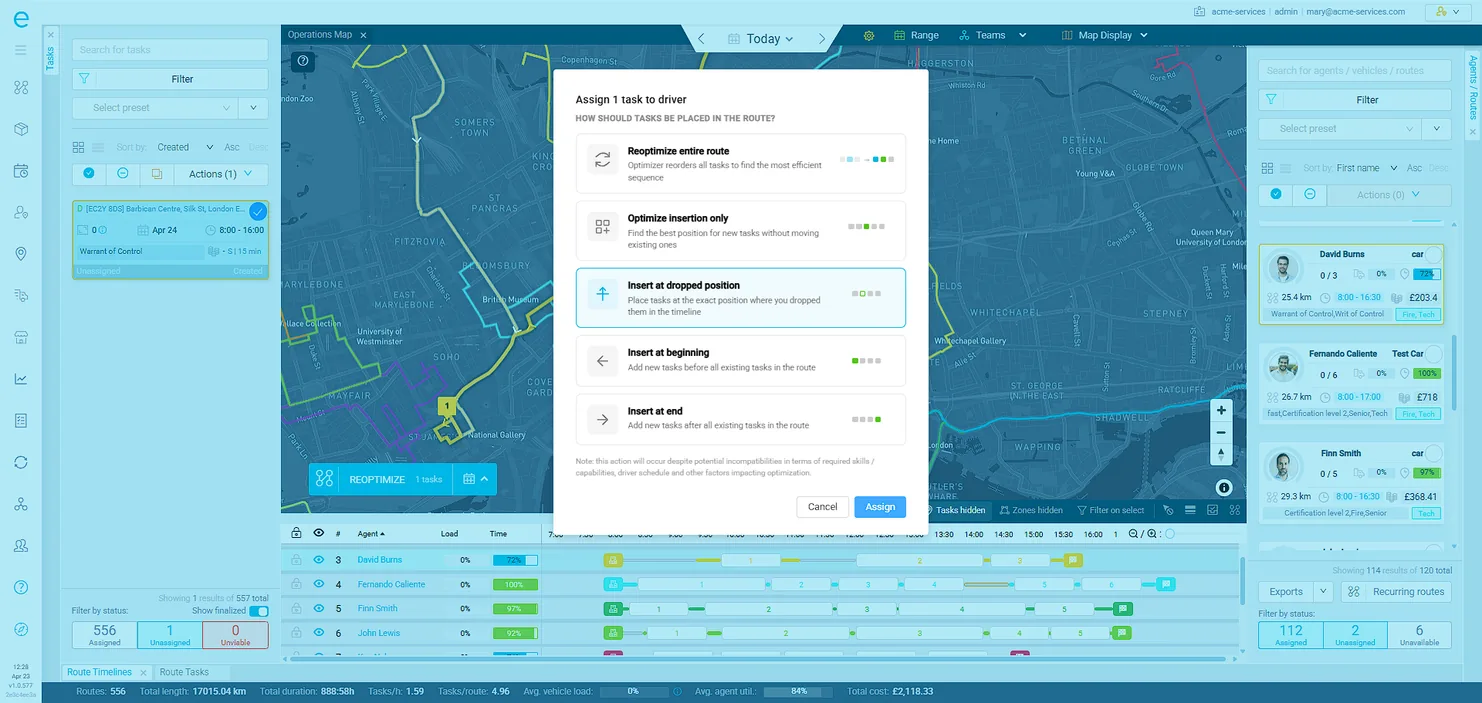
Ordering task assignments for delivery drivers and field technicians in eLogii

Every recalc respects the reality of your operation

A re-optimization is only useful if the new plan is actually workable. eLogii's engine re-evaluates skills, vehicle compatibility, customer time windows, driver breaks, and capacity on every pass - so dispatchers can trust the output without a second look.
Skills & capability matching
Certifications, licenses, and product expertise are matched per task. Schedule-based skills handle drivers whose capabilities vary by day of the week.
Vehicle-specific routing
Capacity, dimensions, weight limits, speed profiles, and road restrictions feed every recalc. A 7.5 tonner never gets routed through a low bridge.
Multiple time windows per task
Customer-side and site-side constraints both respected. The engine finds a window that works for both sides or flags it for the dispatcher.
Driver breaks & shift patterns
Legal break windows, overnight patterns, and schedule exceptions are built in. The optimizer plans around real availability, not idealized shifts.
Constraint tolerances
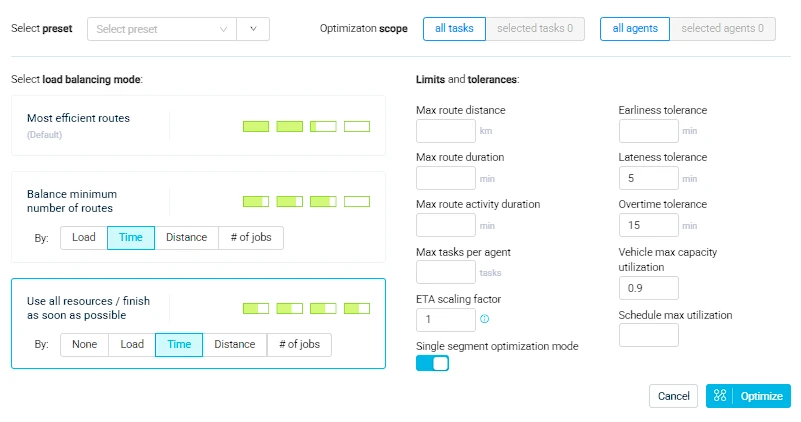
Soft vs hard constraints per task. Tell the engine which rules can bend a few minutes and which must hold exactly - per customer, per task type.
Setting route optimization and scheduling goals and objectives in eLogii

Automation with a human in the loop

The engine handles the 95% that's routine. For the 5% that needs judgment - VIP customers, driver preferences, depot exceptions - dispatchers stay in control with lock/unlock, manual overrides, and automated rules that codify the patterns you've learned.
Lock / unlock tasks & routes
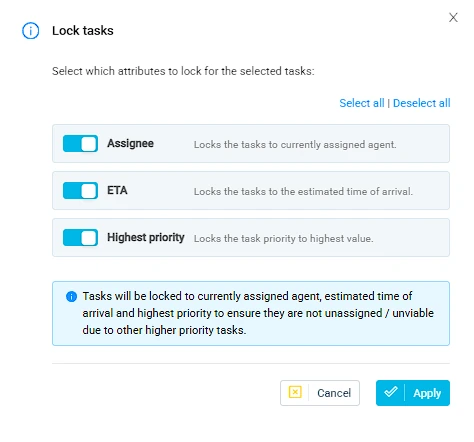
Pin specific stops, driver-task pairings, or entire routes so the re-optimizer leaves them alone. Unlock when flexibility is needed again.
Rules engine for automated decisions
Codify the policies your team already follows. "VIP customers go to senior technicians", "oversized jobs route via depot" - written once, applied every recalc.
Manual task assignment
Drag a task onto a driver. The engine recalculates around your choice without touching the assignment you made.
Task priority management
Mark a job as priority and the engine protects it first on every recalc. Useful for SLA-bound work and same-day inserts.
Range & multi-day planning
Plan across a week or a custom date range. Move tasks between days to rebalance workload without losing the sequencing logic.
Setting task priority based on agent, ETA, and top priority for service jobs and deliveries in eLogii

Failed jobs, reattempts, and inserts - handled, not piled up

Real operations run on exceptions. eLogii treats every failed delivery, reattempt, and same-day insert as a first-class event - with predefined workflows that move the work back into the plan instead of leaving it for the dispatcher to mop up.
Task fail with configurable reasons
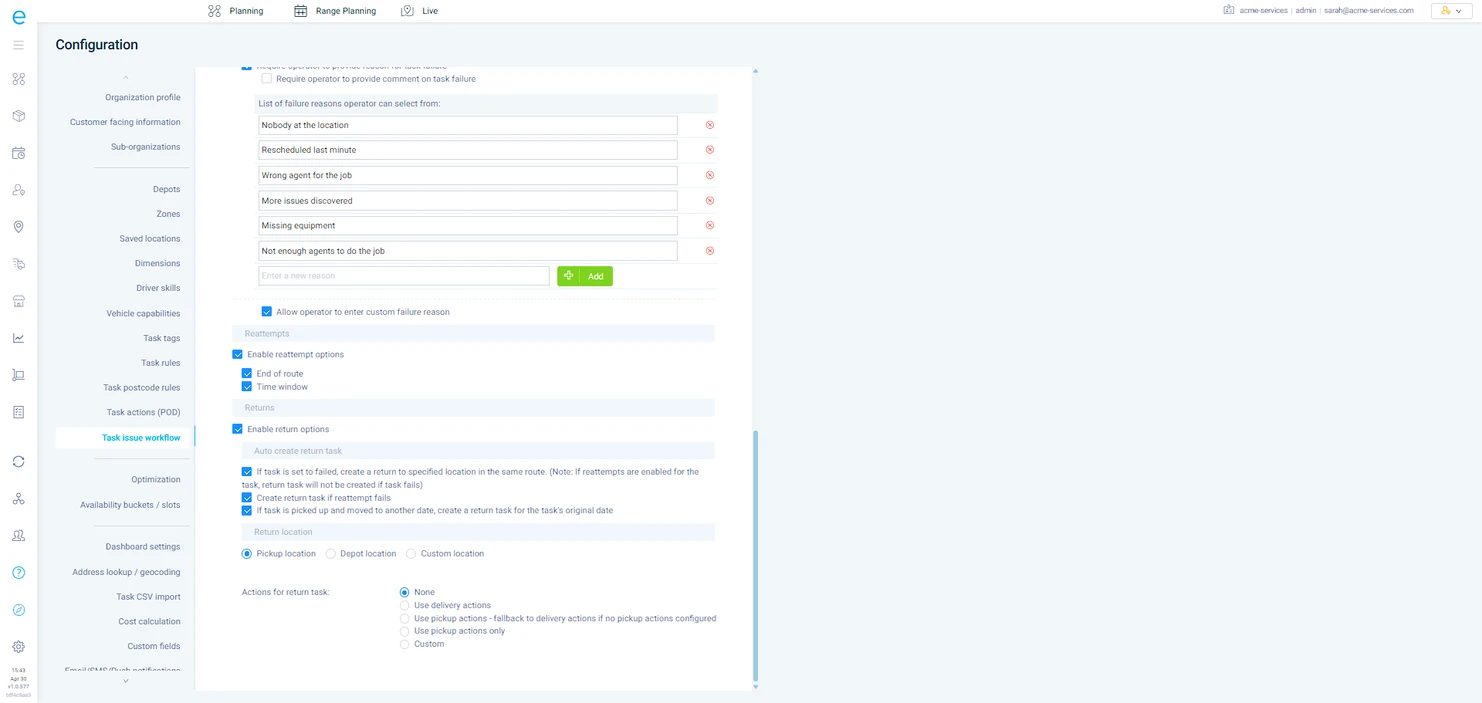
Drivers mark tasks failed from a dropdown you control per task type. Each reason triggers its own downstream workflow - retry, return, reschedule, escalate.
Automated reattempts
Failed tasks are queued for reattempt on a configurable schedule - same day, next working day, or a specific reattempt window.
Return-to-depot logic
When a failed stop means goods need to come back, the return leg is sequenced into the driver's current route automatically.
Same-day insert handling
New urgent task arrives? The engine evaluates every live route, finds the lowest-disruption insertion point, and pushes it to the driver without a manual reshuffle.
Webhooks & live notifications
Status changes fire webhooks to your systems in real time. Drivers get push alerts for route changes. Customers get updated ETAs without dispatcher involvement.
Configuration of automated and dynamic scheduling in eLogii

"Before eLogii, our regional managers were spending significant time planning and re-planning routes. Due to the way we were planning, we were doing everything in silos and missing significant opportunity for optimization by sharing our resources across our entire portfolio of stores."

Jord Van Dijk
Jord van Dijk

IT Director, J-Club

What changes when scheduling is live

Concrete operational shifts customers see inside the first quarter.

Same-day inserts without a reshuffle

New urgent jobs slot into live routes with minimal disruption. Dispatchers confirm, not rebuild.

2x more same-day jobs absorbed

Morning planning bottleneck gone

Routes rebuild overnight around reattempts, cancellations, and new priority work. Dispatchers walk in to a live plan.

90% less manual replanning time

Missed windows cut sharply

Late-arrival cascades don't get a chance to start. The engine recovers slipping SLAs before customers notice.

40% fewer missed appointments

Grow the business without growing the dispatch team

Live re-optimization absorbs the operational complexity that would otherwise force a planning headcount increase.

Support 2x business growth with the same team
<30s
Typical recalc time for a 50-vehicle fleet
15-25%
More jobs completed per driver per day
40%
Fewer missed time windows

Everything in Dynamic Scheduling

18 capabilities

Same-Day Re-Optimization

Event-triggered recalculation across live routes. Keeps completed and in-progress stops untouched.

Live ETA Updates

Driver, dispatcher, and customer-facing ETAs all update on every recalc.

Rules Engine

Automated policies triggered when task conditions are met. Codify your dispatcher playbook.

Skills & Capability Matching

Jobs routed to drivers with the required certifications, equipment, or product knowledge.

Schedule-Based Skills

Driver skills that vary by day of the week. The optimizer matches tasks to daily capabilities.

Vehicle Selection & Management

Capacity, dimensions, weight, speed profiles, and cost feed every recalc.

Multiple Time Windows Per Task

Customer-side and site-side windows both respected on every recalc.

Constraint Tolerances

Soft vs hard constraints per task. Dispatchers set what can bend and what must hold.

Driver Breaks & Shifts

Legal break windows, shift patterns, and exceptions. Optimizer plans around real availability.

Task Priority Management

SLA-bound and urgent jobs protected first on every recalc.

Failed Delivery Workflows

Configurable failure reasons trigger retry, return, reschedule, or escalation automatically.

Automatic Return-To-Depot

Return legs for failed or undelivered goods sequenced into live routes without manual work.

Traffic-Aware Routing

Live and historical traffic built into every ETA and sequence decision.

ETA Scaling Factors

Calibrate drive-time and service-duration assumptions per driver, vehicle, or territory.

Lateness Monitoring Panel

Live view of routes slipping behind schedule. Spot issues before customers do.

Real-Time Webhooks

Route, task, and driver events pushed to your systems the moment they happen.

Multi-Day Route Planning

Plan across days or weeks. Move tasks between dates without losing sequencing logic.

Date Range Planning

Week-view planning screen. Rebalance workload across drivers and days with a single drag.

See It Re-Optimize Live

Watch the plan rebuild itself while you watch

In a 30-minute walkthrough, we'll trigger a job overrun, drop a same-day priority insert, fail a delivery, and cancel a customer - live on your data. You'll see the recalc happen, see the rules engine fire, and see the updated plan hit the driver app in real time.
