Get A Demo

You're viewing eLogii for Field Service. Distribution business? Switch to Distribution →

Customer Communications & Experience

Smart Notifications: Automate custom emails, SMS, and push notifications

At 50+ people in the field, you can't have coordinators manually texting customers. eLogii fires SMS, email, and data message notifications at every stage - booking, day-before, en-route, arriving, completed, failed - with templates that pull live data. Every message reflects what's actually happening in the field, not what was planned 6 hours ago.

Why your coordinators are drowning in status calls

Most customer frustration comes from a lack of information - not a lack of service quality. Here is what drives avoidable contact.

62%
Of complaints are "where is my technician?"
Customers and site contacts call your office because they have no visibility into their appointment. Every call ties up a coordinator who should be managing exceptions.
200+
Jobs a day, zero manual updates
At scale, manually texting or emailing customers is not viable. You need notifications that fire automatically based on what's actually happening in the field - not what was planned this morning.
28%
Failed visits from outdated information
Without an "arriving soon" notification, customers aren't prepared - leading to failed visits and costly re-dispatches that eat into your daily capacity.

Stage-based triggers across every channel

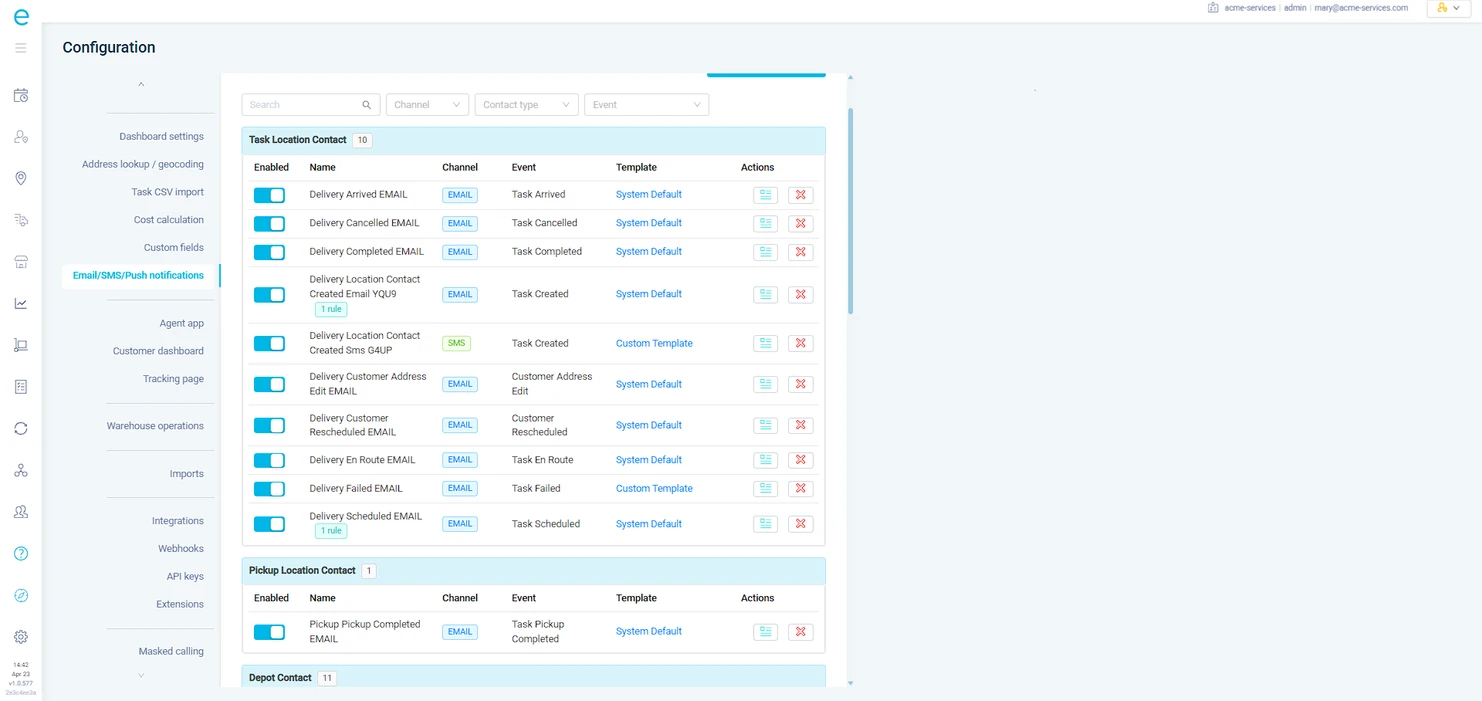
Define which notification fires at which stage, on which channel, for which customer type. A commercial client gets an email the day before and an SMS when the engineer is en-route. A residential customer gets SMS at every stage. Configure once per customer type - it scales to an unlimited number of jobs without anyone touching a keyboard.
Task state and route triggers
Notifications fire on task created, en-route, arrived, completed, failed - plus route-level events like driver starts route and driver ends route. Each trigger has its own template and channel.
Dynamic fields from live data
Templates pull the current ETA, not the planned one. The assigned technician's name, not a generic greeting. Job reference, tracking link, time window, contact details, and any custom data field from the task.
SMS, email, and data messaging
Send via SMS, email, or data message - configurable per customer, per task type, or per trigger stage. Different contacts on the same job can receive different channels.
Conditional send rules
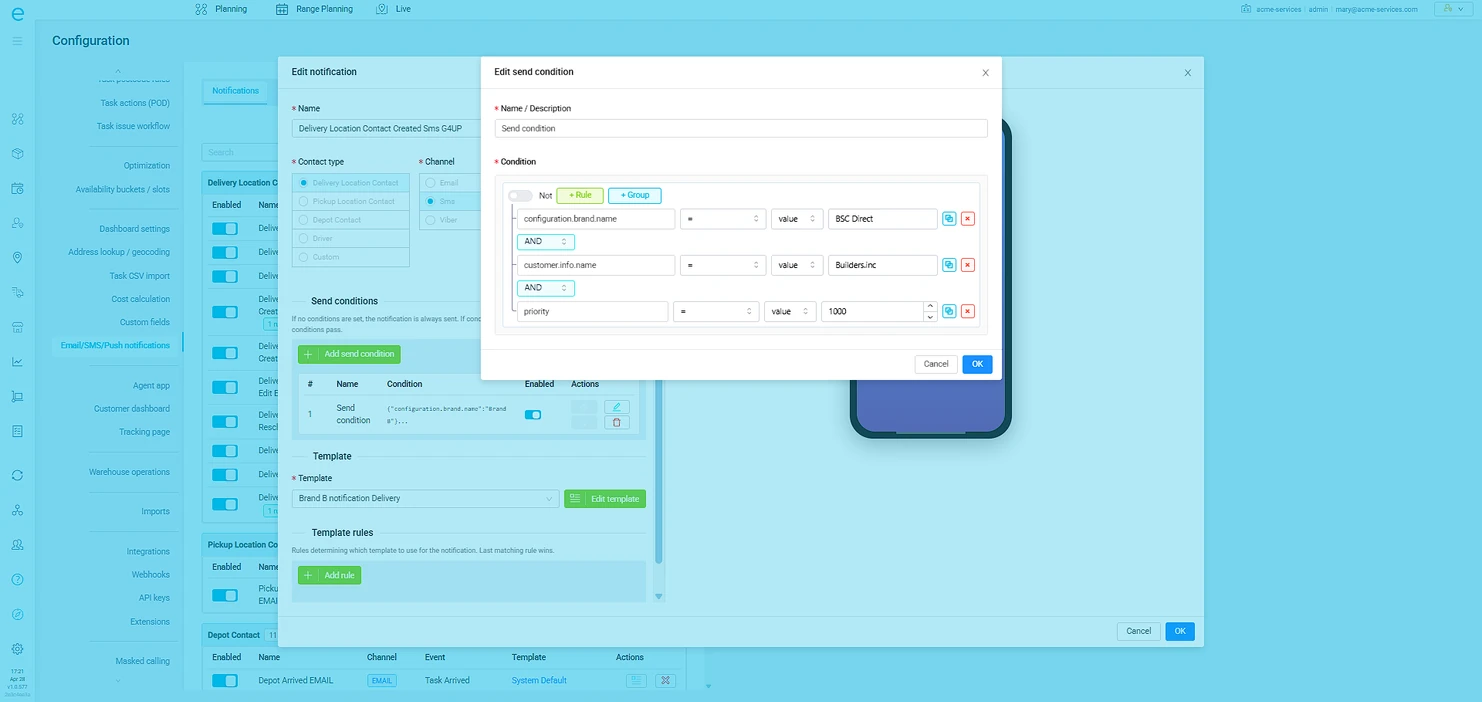
Add conditions that must pass before a notification fires - using AND/OR logic across task fields. Only notify the site contact if the task is tied to a specific customer, or only send the failed notification if the reason matches a certain category.

Advanced notification rules for complex operations

When the schedule shifts mid-morning, every outbound message already reflects the change. eLogii's advanced notification engine uses template rules and conditional logic to ensure the right message reaches the right contact - with content that matches the live state of the job.
Template rules per customer
Apply different notification templates based on which customer the task belongs to. Your premium SLA clients get a different tone and detail level than standard accounts - automatically.
Customer-triggered notifications
When a customer reschedules or updates their address on the tracking page, that action triggers its own notification chain - keeping coordinators and drivers informed without manual follow-up.
Push notifications for field teams
When a reactive job lands, the nearest available technician gets a push notification with full job details. When a schedule changes, affected drivers see the update instantly. No coordinator calling around.
Three-level notification hierarchy
Set defaults at the organisation level, override per customer, override again per task. Delivery contacts, pickup contacts, and depot contacts each get their own notification settings.

What You'll Gain

Measurable improvements from day one.

Cut inbound call volume in half

Proactive notifications answer the "where is my delivery?" question before customers pick up the phone.

50% fewer inbound status calls

Reduce failed delivery or access attempts

"Arriving in 10 minutes" notifications ensure customers are prepared and present when the driver arrives.

23% fewer failed attempts

Free up your support team

With status questions handled automatically, your team can focus on complex issues that actually need human attention.

2+ hours saved per agent per day

Improve customer satisfaction

Customers rate proactive communication as the single biggest factor in delivery satisfaction.

25-point NPS improvement
50%
Fewer inbound "status check" calls
23%
Fewer failed delivery attempts
60%
Drop in "when will they arrive?" tickets

Smart Notifications

Stop waiting for customers to call you

See how context-aware notifications keep customers informed and your phone lines clear.
