Get A Demo

Customer Communications & Experience

Communicate with customers at every touchpoint. Fully branded. Fully automated.

Branded tracking pages, context-aware notifications across SMS, email, and data messaging, self-service rescheduling, and ETAs that recalculate dynamically as conditions change. Every message sounds like your company - because it is your company.

Why your customers call when they should not have to

Most customer frustration comes from a lack of information - not a lack of service quality. Here is what drives avoidable contact.

62%
Of complaints are "where is my technician/order"
Customers and site contacts call your office because they have no visibility into their appointment or delivery. Every call ties up a coordinator who should be managing exceptions.
4.2x
More likely to rebook with tracking
Customers who receive branded tracking pages and proactive stage-by-stage notifications are significantly more likely to rebook and leave positive reviews.
28%
Failed visits from outdated information
Wrong addresses, missed time windows, and no way to reschedule. Customers need self-service tools to correct information and reschedule before the technician, engineer, or driver arrives.

One account. Multiple brands. Every tracking page on-brand.

When you're running 50+ technicians or drivers across multiple divisions, customer-facing communications can't look like they came from a software vendor. eLogii gives each brand, business unit, or contract its own tracking page - your logo, your colors, your layout. Embed job-specific instructions, NPS surveys, or compliance notices with custom HTML. Every page reinforces your brand, even when three divisions share the same dispatch team.
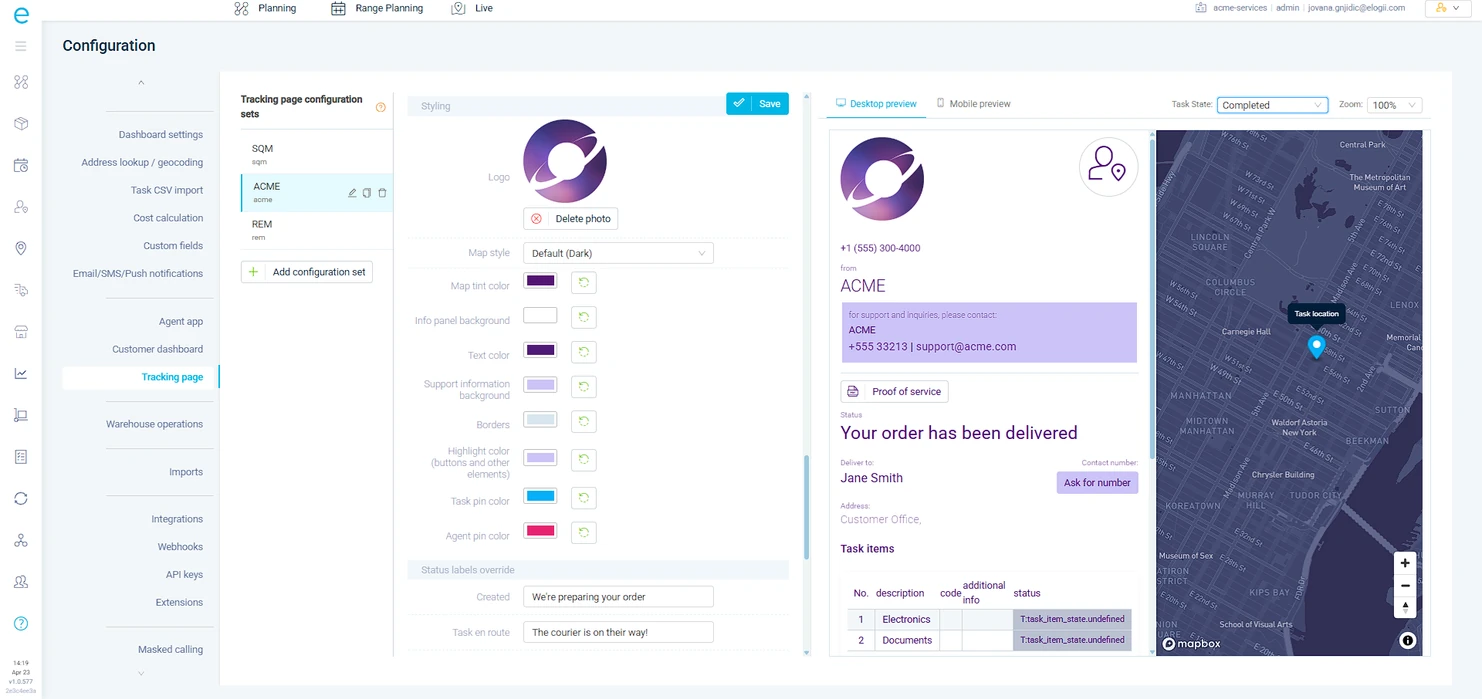
Multi-Brand Tracking Design
Run three brands from one dispatch desk. Each gets its own tracking page design - different logos, colors, and layouts. A facilities company managing maintenance, cleaning, and compliance divisions sees three distinct customer experiences, all powered by the same eLogii account.
White-Labeled Branding
Your logo, your colors, your map style, your status labels. Customers see a branded tracking page that matches your company - not a third-party platform. Your branding also carries through to the driver app, task labels, and email notifications for a consistent experience across every touchpoint.
Embedded Content and Code Snippets
Add NPS surveys, safety briefings, access codes, or promotional content directly to the tracking page. A healthcare provider embeds patient preparation instructions. A facilities company embeds site access protocols. The tracking page becomes a working document, not just a map pin.
Configurable ETA Display
Show a precise ETA or a time band - and vary it by customer tier or contract type. Commercial clients on premium SLAs see a 30-minute window. Residential customers see a 2-hour band. You control what each segment sees without changing your operational workflow.
Branded tracking pages per business unit

Hundreds or thousands of jobs a day. Zero manual status updates.

At 50+ people in the field, you can't have coordinators manually texting customers. eLogii fires SMS, email, and data message notifications at every stage - booking, day-before, en-route, arriving, completed, failed - with templates that pull live data. ETA, technician name, job reference, tracking link. Every message reflects what's actually happening in the field, not what was planned 6 hours ago.
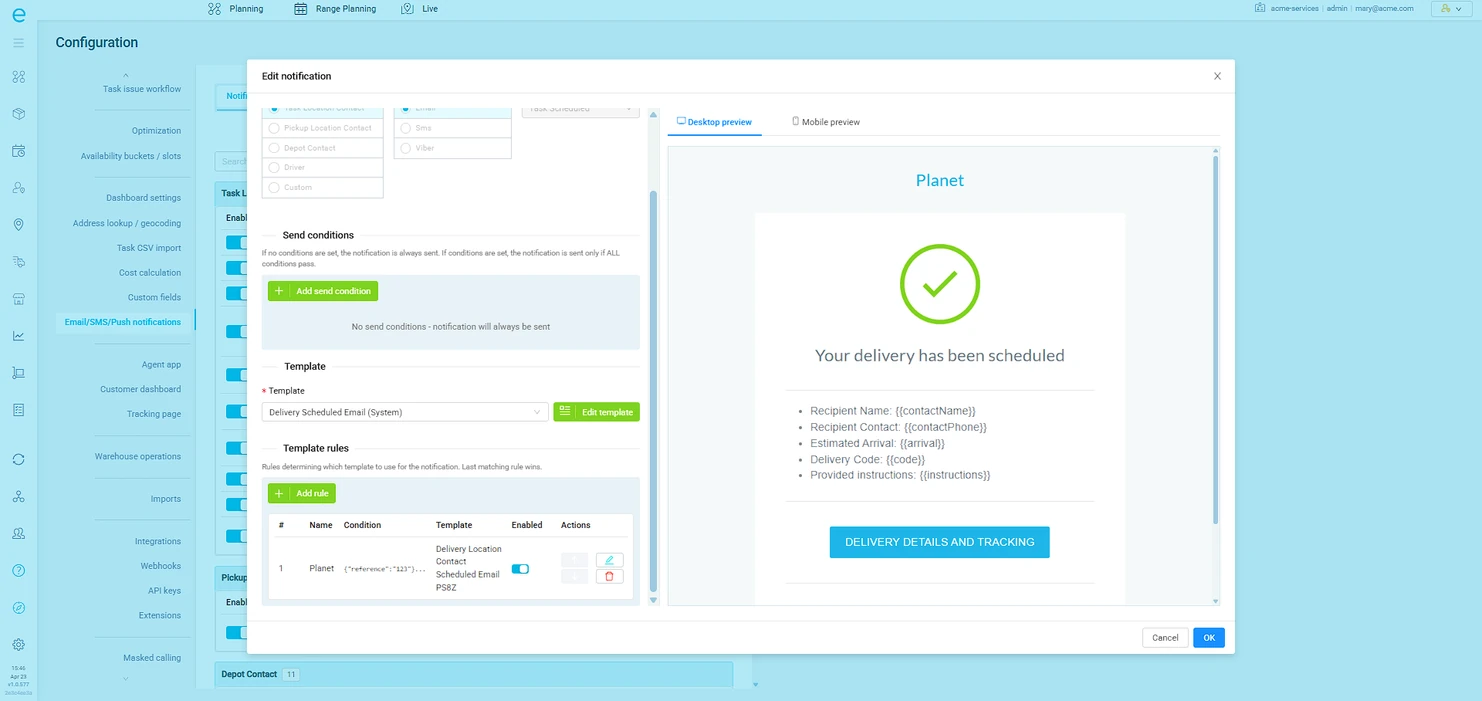
Stage-Based Triggers Across Channels
Define which notification fires at which stage, on which channel, for which customer type. A commercial client gets an email the day before and an SMS when the engineer is en-route. A residential customer gets SMS at every stage. Configure once per customer type - it scales to an unlimited number of jobs without anyone touching a keyboard.
Dynamic Fields from Live Data
Templates pull the current ETA, not the planned one. The assigned technician's name, not a generic greeting. Job reference, tracking link, time window, contact details, and any custom data field from the task. When the schedule shifts mid-morning, every outbound message already reflects the change.
Push Notifications for Field Teams
When a reactive job lands, the nearest available technician gets a push notification with full job details. When a schedule changes, affected drivers see the update instantly. No coordinator calling around - the app handles distribution.
Smart automated SMS and email notifications

Every reschedule your customer handles is one your coordinator doesn't.

At scale, failed visits are expensive - wasted travel, idle technicians, and a rebooking that ties up your planning team. eLogii lets customers and site contacts reschedule, update addresses, and correct access details directly from the tracking page. The new slot is pre-optimized into your existing routes, so it improves team utilization instead of creating a scheduling headache.
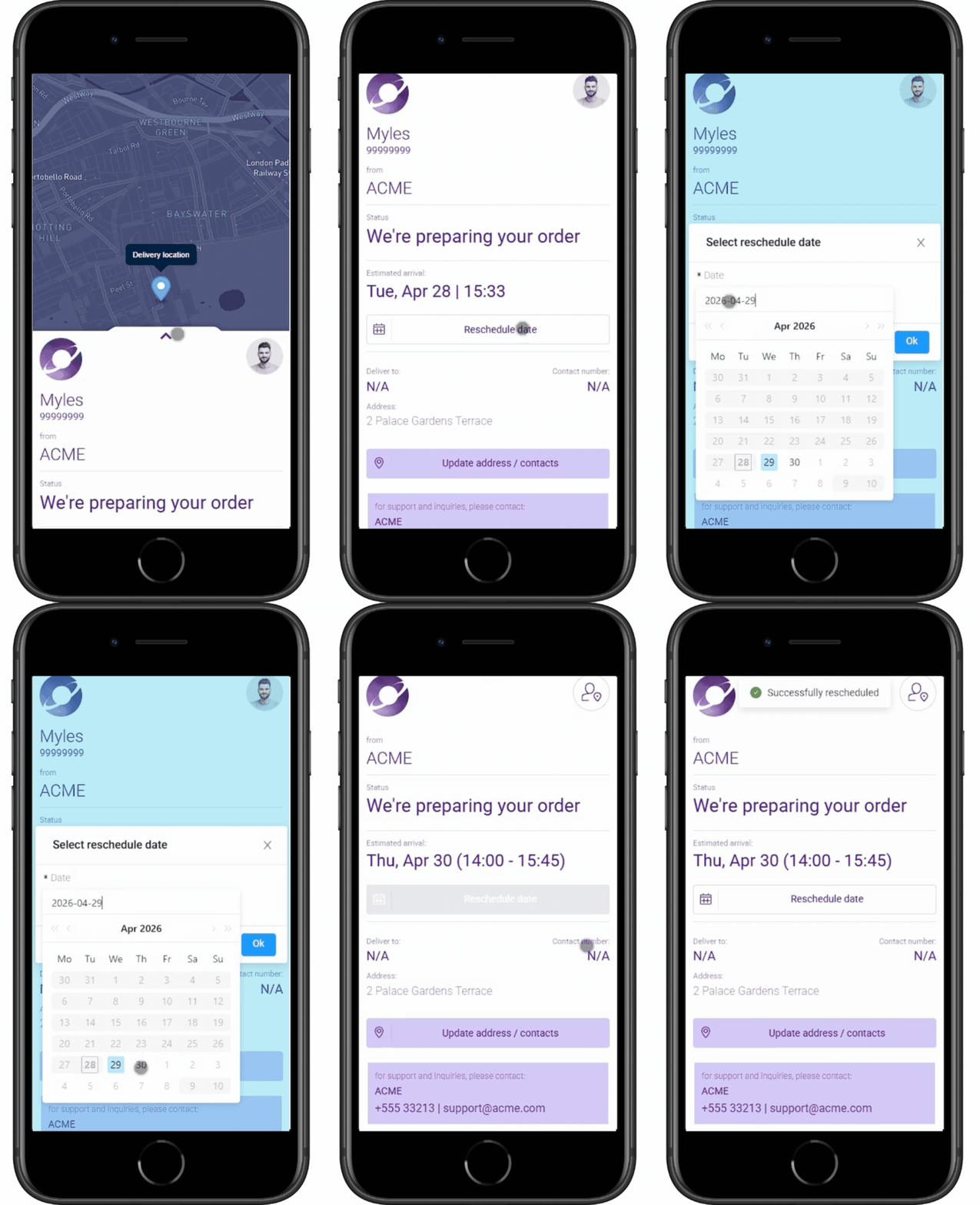
Customer-Initiated Rescheduling
The customer clicks 'reschedule' on the tracking page and sees available slots that are already optimized into tomorrow's routes. They pick one. No phone call, no coordinator involvement, no route degradation. For operations running 100+ daily jobs, this alone can recover 3-5 coordinator hours per day.
Address and Access Corrections
Wrong postcode. Changed access code. New site contact number. Customers fix these before the technician arrives - not after they've already driven 45 minutes to the wrong entrance. Corrections sync instantly to the driver app and re-trigger route optimization if the location changed.
Self-Service Portal for B2B Clients
Your largest accounts don't want to call your office to check on 30 scheduled PPM visits. Give them a portal where they view upcoming and completed jobs, track active engineers, download proof of service, and reschedule within the parameters you define. Configurable visibility levels mean each client sees exactly what's relevant to their contract.
Customer self-service rescheduling

A portal your biggest clients actually use

When a single client sends you 200 jobs a week, they shouldn't be emailing spreadsheets to your planning team. eLogii's customer dashboard gives your B2B accounts their own login to place orders, track live progress, and manage their account - without tying up a single coordinator.
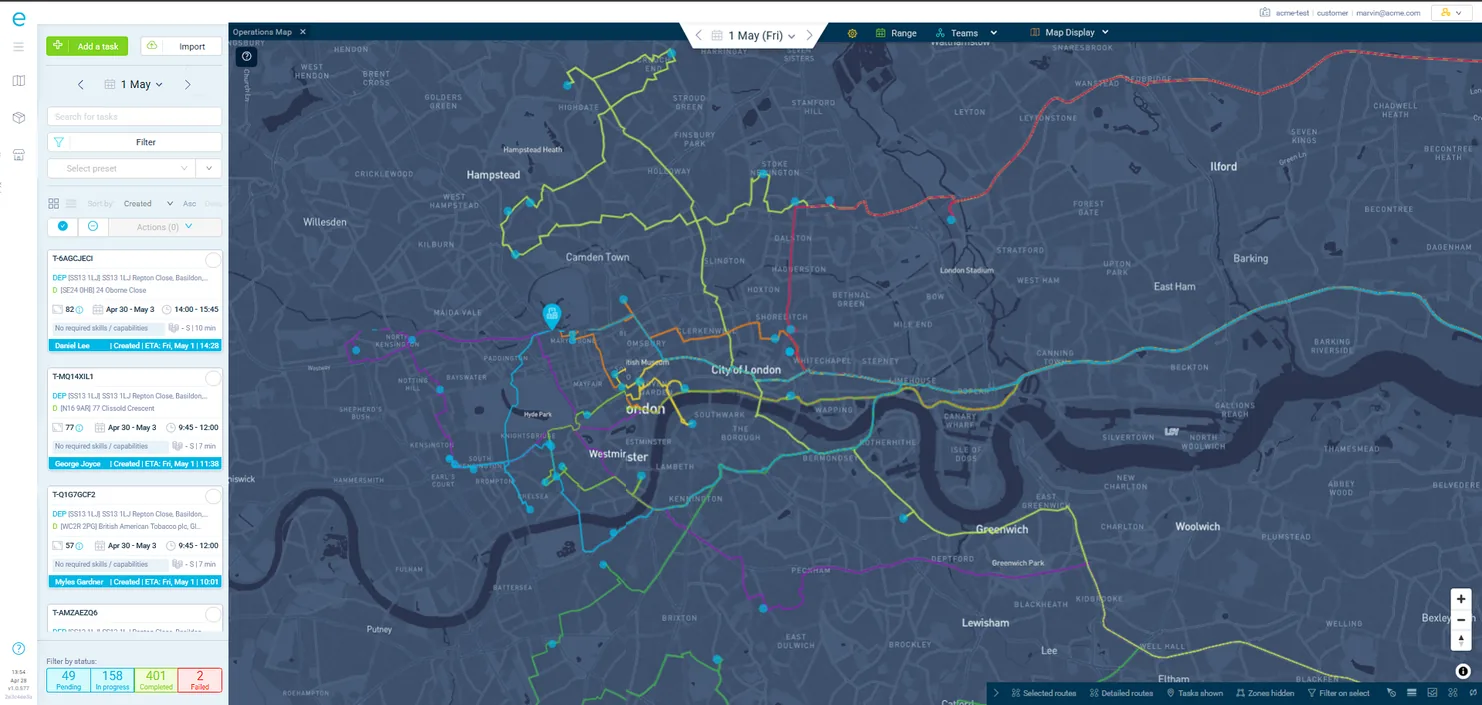
Customer Dashboard
Each B2B customer gets a dedicated login to view current, past, and future jobs. They see task status, ETA information, and proof of service - scoped to their account only. You control exactly which fields and features each client can access.
Bulk Order Management
B2B customers create individual tasks or bulk import via CSV directly through the portal. They set preferred time windows, specify date ranges, and cancel jobs within the rules you configure - before the scheduled day or before execution starts.
B2B customer portal with masked calling

What teams accomplish with eLogii communications

Real outcomes from operations that automated their customer communications with eLogii.

Cut 'where is my technician/order?' calls by 60%+
Proactive stage-by-stage notifications and live tracking pages eliminate the most common inbound call before it happens. Coordinators handle exceptions instead of status requests.
Typical result: 55-70% reduction in inbound status calls
Increase first-time access rates by 25%
Day-before reminders with rescheduling links mean customers who cannot be home reschedule themselves - instead of the technician arriving to find nobody there.
Typical result: 20-30% fewer failed visits and wasted journeys
Achieve 95%+ on-time perception
Dynamic ETAs that update throughout the day mean customers see accurate arrival windows - even when the schedule shifts. The perception of punctuality tracks the reality.
Typical result: 95-98% customer-perceived on-time rate
Drive repeat bookings with branded experience
Multi-brand tracking pages, NPS survey embedding, and a consistent branded experience at every touchpoint increase customer satisfaction scores and repeat booking rates.
Typical result: 4.8/5 average end-customer satisfaction score

Everything in Customer Communications & Experience

12 capabilities

"Our 'where is my engineer' calls dropped by 65% in the first month. But the bigger win was self-service rescheduling - customers now move their own appointments into pre-optimized slots, so our coordinators spend their time on reactive callouts instead of playing phone tag."

Customer Experience Manager, National Property Maintenance Company

70%
Reduction in inbound status calls from customers and site contacts
95%
Customer-perceived on-time rate with dynamic ETA updates
25%
Fewer failed visits and wasted journeys

Every touchpoint, automated

See how eLogii keeps your customers informed without adding coordinator overhead

We will show you the full notification workflow - from booking confirmation through completion proof - using your brand, your templates, and your customer journey.
