Get A Demo

Planning & Scheduling

Planning and Scheduling: Plan hundreds of jobs. Adapt the moment things change.

Route optimization, dynamic scheduling, multi-depot routing, and a rules engine that codifies how your operation actually works. So you can run twice the operation with half the planning team.

What planning looks like before eLogii

3hrs+
Morning planning overhead
Your coordinators spend half their morning building routes in spreadsheets. That doesn't scale when you add depots or reactive work.
37%
Drive time wasted
Without proper clustering and sequencing, your teams zigzag between jobs that should be grouped.
1 delay
5 missed windows
One late job knocks out time windows for every stop after it. Without live replanning, there's no recovery.

An optimization engine that thinks in constraints, not just distance

Your operation has dozens of rules. Who can do what, which vehicle fits, when customers are available, how long each job takes. Most routing tools ignore half of them. eLogii factors in every constraint simultaneously and builds the best plan in seconds.
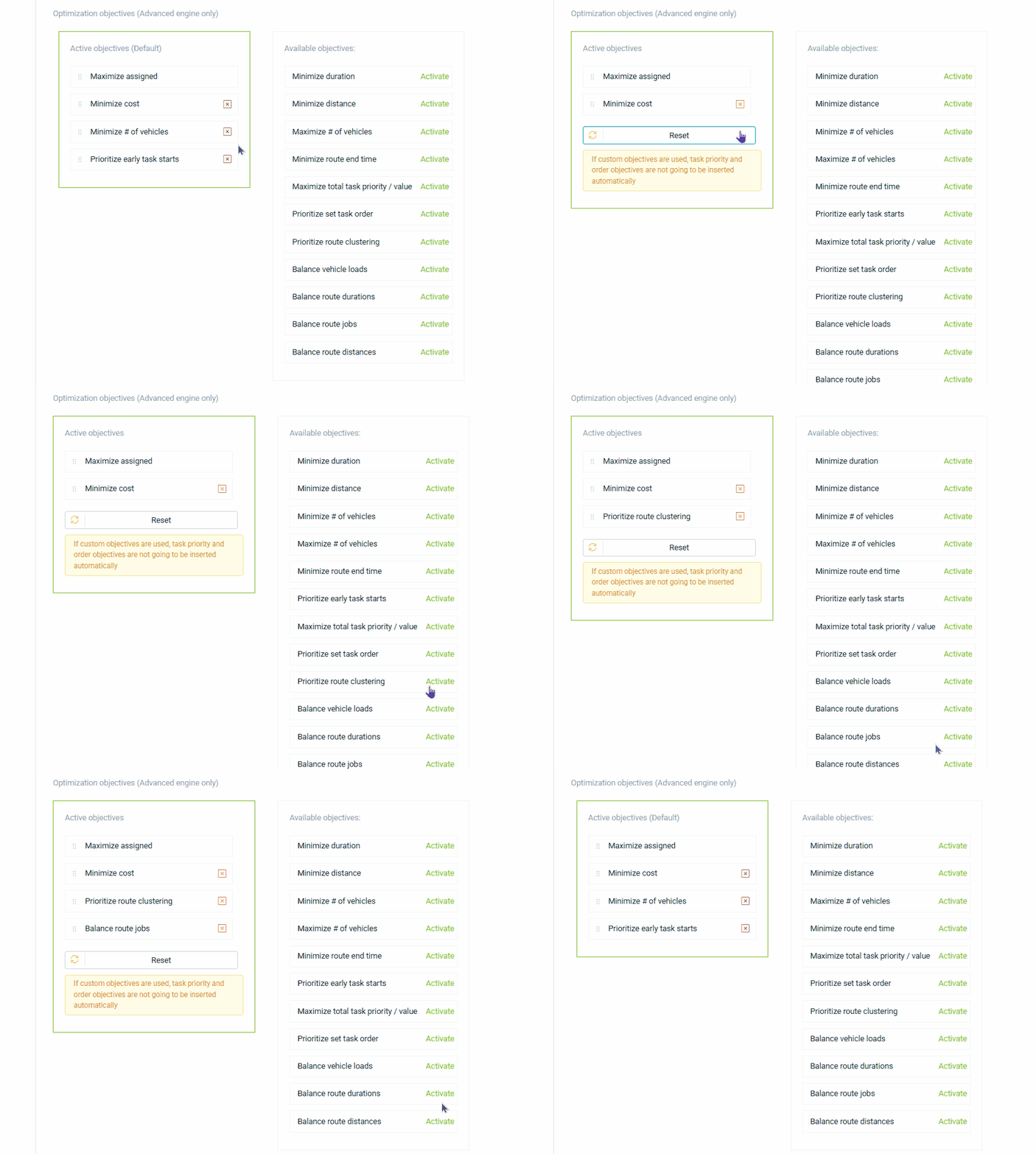
Plan for speed or plan for balance
The Base Engine builds the fastest routes using the fewest resources. The Advanced Engine lets you balance workloads by load, time, distance, or job count, set route duration limits, and synchronize tasks across drivers.
You decide what to optimize for
Stack up to 15+ objectives in priority order: minimize cost, reduce drive time, maximize jobs assigned, balance workloads, prioritize urgent tasks. The engine resolves trade-offs automatically based on your ranking.
Plan a day, a week, or three months ahead
Run optimization across any planning horizon. Group jobs geographically before routing, or let the engine cluster automatically based on vehicle capacity and location.
Route by cost, not just distance
Per-hour and per-day driver costs. Per-kilometer vehicle costs. Tiered cost bands. Every route shows its true cost on the driver card, exportable to CSV or via the API.
Handles scale without slowing down
Control how long the engine runs vs. how refined the result is. 200 people in the field with 2,000 stops plans in seconds. You set the trade-off between speed and quality.
An optimization engine that thinks in constraints

When the day doesn't go to plan, the plan fixes itself

New jobs, cancellations, traffic shifts. Your schedule re-optimizes automatically without blowing up the rest of the day. No manual reshuffling, no second tool.
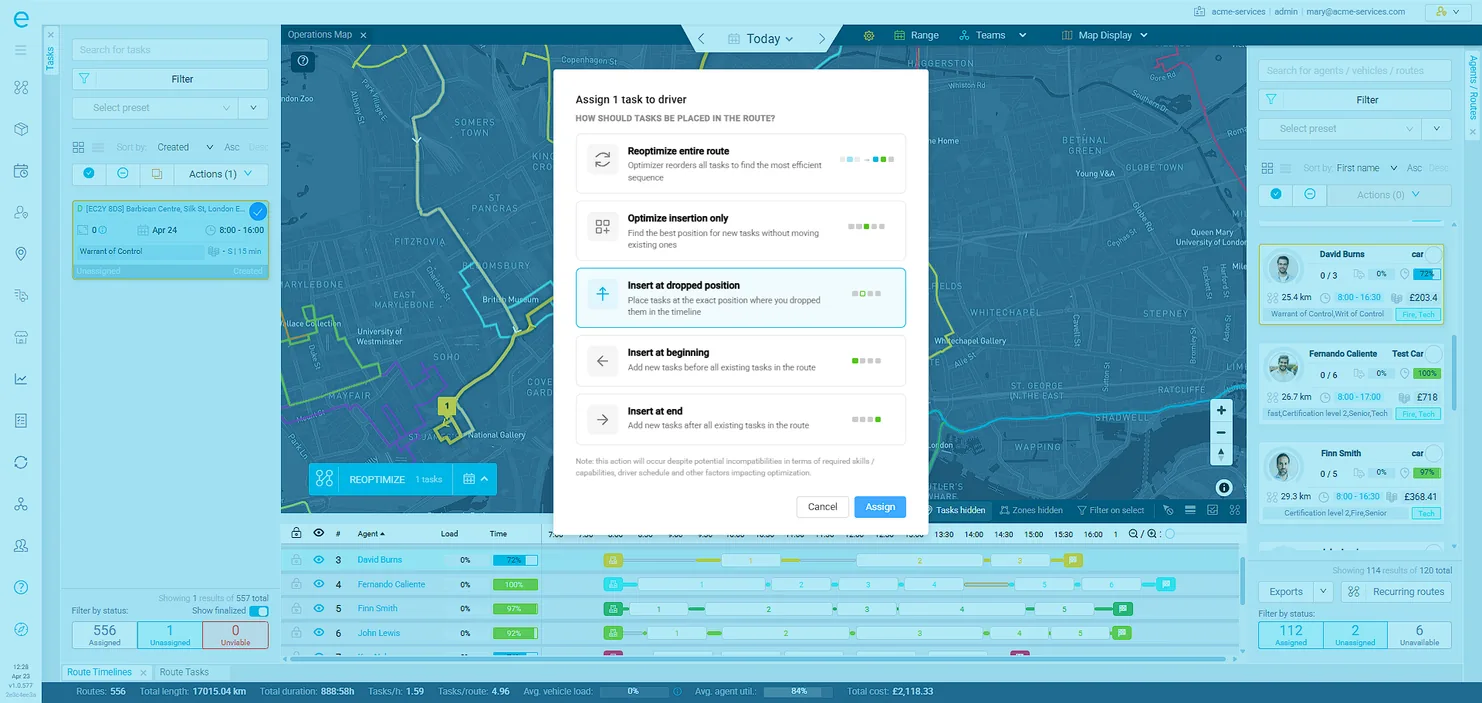
Changes trigger replanning automatically
A new job lands, a cancellation comes in, a driver gets reassigned. The schedule re-optimizes on the spot. You choose whether active tasks stay locked or get reshuffled too.
Schedules that handle the real world
Set shifts, breaks, start locations, and skill overrides per person or across the whole team. Day off? Location change? Bulk import exceptions via CSV. The optimizer respects all of it.
Right person, right vehicle, right job
Driver skills (e.g. Gas Safe, NICEIC, F-Gas) and vehicle capabilities (e.g. tail-lift, crane, refrigeration) are matched independently. A gas boiler replacement needs both a certified engineer and the right vehicle. The optimizer handles both at once.
Protect capacity for reactive work
Set utilization caps per person (e.g. 80% of available hours). The optimizer stops assigning once the cap is reached, keeping room for same-day emergency callouts or urgent jobs.
Live traffic built into every ETA
Routes and arrival times update based on real-time traffic conditions, not just static distance calculations. When congestion hits, the schedule adjusts automatically so your customers get accurate ETAs and your team isn't chasing a plan that was already wrong by 9am.
Dynamic re-optimization when the day shifts

Multiple branches, depots, or regions. One optimization run.

Most tools force you to plan each location separately. eLogii routes across all of them at once, respecting which teams work where, which depot serves what, and who has the right skills for each zone.
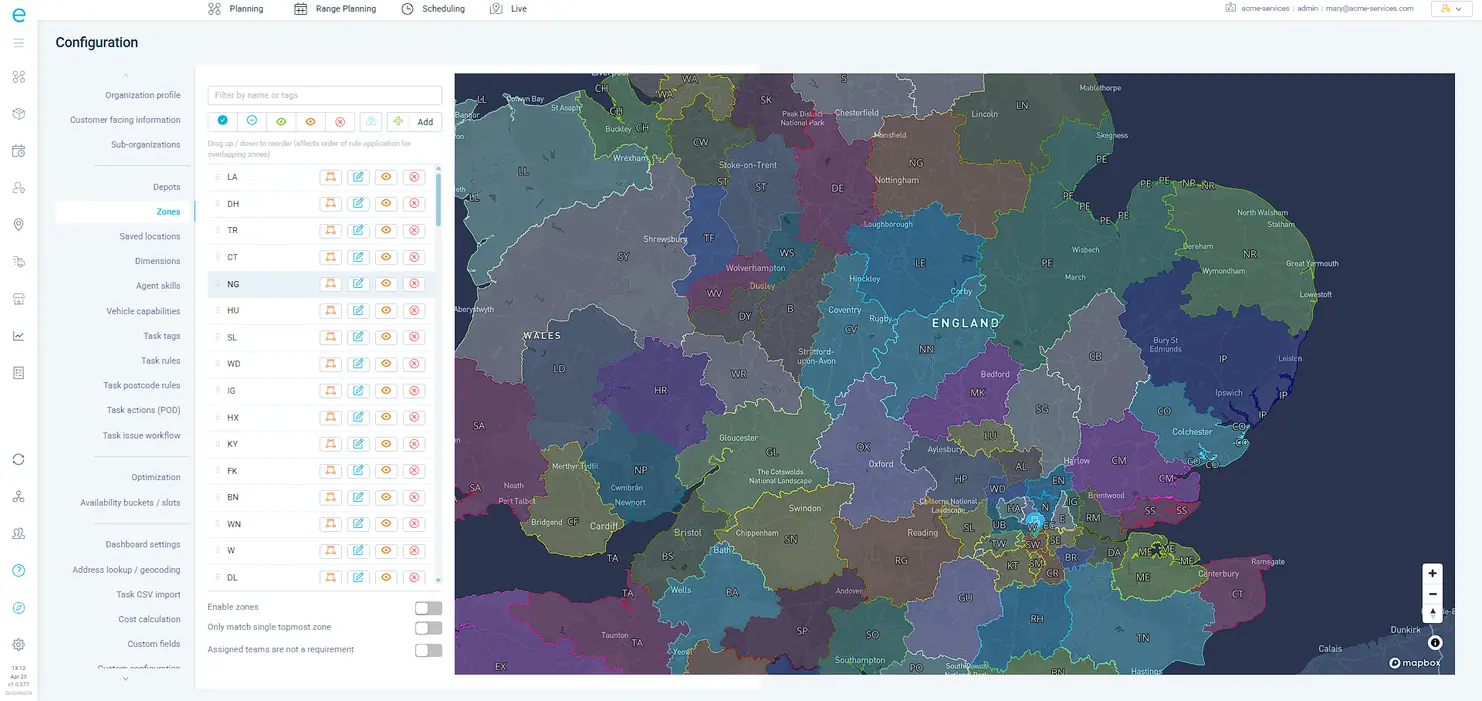
Draw your territories on the map
Define zones with polygon boundaries. Each zone carries its own rules: required skills, vehicle types, assigned teams, default depots, and automation triggers. Jobs auto-assign to the right zone based on location.
Jobs that cross zone boundaries just work
When a task spans multiple zones, the system handles it. Overlapping territories, boundary-edge jobs, cross-zone drivers. No manual sorting.
Vehicles reload and keep going
When capacity runs out mid-route, the system automatically plans a depot return and reload. Drivers keep going instead of cutting their route short. Critical for operations doing 30+ stops per day.
The system picks the best depot automatically
When multiple depots could service the same area, the optimizer selects the one that produces the lowest-cost route, accounting for drive time, load availability, and depot-specific constraints.
Teams only see work that's theirs
A Gas Safe team in the North West only sees North West work requiring Gas Safe certification. A team at Depot B only handles Depot B capacity. Full isolation, no cross-contamination.
Multi-depot and territory management

Codify every operational decision your planners make manually today

Every operation has rules that live in people's heads. Which team handles what, when to escalate, how to prioritize. The rules engine turns that tribal knowledge into automated logic. No code required.
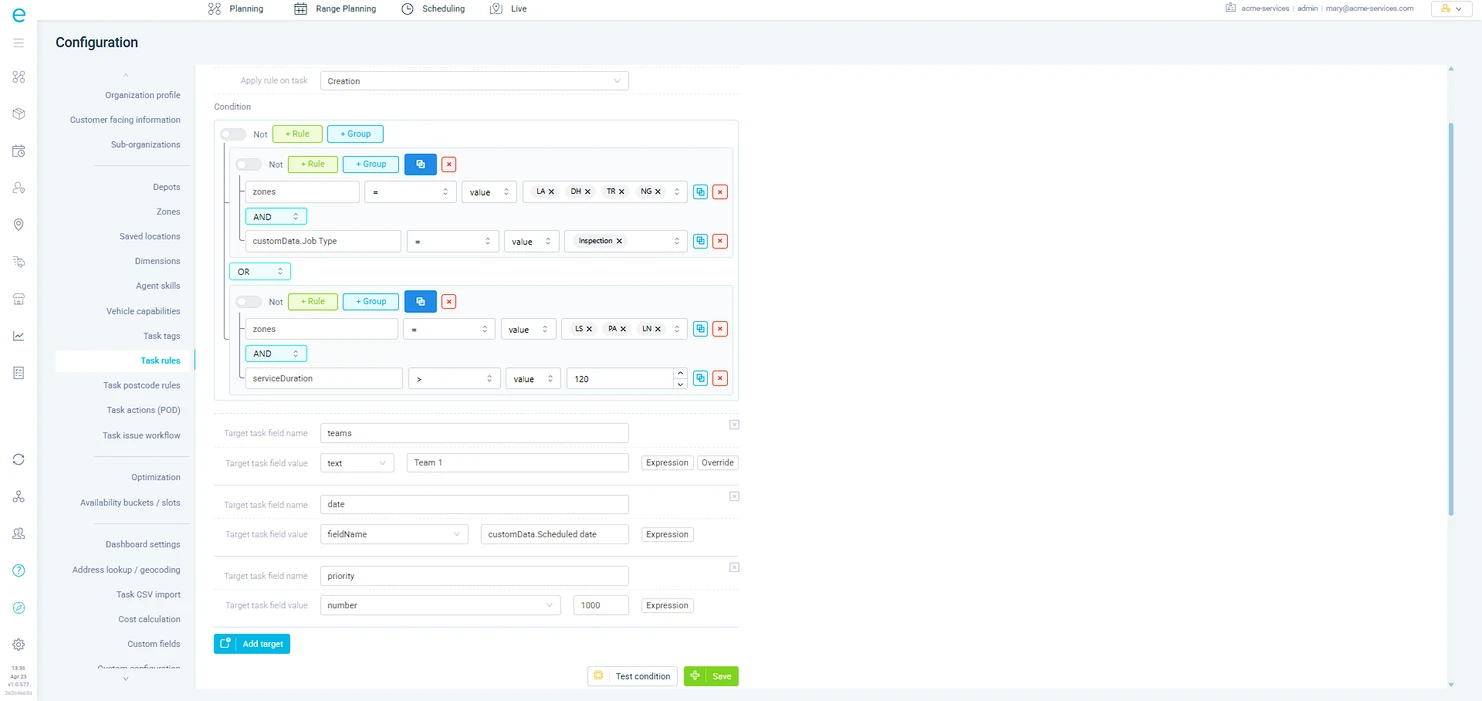
One rule can do the work of five manual steps
Assign teams, set priority, change skill requirements, trigger customer notifications. All from a single rule. Example: "IF certification = Gas Safe AND region = North West THEN assign to Team A, set priority = high, and notify the customer."
Logic as complex as your operation needs
Combine conditions with AND/OR operators and nest them for multi-layer rules. Example: "IF (weight > 500kg OR access = restricted) AND region != Scotland THEN require tail-lift vehicle AND assign to heavy-goods team."
Reference any data point in the system
Build rules against any task property, custom field, driver assignment, or job state. Text, numbers, dates, booleans, or custom expressions.
Test before you go live
Validate rule behavior against sample data before activating. Rules process top to bottom, later rules override earlier ones. No surprises in production.
Works across the entire workflow
Rules don't just run at planning time. They trigger on task creation, status changes, and field updates. Automate assignment, escalation, and notifications across the full job lifecycle.
Rules engine codifying operational decisions

What changes when planning takes seconds, not hours

Cut drive time by 30%+
Routes are clustered geographically and sequenced against real time windows and live traffic. Your teams spend more time on-site and less time on the road.
Typical result: 25-40% reduction in drive time
Fit 2-4 more jobs per person per day
When the optimizer accounts for service durations, break schedules, and capacity, your teams consistently add stops without extending hours or adding headcount.
Typical result: 15-25% more jobs per person per day
Eliminate 3+ hours of daily planning overhead
Planners who spent mornings building routes in spreadsheets now run optimization in seconds. The rules engine handles team assignment and priority logic automatically.
Typical result: 90% reduction in planning time
Hit 95%+ on-time arrival rates
Traffic-aware routing, real-time re-optimization, and time-window constraints mean schedules hold up throughout the day. Not just until the first overrun.
Typical result: 95-98% on-time performance

Everything in Planning & Scheduling

29 capabilities

Multi-Objective Route Optimization

Set ranked optimization objectives. Prioritize cost, time, distance, or workload balance in the order that matters most to your business.

Dynamic Same-Day Re-Optimization

Re-optimize live routes in seconds when new jobs arrive, plans change, or cancellations hit throughout the day.

Cost-Based Routing

Factor in driver and vehicle costs so the engine picks the cheapest resource combination, not just the shortest route.

Cluster Optimization

Group nearby stops geographically before routing. More time on-site, less time driving between jobs.

Multi-Depot Optimization

Route across multiple depots, branches, or starting locations in one optimization run.

Zones & Zone Automation

Define service zones on the map. Auto-assign tasks to the right team based on geographic boundaries.

Skills & Capability Matching

Match jobs to qualified people and vehicles. Certifications and equipment are matched independently so the right combination is always assigned.

Traffic-Aware & Vehicle-Specific Routing

Real-time traffic data and vehicle-specific road selection built into every route. ETAs that hold up in the real world.

Workload Balancing

Distribute jobs evenly across your team by time, distance, load, or stop count. Reduces overtime and keeps everyone productive.

Rules Engine

Automate task assignment with if-then rules. Set teams, priorities, skills, and tags when conditions match. No code required.

Date Range Planning

Optimize tasks across a date range of 30 days or longer. The engine assigns each task to the best day and person based on location and capacity.

Multi-Day Route Planning

Plan routes spanning multiple days. Assign multiday schedules, override start locations for overnight stops, and mix with single-day drivers.

Multi-Day Job Sequencing

Sequence multi-step jobs across multiple days with driver continuity. Plan phased installations, staged deliveries, and return visits.

Configurable Service Duration

Set per-customer and per-job service durations for accurate planning. Tiered durations, setup times, and rule-based time estimates.

Constraint Tolerances

Set earliness, lateness, and overtime tolerances. Balance customer time windows with operational efficiency.

Route Duration & Distance Limits

Set maximum route duration, distance, and stop limits per person or across the whole operation.

Capacity & Schedule Utilization Factors

Set utilization caps for vehicles and people. Build in safety margins for loading time, emergencies, and realistic planning.

Automatic Return to Depot

Automatically factor return-to-depot trips into route planning for accurate total route costs and working day calculations.

Slot Booking Co-Pilot

Offer customers time slots pre-optimized into existing routes. Every booking improves overall efficiency.

Task Priority Management

Assign priority scores so VIP customers and urgent jobs are always scheduled first by the optimizer.

Teams

Group people, users, and customers into teams for structured dispatch. Each team gets its own task pool, roster, and visibility.

Multi-Man Jobs

Schedule two-person or multi-crew jobs with synchronized arrival times. Plan heavy installations and safety-required team operations.

Recurring Route & Task Templates

Create recurring templates with weekly or monthly schedules. Auto-generate planned routes without rebuilding from scratch.

Interval Optimization

Auto-generate recurring tasks at set intervals. Schedule subscription services, contract visits, and replenishment runs automatically.

Segmented Optimization

Split optimization by depot, team, or day for large task volumes. Segment processing handles scale where global optimization is impractical.

Fast Optimization Mode

Quick route optimization for simple operations. Generate daily route plans in seconds without complex configuration.

ETA Scaling Factors

Fine-tune ETA accuracy with scaling factors for local conditions. Account for rural roads, campus navigation, and seasonal traffic patterns.

Hazardous Materials Routing

Route hazardous materials safely with road-type and tunnel restrictions. Ensure compliance for HAZMAT and regulated cargo.

Multi-Timezone Support

Run a single operation across multiple timezones. All scheduling, ETAs, and shift hours display in local time automatically.

"The dual engine approach was the deciding factor. We run the Base Engine for same-day reactive work where speed matters, and the Advanced Engine for weekly PPM planning where we need balanced loads and depot reloads across 75 engineers. No other platform gave us both."

Operations Director, National Safety & Compliance Contractor

30%+
Average reduction in windshield time across field service and distribution operations
15min
To plan and optimize routes for 200+ stops
98%
On-time arrival rate with constraint-respecting, traffic-aware optimization

Ready to see the depth?

See what eLogii would save your operation

We'll model your actual routes and schedules with a custom data simulation - real numbers, not estimates.
