This article is about the differences between static and dynamic scheduling in field operations.
We're going to explain what they are, and compare their effects on labor costs, technician utilization, service performance and more.
Plus, we're going to explain why adopting dynamic scheduling software to your operations is the key for their success in 2026. And what you need to do to achieve it.
So if you're looking to learn why your scheduling efforts are missing their mark, or you want to add dynamic scheduling into your stack mix, this article is for you.
Here's a quick overview of what's to come in this guide:
Key Takeaways
- Static scheduling is a plan, where schedules are fixed before the day starts and cannot adapt once technicians hit the road. That's why they degrade the moment operational reality shifts, especially at scale.
- Dynamic scheduling keeps the day efficient because it's a live system. Work is reallocated in real time based on live conditions like cancellations, traffic, and emergency jobs, protecting utilization and SLAs as the day changes.
- Disruptions are normal in field operation, and you (or the tools you use) shouldn't treat them as exceptions. They happen every day, and static schedules are built around the false assumption that they won't.
- The hidden costs of static scheduling adds up quietly. Overtime, missed SLAs, dispatcher firefighting, and idle capacity rarely show up as a single line item, but they inflate labor costs across the operation.
- The ROI of software with dynamic scheduling capabilities rises with your operational complexity. Dynamic scheduling delivers the most value for large mobile workforces, mixed reactive and planned work, high job volumes, strict SLAs, and wide service territories.
- Execution matters more than planning for managing field operations. An execution layer sits on top of existing systems and continuously adapts work as conditions change, closing the gap between the plan and the day.

What Is Static Scheduling?
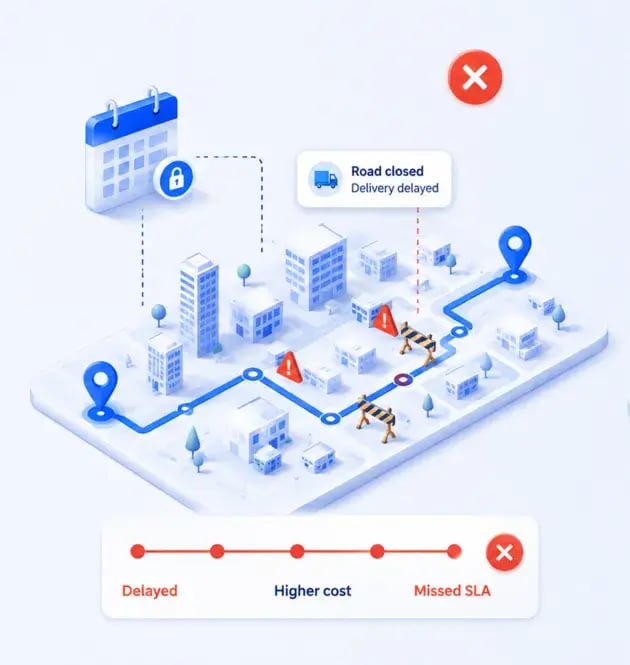
Static scheduling is a method where field schedules are built and locked before the workday begins. Crews, jobs, routes, and timing are fixed in advance and do not adapt once work starts, even when conditions on the ground change.
This is the traditional approach to route and workforce planning:
A planner or dispatcher looks at the next day's jobs, assigns them to available technicians, sequences the stops, and finalizes the plan. Once the day begins, that plan is treated as the source of truth.
Static scheduling stays a common practice because it's simple to understand, predictable to manage, and easy to build in spreadsheets or basic tools.
Many teams handle their planning and scheduling field service operations this way because it works well enough when work is stable and volumes are modest.
The catch shows up when the day stops matching the plan. A static schedule has no built-in way to respond to exceptions, so any change to your planned schedules has to be handled manually.
What Is Dynamic Scheduling?
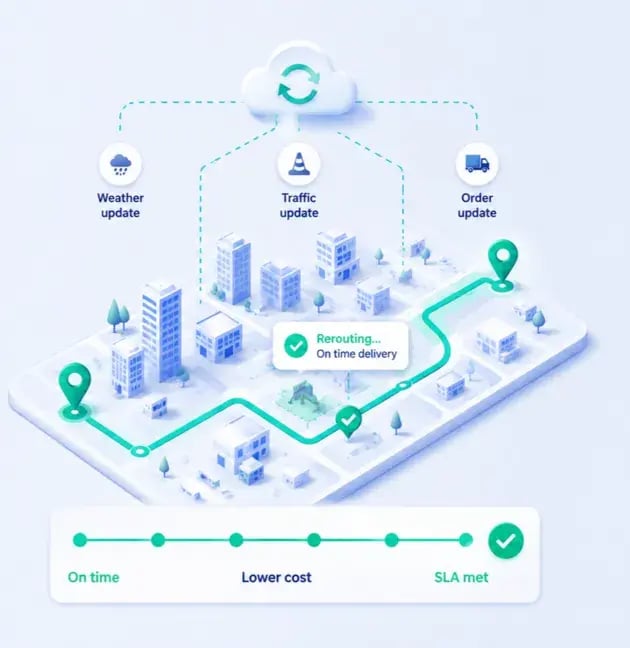
Dynamic scheduling is a method where schedules continuously adapt as operational conditions change during the day. Instead of locking the plan in advance, work is reassigned in real time based on live inputs like cancellations, traffic, new jobs, and technician availability.
You can think of dynamic scheduling as the engine behind modern field service optimization. It treats the morning plan as a starting point rather than a fixed contract with the day.
When a job cancels, an emergency comes in, or a technician runs late, the system reevaluates and reallocates work to keep the operation efficient. Routes, assignments, and priorities update continuously as new information arrives.
The core idea is simple:
A good plan gets you started, and continuous adaptation keeps you productive when the plan inevitably shifts.
Static vs Dynamic Scheduling
Here's a quick-reference summary of how the two approaches compare across the factors that matter most to field operations.
| Attribute |
Static Scheduling |
Dynamic Scheduling |
| When the schedule is set |
Fixed before the workday begins |
Set at the start, then continuously updated |
| Response to disruptions |
Manual, handled by dispatchers |
Automatic, reallocated in real time |
| Route optimization frequency |
Once, before work starts |
Recalculated throughout the day |
| Technician utilization |
Idle time when jobs change |
Gaps filled with nearby work |
| Dispatcher workload |
High, reactive firefighting |
Lower, focused on exceptions |
| SLA reliability as the day progresses |
Degrades as delays cascade |
Holds steadier through adaptation |
| Best-fit operations |
Stable, predictable, low-volume |
Complex, high-volume, changeable |
| Scalability |
Limited by manual coordination |
Scales with automation |
How Real-World Events in Live Operations Break Static Schedules
Most field operations teams put real effort into building efficient schedules.
On paper, everything looks optimized: the right crews, the right jobs, the right routes, and the right timing.
It's a genuinely good plan.
Static schedules assume the day will go according to plan. But real-world operations rarely do.
And the biggest threat to your operational efficiency is the constant stream of unpredictable events that occur after the schedule is created.
Let's walk through three that field service and utility teams face every day.
Customer Cancellations and Reschedules
A single cancellation can open an unexpected gap in a technician's day. One minute the schedule is full, the next there's a two-hour hole where a job used to be.
When the schedule can't adapt, that gap turns into idle time, wasted travel, underused resources, and inefficient routes.
The technician is available, but there's no easy way to redeploy them.
Picture a technician who drives across town for a 10:00 AM appointment, only to find it was cancelled that morning. There's no nearby work queued up, so they sit and wait for the dispatcher to figure out what's next.
That's paid time producing nothing.
Traffic Delays and Unexpected Travel Times
Even minor traffic disruptions create a domino effect across an entire schedule. One late arrival pushes back every job behind it.
That single delay often leads to multiple missed appointments, SLA risk, frustrated customers, and overtime later in the day as technicians try to catch up.
Say an dynamic scheduling for HVAC technician hits an accident on the highway and loses 20 minutes on the way to their first job.
In a static schedule, that 20 minutes can cascade into five downstream jobs, each one starting late, until the last customer of the day is left waiting well past their window.
Emergency Jobs and Priority Requests
Urgent work is especially hard for static schedules to absorb.
An emergency repair, an outage, or a high-priority request lands with no slot to hold it, so dispatchers have to manually reorganize the day around it.
Every emergency forces a reshuffle. Someone has to decide which technician gets pulled, which planned jobs get bumped, and how the rest of the routes get rebuilt.
Consider a critical outage that comes in mid-morning:
A dispatcher has to redirect crews away from planned maintenance and send them to the emergency, then manually rework everything those crews were supposed to do.
The same pattern shows up when scheduling plumbing services and an emergency call-out blows apart a carefully planned day.
None of these events are unusual.
They are normal operating conditions.
The issue isn't that schedules break occasionally. It's that static schedules are built around the assumption that disruptions are exceptions when, in reality, they are constant.
The operational consequences pile up fast:
- Increased dispatcher workload
- Reduced technician productivity
- Lower schedule adherence
- More overtime
- Missed SLAs
- Poor customer experience
The question isn't whether disruptions will occur. It's how quickly operations can adapt when they do.
Comparing the Operational Impact of Static and Dynamic Scheduling
Both approaches aim to organize field work efficiently.
On the surface they look similar, since both assign jobs, allocate crews, and produce a daily schedule.
The real difference shows up once operations are underway and conditions start to change.
The true value of dynamic scheduling is in maintaining operational efficiency after the plan starts breaking down.
The clearest way to see this is to compare the outcomes each approach produces across three areas.
Workforce Utilization
Technician productivity tells the story. Across the industry, utilization already runs lower than most leaders assume.
According to research cited by AEX from the Technology Services Industry Association, the average field service organization operates at only 60 to 65% technician utilization.
Static schedules make that worse whenever jobs are cancelled, delayed, or reprioritized.
When a gap opens, a dispatcher has to manually find replacement work or reassign the job, and the technician waits in the meantime.
Dynamic scheduling reallocates work continuously based on real-time conditions, so technicians spend more time completing jobs and less time waiting for instructions.
When a cancelled appointment creates a one-hour gap, the system can fill it with nearby work instead of leaving the technician idle.
Route Efficiency
Route efficiency changes constantly throughout the day.
Static schedules optimize routes once, before work begins, and every disruption after that quietly makes the plan worse.
Traffic delays, emergency jobs, and schedule changes gradually add travel time and mileage. Travel is a major drain even on a good day.
As Gomocha notes, poor route planning and excessive distances can consume 20 to 30% of a technician's day without adding customer value.
Dynamic scheduling continuously recalculates assignments and routes as conditions evolve.
When an urgent job comes in, it can be assigned to the nearest available technician rather than the originally scheduled crew, cutting unnecessary travel.
This kind of continuous route optimization for field operations keeps mileage in check as the day shifts.
Customer Service Performance
Scheduling shapes the customer experience directly.
Static schedules become less reliable as disruptions accumulate, and delays cascade into missed appointment windows, poor communication, and frustrated customers.
Dynamic scheduling continuously adjusts work to protect on-time arrivals and service consistency.
Instead of reacting after a delay has already burned a customer's window, an operation can proactively shift an appointment and give the customer accurate expectations before anything goes wrong.
Static scheduling is designed to create an efficient day. Dynamic scheduling is designed to keep the day efficient.
That distinction matters more as operations scale and grow more complex.
The broader business impact is hard to ignore:
- Higher technician productivity
- Better crew utilization
- Reduced travel time
- Lower operational costs
- Improved SLA performance
- Better customer satisfaction
- Reduced dispatcher workload
This is where dynamic scheduling moves from a planning tool to an operational advantage.
The Hidden Costs of Static Scheduling
Most organizations measure scheduling success by a simple question:
Did the jobs get assigned and eventually completed?
By that measure, static scheduling can look perfectly effective.
The real costs stay hidden because they build up gradually throughout the day and rarely get traced back to the scheduling approach itself.
The biggest cost of static scheduling is everything the organization has to do to compensate when the schedule stops reflecting reality.
And those costs grow as operations scale, volumes rise, and field conditions get more dynamic.
Technician Overtime
Disruptions push work later into shifts.
Delays, emergency work, inefficient routing, and manual adjustments all conspire to keep technicians on the clock past their scheduled hours.
None of it looks dramatic in the moment.
A 15-minute delay here, a re-route there. But across a full workforce, those small slips accumulate into hours of overtime every single day, and overtime is some of the most expensive labor an operation buys.
Missed Appointments and SLA Failures
Static schedules get less accurate as the day progresses.
A delay in one part of the plan ripples straight into later appointments.
The impact lands on customer commitments, SLA compliance, service reliability, and satisfaction.
A single delayed morning appointment can knock every afternoon customer behind it out of their promised window, turning one problem into five broken promises.
Dispatcher Workload
Static scheduling transfers operational complexity onto dispatchers.
When the plan breaks, they're the ones who have to fix it in real time.
Dispatchers end up spending large parts of the day manually reassigning work, rerouting technicians, responding to disruptions, updating customers, and rebuilding schedules from scratch.
This reactive approach gets harder as operations scale.
Teams still running this on spreadsheets feel it first, which is a big part of why spreadsheets don't work for field operations at scale.
Instead of optimizing operations, dispatchers spend hours a day just managing exceptions.
Underutilized Capacity
Static schedules frequently leave productive capacity sitting unused.
Technician downtime, schedule gaps, inefficient job sequencing, and excess travel all quietly waste hours you're already paying for.
Many organizations respond by assuming they need more field workers, when the real issue is that existing resources aren't being used efficiently.
A technician might finish early with two hours of capacity to spare, but with a rigid schedule there's no clean way to redeploy them to work that's waiting elsewhere.
Most of these costs never appear as a line item on a financial report.
They show up as lost productivity, unnecessary labor costs, missed revenue, customer dissatisfaction, and operational inefficiency.
Because they're spread across multiple departments, organizations routinely underestimate their true impact:
- Rising operational costs
- Lower workforce productivity
- Increased customer complaints
- Reduced schedule reliability
- Higher dispatcher stress
- Difficulty scaling operations
This raises an important question: what happens when scheduling is designed to adapt instead of react?
When Dynamic Scheduling Delivers the Greatest ROI
Dynamic scheduling isn't necessary for every field operation.
If your work is highly predictable, your schedules rarely change, your jobs are concentrated in a small area, and disruptions are uncommon, a static approach may be enough.
The ROI of dynamic scheduling increases as operational complexity increases.
It creates the most value where schedules change often and conditions are hard to predict.
Here's what those operations tend to look like.
Large Mobile Workforces
Managing dozens, hundreds, or thousands of field workers creates a level of scheduling complexity that's difficult to handle manually.
Small inefficiencies become expensive when multiplied across the whole team.
Take a utility with 100+ technicians:
Saving just 20 minutes per technician per day adds up to more than 33 hours of recovered capacity daily.
Coordinating large, distributed teams is exactly where scheduling facilities management technicians becomes too much for manual methods to keep up with.
Mixed Reactive and Planned Work
Organizations that balance emergency jobs, outages, service requests, inspections, and planned maintenance are especially well suited to dynamic scheduling.
Their priorities shift constantly, and every shift disrupts a static plan.
Dynamic scheduling lets you absorb urgent work without blowing up the rest of the day.
The emergency gets slotted to the best-placed crew, and the planned work reflows around it automatically.
High-Volume Daily Operations
The more jobs you manage each day, the harder it becomes to coordinate resources manually.
Volume compounds complexity.
Dynamic scheduling continuously optimizes assignments as new information enters the system, so the operation keeps improving its decisions in real time instead of relying on a plan that's already out of date by mid-morning.
Complex Service Commitments and SLAs
Organizations with strict response times, customer appointment windows, or regulatory obligations gain a lot from being able to adapt schedules throughout the day.
When conditions change, the ability to reshuffle work is what keeps commitments intact.
This matters most where the stakes are regulatory.
Safety and compliance scheduling often carries obligations that can't slip without consequences.
The same pressure shows up in test inspection scheduling, where inspection windows and compliance deadlines leave little room for a plan that can't flex.
Distributed Assets and Large Service Territories
Route complexity grows when crews, assets, customers, and work locations are spread across large regions.
A change in one corner of the territory can ripple across the whole map.
Dynamic scheduling continuously improves routing and resource allocation as conditions change.
That's a real advantage when dynamically scheduling telecoms network technicians across wide territories, or when scheduling technicians in solar and renewable energy across sites that can sit hours apart.
These environments generate disproportionate ROI for a simple reason.
The more variability, disruption, and complexity you have, the more opportunities dynamic scheduling gets to improve outcomes.
In a simple operation with few moving parts, there's less to optimize and a lower return on advanced capabilities.
Dynamic scheduling isn't primarily a technology investment.
It's an operational complexity management tool. Organizations that fit the profile tend to see measurable gains in:
- Technician productivity
- Labor utilization
- Route efficiency
- SLA compliance
- Customer satisfaction
- Dispatcher productivity
- Overtime reduction
- Operational scalability
Ask yourself a practical question:
If your schedules require frequent manual intervention throughout the day, are you dealing with a scheduling problem or an operational complexity problem?
The organizations seeing the biggest gains aren't necessarily the largest.
They're the ones managing the most complexity.
Execution Layer: The Tool That Unlocks Dynamic Scheduling for Field Operations
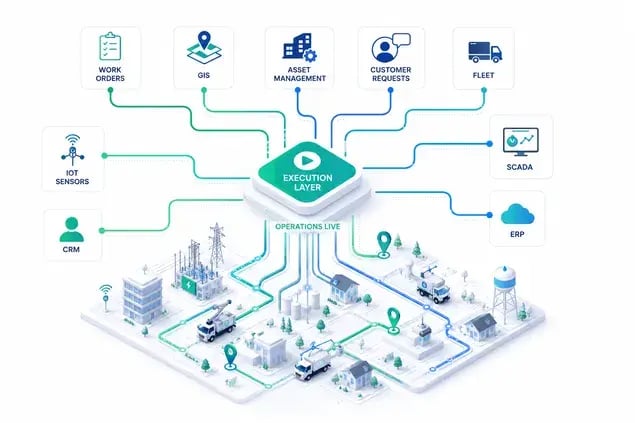
Most organizations try to improve field operations by creating better schedules.
They invest in FSM, CAFM, ERP, and planning systems that help organize work before the day begins, on the assumption that a better plan produces better performance.
The schedule is only accurate until something changes.
And in field operations, something is always changing.
Customer cancellations, emergency jobs, traffic delays, technician availability changes, and shifting priorities constantly pull operations away from the original plan.
That creates a gap between planning and execution, and leading organizations approach this differently:
Instead of chasing the perfect schedule, they focus on continuously adapting the schedule as conditions change.
That's the role of the execution layer.
The principle is straightforward:
The execution layer sits on top of existing systems such as FSM, CAFM, ERP, EAM, and scheduling tools.
It doesn't replace them. It uses the data they already contain to continuously optimize work throughout the day.
Your existing systems determine:
- What work needs to be done
- Which assets are involved
- Which technicians are qualified
- What priorities exist
The execution layer continuously determines:
- Who should do the work now
- What should be reprioritized
- Which technician should be reassigned
- How routes should change
- How disruptions should be absorbed
Here's how that plays out:
Imagine a utility starts the day with 500 scheduled jobs. By midday, several customers have rescheduled, a technician has called in sick, traffic has increased travel times, and two emergency jobs have entered the system.
A traditional approach forces dispatchers to manually rebuild the plan around all of that.
On the other hand:
The execution layer continuously evaluates the changes and dynamically updates assignments, schedules, and routes in real time.
Most people assume the primary benefit is better scheduling.
The real value is maintaining operational efficiency despite constant disruption:
- Higher technician utilization
- Lower travel time
- Reduced dispatcher workload
- Faster response to urgent work
- Improved SLA performance
- Better customer experience
- Increased operational capacity
This is also where planning and execution show their distinct roles, which is part of the difference between route optimization and FSM software.
Dynamic scheduling isn't a standalone capability. That's why it requires a system that can continuously evaluate changing conditions and make intelligent operational decisions all day long.
This is where dynamic scheduling stops being a feature and becomes an operating model.
Examples of Dynamic Scheduling in Field Operations
Concepts like dynamic scheduling, execution layers, and real-time optimization can sound theoretical until they're applied to actual operations.
The clearest way to understand the impact is to look at measurable outcomes from organizations working in complex, constantly changing environments.
Here are three examples focused on the challenge, the role of dynamic scheduling, and the result.
High-Volume Pest Control: Vergo Pest Management
Vergo Pest Management, the UK's second-largest pest control operation with roughly 400 technicians nationwide, was spending hours a day manually building routes while scaling through aggressive acquisition growth.
Managing large numbers of appointments each day meant constant schedule changes, travel inefficiencies, and hard-to-track technician utilization.
This is the kind of scale where dynamic scheduling for pest control operations stops being optional.
Dynamic scheduling automated nationwide scheduling and route optimization. This kept planning lean through rapid growth, and cleared service backlogs while juggling repeat treatments, emergency call-outs, technician certifications, and customer timing commitments.
The measurable outcomes:
- 3 to 4x ROI, beating all internal records
- Roughly 5x efficiency improvement
- Up to 90% of route planning automated
- Significantly reduced mileage
- 3+ more jobs per technician per day
The organization completed far more work without proportionally increasing its resources.
Large-Scale Enforcement Operations: Bristow & Sutor

Bristow & Sutor, a UK enforcement and debt resolution agency, manages 40,000 to 50,000 active tasks simultaneously across 200+ field agents in England and Wales.
That's a scale static scheduling simply cannot handle efficiently.
Coordinating a mobile enforcement workforce at that volume is exactly where dynamic scheduling for debt collection operations earns its keep.
Dynamic scheduling let planners react quickly to operational changes, add work during the day, handle exceptions, and continuously improve route efficiency without rebuilding schedules from scratch.
These changes update instantly across integrated systems via API.
The measurable outcomes:
- 35% reduction in planning time
- Faster, more accurate planning
- More collections per field agent from more efficient routing
- Ability to work on 40,000 to 50,000 tasks at once on a single screen
- Faster response to last-minute work
The gains came from continuously adapting operations as the day evolved, not from a static plan set at dawn.
Time-Critical Healthcare Operations: NHS
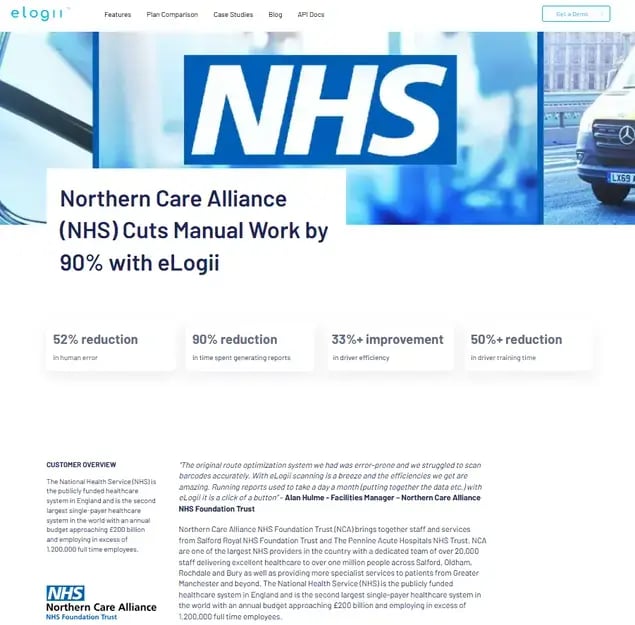
Healthcare field operations at the Northern Care Alliance NHS Foundation Trust involve strict service commitments, changing priorities, and the need to respond quickly to disruptions.
Getting resources allocated efficiently while holding service quality is a genuine balancing act.
Dynamic scheduling allowed the Trust to manage that complexity without sacrificing performance standards.
The measurable outcomes:
- Manual work cut by roughly 90%
- Around 10x more speed and flexibility versus previous systems
- Planning time down 60%+ with a leaner team
- Executable, accurate routes
These organizations operate in different industries.
Yet they face the same operational challenge: the plan changes throughout the day.
Dynamic scheduling consistently delivers value where organizations must manage:
- Mobile workforces
- Large volumes of work
- Geographic complexity
- Changing priorities
- Service commitments
- Operational disruptions
The common thread isn't industry. It's operational complexity.
The examples are different, but the lesson is the same: operational performance improves when schedules can adapt as fast as the business changes.
How eLogii Unlocks Dynamic Scheduling for Field Operations
Most field operations organizations already have systems for planning, work order management, asset management, customer records, and reporting. But these inefficiencies persist.
Why?
Because schedules rarely survive contact with reality.
The issue isn't a lack of systems or data. It's the absence of a layer that continuously manages execution as conditions change throughout the day.
That's where eLogii enters the game.

eLogii acts as an execution layer that sits on top of your existing operational systems rather than replacing them:
→ Organizations typically use platforms like FSM, CAFM, ERP, EAM, and CRM to manage records, create work, define priorities, and maintain data.
→ eLogii uses that information to help you continuously optimize how work actually gets executed in the field.

The division of labor is clear:
→ Existing systems determine what work needs to be done.
→ eLogii helps determine how that work should be executed most efficiently as conditions change.
Here's how that works in practice:
A schedule is created at the start of the day. As operations unfold, new jobs enter the system, customers reschedule, technicians become unavailable, travel conditions change, and priorities shift.
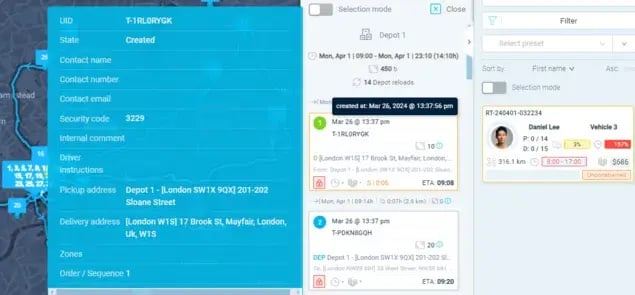
eLogii continuously evaluates those changes and helps you dynamically adjust schedules, routes, and resource allocation in real time.
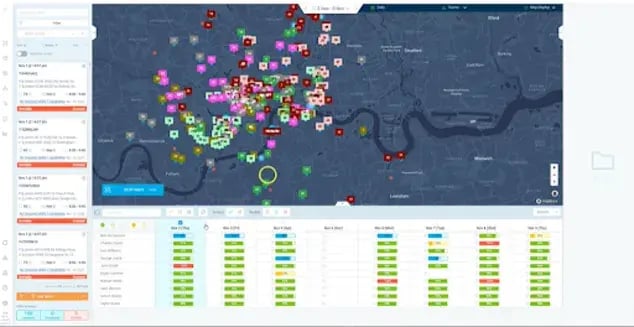
The operational outcomes are what matter:
- Increase technician productivity
- Improve labor utilization
- Reduce travel time and mileage
- Improve SLA performance
- Respond faster to urgent work
- Reduce dispatcher workload
- Improve customer service reliability
- Scale operations more effectively
Dynamic scheduling isn't simply about creating better schedules. It's also about maintaining operational efficiency after the schedule starts changing.
And that's where eLogii creates value.
Rather than requiring dispatchers to constantly rebuild schedules by hand, our software helps you continuously adapt operations as new information emerges.
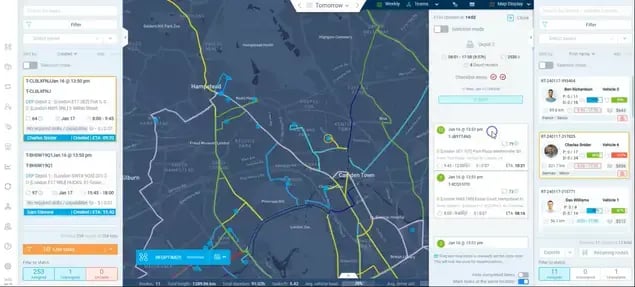
A simple way to frame it:
Your existing systems are the system of record, and eLogii acts as the system of execution.
eLogii is trusted by operators managing up to 10,000+ daily tasks across fleets and field teams, and it cuts routing and planning time by 50%+ regardless of order volume.
It complements your technology investments instead of replacing them, helping you get more value from the systems you already run.
While your greatest gains come from continuously adapting schedules as operations evolve.
The question is no longer whether schedules will change, it's how effectively your operation adapts when they do.
What Kind of Company Should Consider Using a Field Execution Layer in Its Operations
A field execution layer isn't a tool every field service organization needs.
Execution layers are built to solve operational complexity at scale.
(Not basic scheduling or dispatching.)
While some industries are more likely to benefit than others, the deciding factor is ultimately operational complexity.
Plenty of organizations run well on FSM software, scheduling tools, spreadsheets, and manual dispatching.
The limitations of static planning only become visible as operations grow larger, more dynamic, and harder to coordinate.
Organizations that hit this complexity threshold tend to share the same traits:
- Large mobile workforces
- High job volumes
- Frequent schedule changes
- Service commitments and SLAs
- Reactive and planned work
- Complex routing requirements
- Multiple assets, locations, and customer sites
The ideal operational profile usually includes:
- 50+ field technicians, engineers, inspectors, or service crews
- Large-scale operations across multiple locations, regions, or territories
- A mix of reactive, urgent, and planned work
- Mobile workforces operating throughout the day
- Multiple assets, facilities, or infrastructure networks to maintain
- SLAs or customer commitments to meet
- Frequent operational disruptions and changing priorities
- Significant coordination requirements across people, assets, and work orders
Some operations genuinely don't need an execution layer. These typically have:
- Small field teams
- Predictable schedules
- Limited daily work volume
- Minimal operational disruptions
- Small service areas
- Few dependencies between jobs, crews, and assets
- Limited need for real-time coordination
In those environments, traditional scheduling and dispatching are often enough, because schedules stay relatively stable throughout the day.
Do You Need a Field Execution Layer?
Use this table to quickly ask and answer this question:
| Operational Characteristic |
Likely Needs an Execution Layer |
May Not Need an Execution Layer |
| Field workforce size |
50+ field workers |
Small teams |
| Geographic coverage |
Multiple regions or territories |
Localized operations |
| Work type |
Mix of planned and reactive work |
Mostly planned work |
| Schedule stability |
Constantly changing |
Highly predictable |
| Dispatcher workload |
Significant manual intervention |
Minimal manual intervention |
| Operational disruptions |
Frequent |
Occasional |
| Asset complexity |
Multiple assets and infrastructure networks |
Limited asset complexity |
| SLA commitments |
Strict service obligations |
Few service constraints |
| Daily coordination requirements |
High |
Low |
| Growth and scale |
Expanding operations |
Stable operations |
Industries Most Likely to Benefit
Sectors like utilities, facilities management, HVAC, telecom, healthcare field services, pest control, security services, and infrastructure maintenance are often the earliest adopters of execution-layer technology.
They share a combination of workforce mobility, operational unpredictability, customer commitments, and scheduling complexity that makes static planning increasingly difficult to sustain.
High-volume, route-based work is a common trigger. Municipal and commercial waste collection scheduling has to juggle enormous daily route volumes with constant service changes.
Multi-site operators feel it too, which is why property maintenance scheduling has to balance reactive repairs against planned upkeep across dozens of locations.
Response-time pressure adds another layer. Scheduling security alarms technicians hinges on tight response windows that a rigid plan struggles to protect.
Recurring and on-demand work follows the same pattern, and dynamic scheduling for clearing services has to absorb frequent add-ons and cancellations without unraveling the day.
The broader takeaway is worth sitting with.
Organizations often assume they need better scheduling software when what they actually need is a way to manage operational complexity in real time.
Execution layers become valuable precisely when schedules require continuous adjustment throughout the day.
So ask the self-assessment question:
If your dispatchers spend a significant part of the day manually reacting to changes, is the issue your schedule or the complexity of your operation?
Execution layers aren't designed for every organization.
They're designed for operations where change is constant, resources are highly mobile, and coordination complexity has outgrown traditional scheduling methods.
Bottom Line: The Real Competitive Advantage Is Better Execution
Most field operations still rely on static schedules in environments that are anything but static.
As you've seen, customer changes, traffic delays, emergency jobs, and shifting priorities constantly disrupt even the best plans.
The problem is treating scheduling as a one-time planning activity rather than a continuous execution process.
A few points to carry with you:
- Static schedules degrade as complexity rises.
- Dynamic scheduling adapts as conditions change.
- Dynamic scheduling needs an execution layer on top of existing systems.
- The highest ROI comes in large, complex operations with mobile workforces, SLAs, and mixed reactive and planned work.
A practical next step:
Use the self-assessment table to gauge your complexity, compare your current approach against the dynamic model, and if the high-complexity profile fits, see how eLogii works as an execution layer.
FAQ about Static and Dynamic Scheduling
How often should field schedules be updated during the day?
Continuously, as conditions change. There's no fixed interval that works for everyone. The right frequency depends on how much disruption your operation absorbs, since a high-volume reactive operation reevaluates far more often than a stable, predictable one.
Does dynamic scheduling remove the need for dispatchers?
No. It shifts dispatchers away from manual firefighting toward exception handling and higher-value decisions. Instead of rebuilding schedules by hand all day, they supervise the operation, resolve edge cases the system flags, and focus on complex judgment calls that still need a human.
Can dynamic scheduling work with unionized workforces?
Yes. When configured properly, it respects shift patterns, break rules, and contractual constraints as part of the scheduling logic. Those rules become inputs the system optimizes around, so adaptation happens within the boundaries your agreements require.
How quickly can dynamic scheduling respond to disruptions?
In real time or near real time as new data enters the system. Compare that to manual rebuilds, which can take a dispatcher anywhere from several minutes to a few hours depending on how many jobs and technicians are affected.
Do organizations need accurate GPS or location data for dynamic scheduling?
Reliable live location and status data improve the quality of decisions. Better inputs produce better reassignments and routing. That said, the exact requirements vary by operation, and many teams start with the data they already collect and refine accuracy over time.
Can dynamic scheduling improve first-time fix rates?
Yes. Better matching of technician skills, available parts, and proximity to the right job supports completing work in a single visit. Industry benchmarks put the median first-time fix rate around 71.9% according to data cited by Nerdbot, so there's real room to improve for most teams.
How does dynamic scheduling affect technician satisfaction?
It generally improves the day-to-day experience. Less idle time, fewer chaotic last-minute changes, and more balanced workloads reduce frustration. Technicians spend more time doing the work they're skilled at and less time waiting for instructions or scrambling to recover from cascading delays.
How difficult is it to implement dynamic scheduling alongside existing systems?
An execution layer is designed to integrate with FSM, ERP, and CAFM systems rather than replace them, which reduces disruption. It uses the data those systems already hold, so you're adding a capability on top of your stack rather than ripping and replacing core tools.
What operational metrics improve most with dynamic scheduling?
Technician utilization, travel time, SLA compliance, overtime, and dispatcher workload tend to see the biggest gains. Utilization matters most, since the average field service organization runs at only 60 to 65% according to research cited by AEX, leaving significant recoverable capacity.
Is dynamic scheduling only useful for large enterprises?
No. Complexity matters more than headcount. A mid-sized operation with constant disruptions, tight SLAs, and mixed reactive and planned work can benefit more than a large but highly predictable one. Large complex operations usually see the biggest absolute gains simply because inefficiencies multiply across more people and jobs.