Event-driven scheduling is an approach to dynamic scheduling that automatically adjusts jobs, routes, and schedules in response to operational events as they occur.
Look at it this way:
When the plan you built at 6 AM collides with the reality of the first urgent callout at 10 AM, event-driven scheduling is what keeps your field operations on track.
But that's just one of the triggers.
A technician calls in sick, a customer cancels, traffic delays an appointment for an hour, and an emergency job jumps the queue. All of these events can trigger scheduling changes in real-time.
If you don't react and reschedule jobs, your schedule will be worthless and you'll lose control over operations. But to do so manually is almost impossible.
That's why in this guide we'll walk you through dynamic scheduling, including:
- What actually counts as a scheduling event
- How the event-to-adjustment workflow operates step by step
- Event-driven scheduling versus reactive dispatching
- Why the approach pays off as operations scale
- Where an execution layer fits your existing stack
Here's an overview of what's to come:
Key Takeaways
- Event-driven scheduling automatically adjusts assignments, routes, and priorities in response to operational events as they happen, instead of assuming the morning plan will hold all day.
- A scheduling event is any change that breaks the assumptions behind your current schedule, such as a cancellation, a sick technician, traffic, or an emergency job.
- The workflow is simple: an event occurs, its impact is evaluated, response options are weighed, the schedule is adjusted, and execution continues in an ongoing loop.
- Reactive dispatching solves the immediate problem fast, while event-driven scheduling weighs the wider operational impact before deciding how to respond.
- The value grows with scale and disruption frequency, because manual coordination gets exponentially harder as technicians, jobs, and territories multiply.
- An execution layer can sit on top of your FSM, CAFM, or ERP without replacing them, turning existing data into live scheduling decisions.
- The goal is not constant rescheduling. It's making the right change when reality makes the original plan less effective.
What Is Event-Driven Scheduling
Event-driven scheduling is a scheduling approach that automatically adjusts work assignments, routes, and schedules in response to operational events as they occur.
Traditional scheduling assumes the plan you create at the start of the day will stay largely intact.
On the other hand:
Event-driven scheduling assumes the opposite. It assumes that field operations change constantly, and that your schedule has to adapt when new data arrives.
An event is any occurrence that changes the assumptions behind your existing schedule.
Common examples include:
- Customer cancellations and reschedules
- Emergency job requests
- Traffic delays
- Technician absences or late starts
- Jobs overrunning their expected duration
- New work arriving during the day
- Changes in job priority
- Asset or equipment issues
Each of these creates new operational conditions that may require the schedule to change.
At a high level, here's how it works:
→ An event occurs
→ The operation evaluates its impact
→ Scheduling decisions are adjusted
→ The updated plan is dispatched to relevant teams
The purpose is to make the targeted adjustments needed to protect performance while minimizing disruption, instead of rebuilding the whole day every few minutes.
That's why an event-driven approach evaluates the schedule changes to identify a better use of the capacity that opened up due to the disruption.
This matters because field operations face constant uncertainty.
As organizations grow, relying only on manual intervention gets harder, because dispatchers must weigh technician availability, capacity, skills, travel time, customer commitments, SLAs, and job priorities all at once.
In fact, scheduling-dispatch and route-optimization led with 28.16% of 2025 revenue in the field service software market, according to Mordor Intelligence.
Event-driven scheduling isn't a specific algorithm or routing method. It's an operational approach that lets schedules adapt as real-world conditions change.
Because the real challenge in field operations is keeping that schedule effective once daily operations start rolling.
What Counts as a Scheduling Event?
A scheduling event is any operational change that affects the assumptions behind your current schedule and may require assignments, routes, priorities, or resource allocation to be adjusted.
But not every event deserves action.
A triggering event becomes significant when it creates consequences for six key areas of your field operation:
- Technician capacity
- Route efficiency
- Customer commitments
- SLAs
- Job priorities
- Resource availability
A field operation experiences dozens or hundreds of events a day, but only some meaningfully affect execution. That's why setting clear event-driven scheduling rules is what separates the events worth acting on from the noise.
Those events generally fall into four categories:
1. Customer Changes
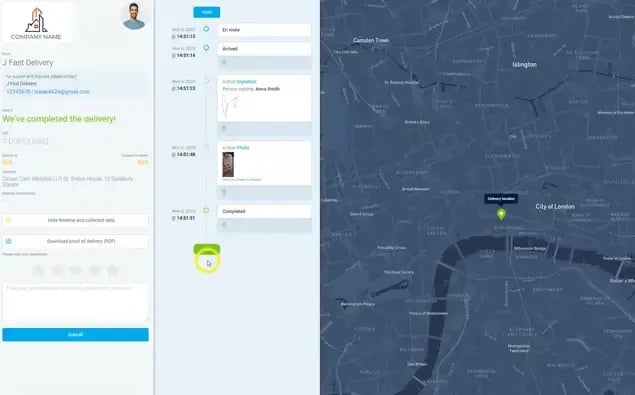
Customer-driven changes are among the most common scheduling events. They include:
- Appointment cancellations
- Reschedule requests
- Changes to availability windows
- Priority work requests
- Work delay requests
A cancelled appointment creates unused capacity. A reschedule can force routes and workloads to be reorganized. And if a technician loses an appointment during the day, the resulting gap becomes an opportunity for you to pull another job forward or slot in extra work to another schedule. (Provided you can spot it in time.)
2. Technician Status Updates
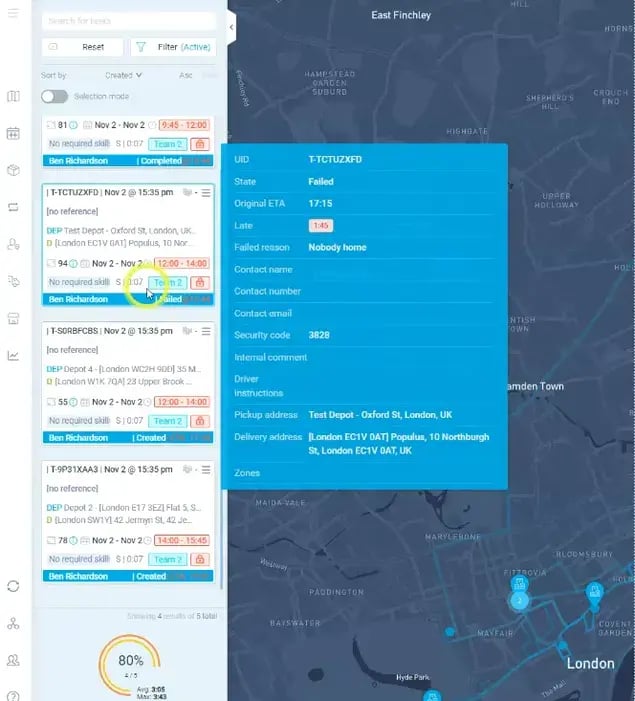
Technician events affect available workforce capacity. This can include anything from absences, late starts, and jobs overrunning, through early completions, to vehicle breakdowns and skill availability changes.
When a technician becomes unavailable for the rest of the day, the operation has to reassign their remaining commitments without creating unnecessary disruption elsewhere.
Even a minor update, like a job running 40 minutes long, can have a domino effect through every appointment that follows.
3. Traffic Delays
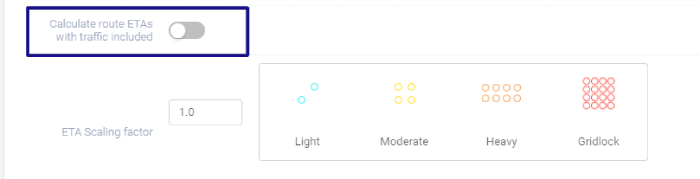
Driving between jobs is one of the most unpredictable aspects of field service operations. Traffic congestion, road closures, accidents, weather delays, and rising drive time all qualify as re-scheduling trigger events.
Take a technician stuck in traffic who arrives 30 minutes late to a job site. If that happens, you need to push every remaining appointment on that route.
Traffic events force you to make a decision:
- Hold the existing schedule and absorb the slippage, or;
- Redistribute work elsewhere (to other routes and technicians).
When SLAs are on the line, that decision has real cost, and job priority becomes important. This is why priority-based scheduling decisions matter so much here.
4. Emergency Job Requests
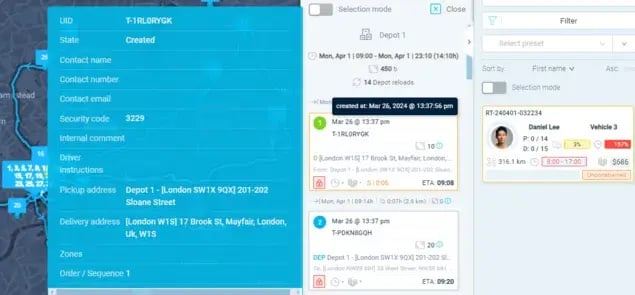
Emergency callouts, appointments, and other jobs are one of the highest-impact events because they introduce priority that wasn't in your original schedule.
Depending on your field service industry, these events can include critical outages, safety incidents, urgent repairs, high-priority customer requests, and compliance-driven work all fall here.
For example, an urgent repair callout that arrives in the afternoon forces you to trade off between your planned work and urgent response. You have to decide whether to:
- Interrupt the existing route;
- Reassign work to a different time slot, or;
- Allocate the job to an available technician.
The events differ, but they all create the same problem:
Your schedule was built on one set of assumptions, and those assumptions have changed.
That's why effective operations distinguish between:
- Events that can integrated into the current schedule without changes
- Events that need a small local schedule and route adjustment
- Events that require a re-scheduling and complete route update.
These distinctions prevents unnecessary work for your planners and dispatchers, while protecting technician performance.
Once an event occurs, the harder question is you should respond.
Which is exactly what the next section covers.
How Event-Driven Scheduling Works
Event-driven scheduling works by continuously monitoring operational events, evaluating their impact on your existing schedule, and making adjustments when those changes can improve operational outcomes.
Different organizations use different tools and processes, but the underlying workflow follows the same sequence:
| Step |
What Happens |
Field Example |
| Event occurs |
Something changes in the operation |
An afternoon appointment is cancelled, freeing capacity |
| Impact evaluated |
The operation checks whether it affects capacity, SLAs, or routes |
A five-minute delay is minor; a one-hour delay hits every later job |
| Response options assessed |
Possible responses are weighed |
Assign an emergency to the nearest, most-skilled, or least-loaded technician |
| Schedule adjusted |
The smallest effective change is made |
A pending job moves into the open slot |
| Execution continues |
Work resumes; new events restart the cycle |
Traffic later delays the same technician, triggering another review |
That's the central distinction.
Traditional scheduling focuses on creating the plan. Event-driven scheduling focuses on keeping that plan effective as conditions change.
The hardest part of most operations is managing the disruptions that arrive after work begins.
Most importantly:
Event-driven scheduling is about making better scheduling decisions when conditions change, instead of reacting to them.
But this raises another question:
How is event-driven scheduling different from simply dispatching jobs reactively?
Event-Driven Scheduling vs Reactive Dispatching
Both event-driven scheduling and reactive dispatching deal with disruptions to field operations. But while event-driven scheduling uses a structured process to evaluate and optimize responses, reactive dispatching focuses on solving the immediate problem as fast as possible.
Reactive dispatching is the traditional response when something unexpected happens in field operations. With this approach, a dispatcher has to manually intervene to fix the operational issue.
This includes reassigning a technician after a cancellation, finding someone to cover an emergency, adjusting appointments after a delay, or reworking routes when a technician drops out.
Reactive dispatching is highly effective in smaller field operations, or with uncommon or isolated events. The catch is that these dispatch decisions are often made under time pressure, with limited visibility into the broader impact to the operation.
On the other hand:
Event-driven scheduling treats operational events and disruptions as inputs into an ongoing scheduling process.
Before responding, it weighs multiple factors, such as available capacity, route impact, technician skills, customer commitments, SLAs, travel implications, and job priorities.
That's the key difference:
The goal of event-driven scheduling is to resolve the issue by finding the response that produces the best overall outcome.
Here's a table that clearly outlines the main differences between reactive dispatching and event-driven scheduling:
| |
Reactive Dispatching |
Event-Driven Scheduling |
| Decision scope |
The specific issue that triggered it |
The wider operation |
| Priority |
Immediate action |
Effective response, still acting quickly |
| Consistency |
Varies by dispatcher experience |
Repeatable decision framework |
| Visibility of wider impact |
Limited |
Built into the evaluation |
| Scalability at high volume |
Strained |
Structured for complexity |
| Best suited for |
Small teams, isolated disruptions |
Large, complex, high-change operations |
A common misconception among field service organizations is that event-driven scheduling replaces dispatchers.
It DOESN'T.
Dispatchers still own oversight, exceptions, communication, and final decisions. Event-driven scheduling simply gives them a framework for evaluating events that cause disruptions to routes, schedules, and field work. It doesn't replace their judgment.
Another key issue that we commonly encounter is that reactive approaches start to break down under complexity.
This includes large territories, high job volumes, frequent emergencies, multiple teams, tight commitments, and numerous daily changes.
In those environments, every decision touches multiple routes, technicians, and appointments at once. Given that 46% of organizations struggle to meet customer SLAs, the pressure to respond well (not just fast) is real.
Why Operations That Adopt Event-Driven Scheduling Thrive at Scale
Field services that adopt event-driven scheduling often perform better at scale because they adapt to change more consistently, use operations capacity more efficiently, and maintain service performance despite rising complexity.
Scheduling complexity increases sharply as operations grow:
✓ More technicians
✓ More daily jobs
✓ Larger service zones and regions
✓ More customer commitments
✓ More operational assets
✓ More emergency and urgent work
✓ More dependencies
Disruptions don't scale in a straight line.
As your operation grows, the number of decisions and the interactions between technicians, office staff, routes, and service commitments grows much faster.
A cancellation across five technicians is easy to manage by hand. The event across 200 technicians, thousands of jobs, and multiple territories has far-reaching consequences.
That's why high-performing field service operations focus on this instead:
Responsiveness: Adapting Faster to Operational Change
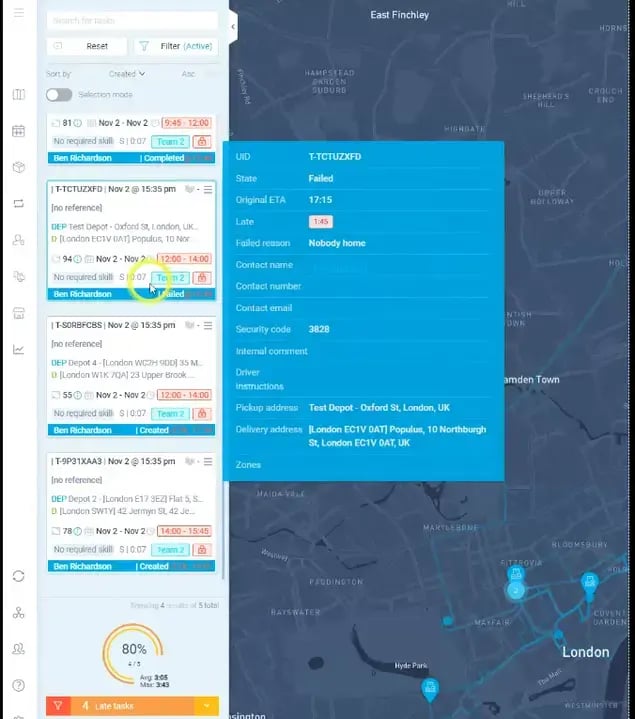
Rather than waiting for dispatchers to spot and fix issues, the operation continuously evaluates changes as they occur (cancellations, delays, emergencies, route disruptions, capacity shifts).
Responsiveness here is about speed, but also about finding the most effective response while conditions are still moving.
A service slot or technician freed up by a cancellation can be redeployed before it becomes wasted time.
Efficiency: Better Use of Existing Capacity
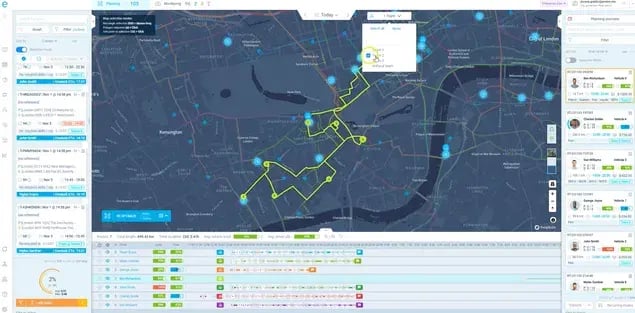
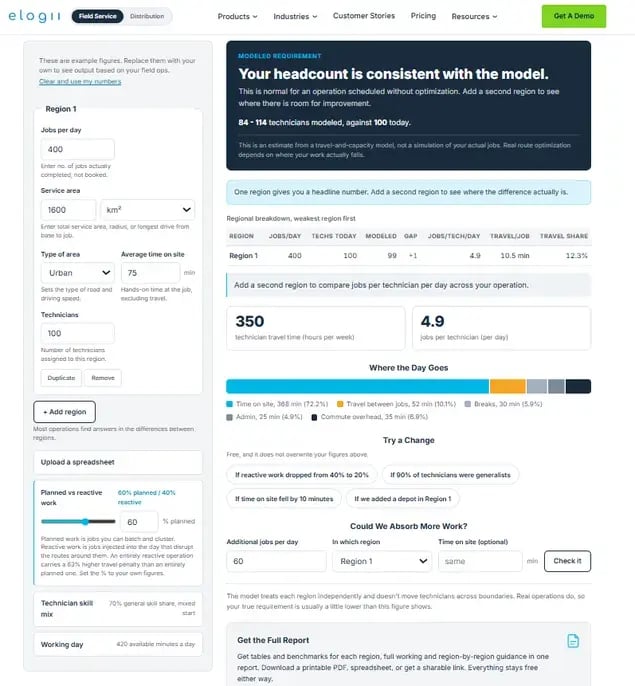
Scale exposes inefficiencies that small operations handle without noticing. This includes idle time, excess driving, poor workload balancing, and underutilized headcount capacity.
Inefficiencies in these operational parameters become major costs when multiplied across dozens or hundreds of workers.
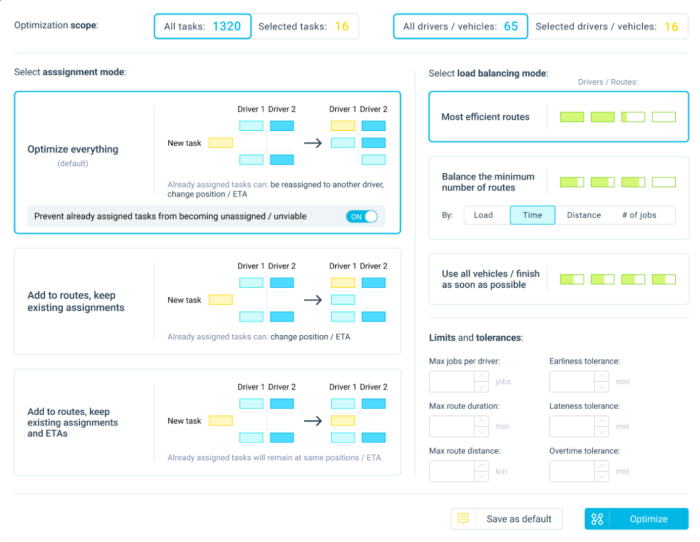
Continuously adjusting routes, assignments, and priorities preserves productivity when disruptions hit your operations.
On the other hand:
Reallocating unused capacity when jobs are rescheduled preserves efficiency across schedules, technicians, and routes where gaps open up. While automated workload balancing keeps that effort from falling on one overloaded team.
The goal is maintaining efficiency through execution, not just producing an efficient plan.
Want to know how efficiently you're using your existing technician capacity? Use our FREE headcount capacity planning tool to find out.
Scalability: Managing Complexity Without Proportional Coordination Effort
The biggest challenge of operational growth is coordination.
Dispatchers must evaluate more variables: skills, availability, capacity, geography, commitments, SLAs, priorities, and asset constraints. And relying on manual coordination gets harder as those variables multiply.
Event-driven scheduling provides a structured framework for operations to handle greater complexity without increasing scheduling effort at the same rate.
Real-time workforce coordination keeps multiple teams working from the same live picture. Scalability is about not needing a new planner for every new region.
One thing to note here:
Event-driven scheduling doesn't eliminate disruptions.
Traffic still happens. Customers still cancel. Emergencies still arise. Technicians still call in sick. The advantage is reducing the operational impact of those disruptions.
The knock-on effects show up as:
✓ Better capacity utilization
✓ Improved technician productivity
✓ Reduced travel waste
✓ Greater schedule accuracy and stability
✓ More reliable service to customers
✓ Stronger SLA performance
✓ Better customer experience
The advantage is a schedule that stays effective when schedule changes inevitably happen.
And that's where the enabling technology comes in.
How eLogii Enables Event-Driven Scheduling for Field Operations
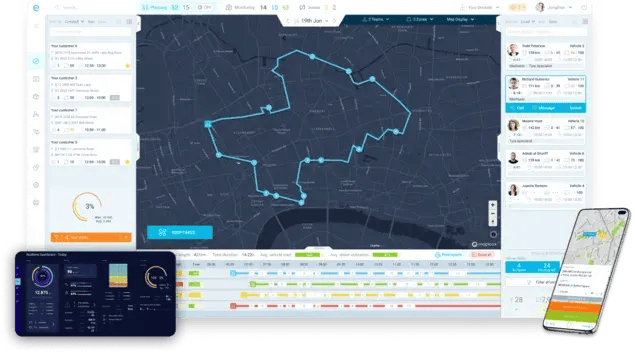
eLogii enables event-driven scheduling by connecting live operational changes to dynamic scheduling decisions, letting field teams adjust jobs, routes, and technician assignments as conditions change through the day.
The workflow mirrors what we've described.
Event occurs → eLogii evaluates its impact → Calculates alternative options → Adjusts the schedule adjusts → Field execution continues.
eLogii responds to cancellations and reschedules, new or emergency jobs, availability changes, delays and overruns, traffic, and priority shifts in the same way:
The software adjusts schedules and routes while respecting constraints like technician skills, availability, locations, time windows, priorities, service commitments, and vehicle limits.
The point is targeted, intelligent change. It isn't to rebuild the whole day.
What This Looks Like in Practice
eLogii acts as an execution layer.
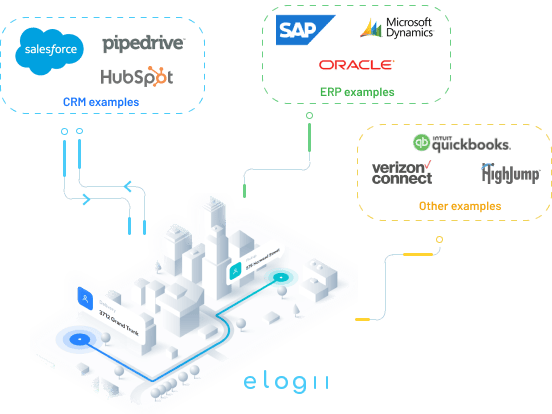
eLogii doesn't replace your FSM, CAFM, or ERP. Instead, the software uses operational data from those systems and turns it into dynamic scheduling and routing decisions during live operations.
Your existing systems stay the systems of record, while eLogii becomes your execution layer that manages what actually happens when reality diverges from the plan.
Simply put:
The planning and scheduling software builds the day, and the broader service operations platform keeps it executable as conditions shift.
This suits organizations with 50 or more field technicians, multi-location or multi-territory operations, mobile workforces working through the day, a mix of planned and reactive work, multiple assets or sites, SLAs, frequent disruptions, and heavy coordination needs.
That profile is common in event-driven telecom operations, alarm response scheduling, and facility service coordination, where planned and urgent work constantly compete.
Smaller operations with fixed, predictable schedules, few disruptions, and low coordination complexity may not need an advanced execution layer.
Bigger isn't automatically better. Complexity and scale are what matters more.
When configured well, the potential benefits of eLogii include better capacity utilization, reduced disruption, improved route efficiency, better protection of time windows and SLAs, lower dispatcher workload, and greater scalability.
The customer results support this:
Vergo Pest Management, one of the UK's largest pest control operations, runs circa 400 technicians nationwide. They evaluated Descartes, Ortec, and other legacy vendors before selecting eLogii, then used it to automate nationwide scheduling, keep planning lean through rapid acquisition growth, and eliminate service backlogs.
Their CIO, James Hodges, put it simply:
"The teams love the platform - the mapping, the interface, the speed."
This kind of compliance-heavy, SLA-driven work is exactly what compliance-driven field operations demand.
Here's an overview of a few results from field service operations that use eLogii and event-driven scheduling:
| Organization |
Operational Challenge |
What Changed |
Result |
| Vergo Pest Management |
Manual routing across ~400 technicians through acquisition growth |
Automated nationwide scheduling, kept planning lean |
3-4x ROI, beating prior internal records |
| Bristow & Sutor |
40,000-50,000 enforcement tasks across 200+ agents |
Live routing synced to case management via API |
Collections per agent up; call center load down |
| Northern Care Alliance NHS |
Heavy manual planning with a lean team |
Automated, executable routing |
~90% less manual work; 60%+ less planning time |
Where Event-Driven Scheduling Fits Into Your Operation and How to Start
Adoption doesn't require replacing your current field operation stack.
Instead, the path runs from existing systems to operational data to the execution layer, then to dynamic scheduling, live field execution, and KPI measurement.
Most organizations start with one use case:
- Same-day reoptimization
- Emergency job insertion
- Cancellation management
- Technician reassignment
Then they expand as the value proves out.
An event-driven execution layer keeps reassessing and adjusting work instead of leaving dispatchers to rebuild the day by hand. The schedule changes, but the operation keeps working toward its underlying goals.
The value is in helping your operation keep making better decisions after reality changes your plan.
Event-Driven Scheduling in a Broader Field Service Management Context
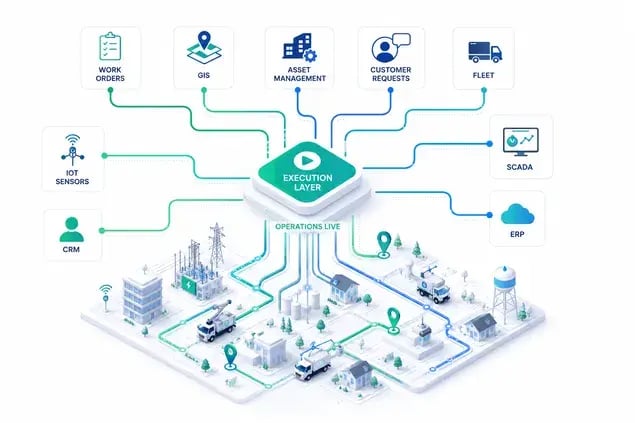
Event-driven scheduling is one part of a broader field service operations model:
FSM systems hold the operational data and records, route optimization determines efficient movement and resource allocation, and an execution layer connects those capabilities to what's actually happening in the field.
Modern operations typically involve three groups of capability.
- Systems of record (FSM, CAFM, ERP, and work order and asset management): These tools hold information about customers, work orders, assets, technicians, service history, and contracts.
- Planning and optimization tools use that information to assign, sequence, and route work based on constraints like availability, skills, geography, time windows, vehicle requirements, SLAs, and priorities.
- Execution software like eLogii deals with what happens after the plan starts and conditions change.
That planning-versus-execution split is the heart of it.
Planning answers:
"What should happen?"
Execution answers
"What should happen now, given what's actually happening?"
During any given day, customers cancel, new jobs arrive, technicians drop out, traffic shifts travel times, jobs overrun, and emergencies reshuffle priorities.
Route optimization and event-driven scheduling are complementary.
- Route optimization sequences and allocates work based on current constraints.
- Event-driven scheduling determines when conditions have changed enough to reconsider the plan and trigger a fresh optimization.
A technician might start with an optimized route of eight jobs; by midday, a cancellation, an urgent job, and traffic mean the remaining route deserves a second look rather than blind adherence to the original sequence.
The layered stack works like this:
| Layer |
Primary Job |
Example Systems |
Key Question It Answers |
| System of record |
Store operational data |
FSM, CAFM, ERP |
What work exists and for whom? |
| Planning & optimization |
Build an efficient plan |
Scheduling and routing tools |
What should the day look like? |
| Execution layer |
Adapt to live change |
Event-driven scheduling |
What should happen now? |
| Field workforce |
Complete the work |
Mobile apps, technicians |
Is the job done? |
| Data & KPIs |
Measure and improve |
BI, dashboards |
Did it work, and where next? |
Bottom Line
Event-driven scheduling helps field operations stay effective when real-world conditions change, connecting planning and route optimization with live execution.
Schedules built at 6 AM rarely survive the day intact. Cancellations, sick technicians, traffic, and emergencies see to that.
Planning and route optimization remain essential, but they can't anticipate every event.
That's the gap event-driven scheduling fills.
Your next step is practical:
Audit how your operation handles disruption today.
Count how often a single change forces manual replanning, and how many planners you need just to keep pace.
If the answer is "too often" and "too many," an execution layer like eLogii can sit on top of your existing systems and adapt schedules as conditions shift.
And if that's the case, click on the banner bellow to start today.
FAQ about Event-Driven Scheduling
How is event-driven scheduling different from real-time or dynamic scheduling?
They overlap heavily. Real-time and dynamic scheduling describe how quickly the system reacts, while event-driven describes the trigger logic - specific operational events that prompt an evaluation. Most event-driven systems are dynamic and real-time, but the defining feature is that changes are tied to defined events rather than continuous recalculation.
Do we need to replace our existing FSM, CAFM, or ERP to use event-driven scheduling?
No. An execution layer can sit on top of your existing systems and use their data, typically integrating via API or webhooks. Your FSM, CAFM, or ERP stays the system of record, while the execution layer handles live scheduling decisions and pushes completion data back.
How do we decide which events should trigger a scheduling change?
Tie triggers to impact. An event should prompt a change when it meaningfully affects capacity, SLAs, customer commitments, or job priorities. Define thresholds so minor events - a five-minute delay, a small overrun - get absorbed automatically, while high-impact events like emergencies or technician absences trigger a proper reassessment.
Should every operational event trigger an automatic reschedule?
No. Rescheduling on every event creates instability and confusion in the field. The better approach distinguishes three responses: absorb the event with no change, make a small local adjustment, or trigger a broader schedule update. Reserve larger changes for events that genuinely threaten performance.
How much human oversight does event-driven scheduling need?
Planners and dispatchers stay in control. The system handles the heavy calculations and surfaces recommended changes, but people own exceptions, overrides, customer communication, and final decisions on sensitive jobs. Think of it as decision support at scale, not autonomous scheduling that runs without supervision.
How do organizations prevent excessive or disruptive schedule changes?
Use rules and change thresholds, and always favor the smallest effective adjustment. Configure the system to protect committed appointments, limit how far work can move, and only re-optimize affected routes rather than the entire day. Stability is a design goal, not an afterthought.
What data do you need for event-driven scheduling to work?
At minimum, you need technicians, jobs, time windows, locations, and reliable event signals such as status updates and GPS data. The more constraint data you add - skills, certifications, vehicle capabilities, SLA windows, and job dependencies - the better the decisions. Poor data quality is the most common reason results disappoint.
How does event-driven scheduling work across multiple teams, territories, or locations?
The system evaluates each event's impact within its zone first, then considers cross-zone options where they help - for example, borrowing capacity from a neighboring territory. Coordination complexity rises with scale, which is why a structured framework matters more the larger and more distributed your operation becomes.
Do smaller field service businesses actually need event-driven scheduling?
Often not. If you run a small team with predictable, fixed schedules and few daily disruptions, a simpler dispatching approach works fine. The value climbs with disruption frequency, job volume, workforce size, and geographic complexity. Match the tool to your actual operational complexity, not to your ambitions.
How do you measure whether event-driven scheduling is delivering value?
Track capacity utilization, the ratio of drive time to productive work, SLA and on-time performance, jobs completed per technician per day, planning time, and the reduction in manual intervention. Compare against a pre-adoption baseline. If dispatchers spend less time firefighting and more jobs get done, it's working.