Yes. ServiceTitan includes route optimization for daily dispatch and scheduling. It sequences a technician's stops to cut drive time and can recommend assignments based on skill and location.
What it does not do is optimize against complex operational constraints, or continuously re-optimize the whole day as reality changes.
One detail worth knowing before you evaluate anything: the strongest routing capability sits in Dispatch Pro, which ServiceTitan sells as a Pro Product add-on rather than including in the base platform.
Check which tier you are on before assuming the automation is switched on.
But if you run 50 or more people in the field across multiple regions, with a mix of planned maintenance and reactive work, you have probably already felt where built-in scheduling stops.
This article covers exactly what ServiceTitan's routing does, when it is genuinely enough, the point at which teams add a dedicated routing layer, and how to do it without replacing your system of record.
This article reflects eLogii's analysis of publicly available information about ServiceTitan as of August 2026. Features and pricing are drawn from ServiceTitan's own published sources and may have changed since. Verify current details with ServiceTitan.
Key takeaways
ServiceTitan does have route optimization. It sequences stops by drive time, supports custom start and end points including technician home locations, and offers skills-based assignment.
The advanced automation is a paid add-on. Dispatch Pro is a Pro Product, not part of the base platform.
ServiceTitan's published figure is a 6% drive time reduction. Dedicated execution layers built for constraint-heavy field work typically report 20 to 40% mileage reduction.
Built-in routing is enough for a single region, roughly 25 technicians or fewer, mostly planned work and few hard constraints.
It is stretched at scale by certification rules, statutory deadlines, multi-trade bundling, whole-operation intraday recovery and subcontractor allocation.
You can add routing without replacing ServiceTitan. An execution layer connects by API, optimizes against your operational rules, and pushes completion data back.
Does ServiceTitan have route optimization?
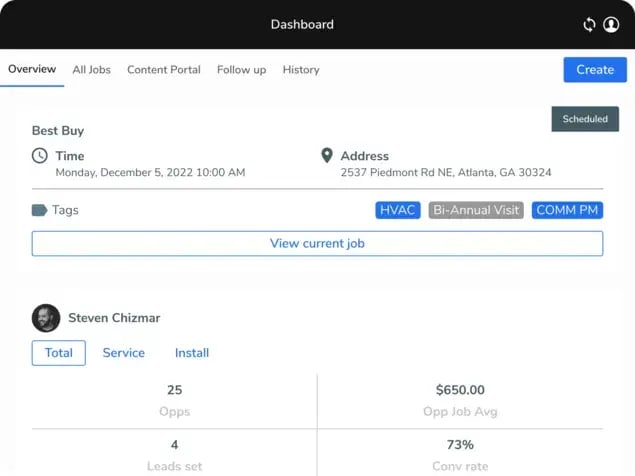
Yes. ServiceTitan provides routing through its Dispatch Board and map view, with drive-time-aware scheduling.
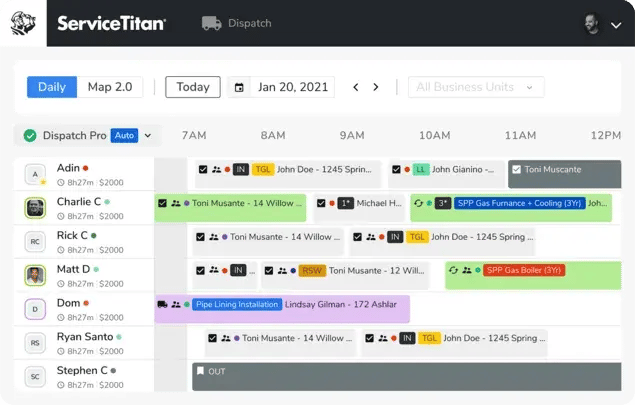
Dispatchers can see where technicians are, what is scheduled, and adjust assignments visually across the day. Dispatching itself is part of the platform.
The automated capability lives in Dispatch Pro.
Dispatch Pro offers:
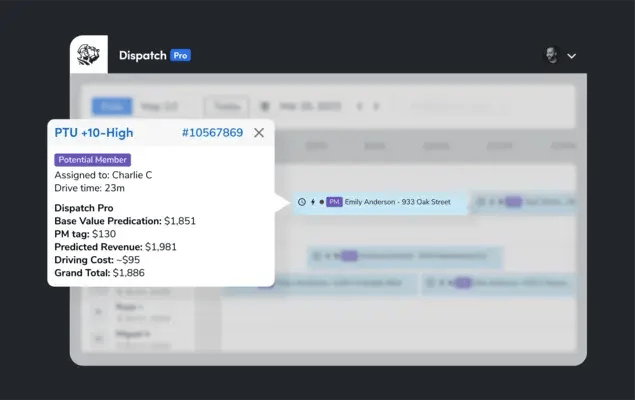
Automatic job assignment
AI-driven recommendations
Technician skill, location and performance, custom start and end points
Technicians routing from home or from a shop
Controls for maximum drive time between jobs
ServiceTitan's own published claim for Dispatch Pro is a 6% reduction in drive time.
Be fair about what ServiceTitan is: A strong system of record.
Work orders, assets, contracts, quoting, invoicing and customer history all live there cleanly, and for a large share of operators the routing does exactly what is needed.
Is ServiceTitan route optimization included or an add-on?
Both, depending on what you mean by routing.
The Dispatch Board, the map view and manual route sequencing are part of the platform.
The automation layer, meaning automatic assignment, AI recommendations and goal-based optimization, is Dispatch Pro, a paid Pro Product.
This matters commercially. Teams often assume they have already bought optimization because they can see routes on a board.
If your renewal conversation includes Dispatch Pro as a new line item, that's the moment to compare what an added execution layer would deliver against the same spend, because you are making a buying decision either way.
What does ServiceTitan's routing actually do?
ServiceTitan sequences a technician's assigned stops for geographic efficiency and gives dispatchers visual context to intervene.
Dispatch Pro adds goal-based settings, letting you prioritize drive time, average ticket size or a blend, plus guardrails such as a cap on travel time between appointments.
The model it is built for is clear:
One technician or one stable crew per route per day, mostly planned jobs with flexible arrival windows, and a manageable number of stops.
It optimizes against drive time, distance, arrival windows and technician availability, weighted toward revenue.
That is distance-and-revenue optimization.
It is the right tool for a large share of residential and single-trade operations.
The question is what happens when your operation stops looking like that model.
When ServiceTitan's built-in routing is enough
For many operators it is genuinely all they need, and bolting on another layer would be over-engineering.
The honest test is not company size on its own. It is constraint complexity and how volatile your day is.
Built-in routing tends to be sufficient when you have:
✓ A single region or contained service area
✓ Roughly 25 technicians or fewer
✓ Mostly planned work with wide arrival windows
✓ Few constraints beyond skill and location
✓ Low same-day volatility
✓ Little subcontractor coordination
A residential service and replacement business running 10 to 15 jobs a day per technician, with wide arrival windows, gets real value from built-in optimization and should not go looking for more.
The threshold is constraint complexity and volatility, not company size alone.
Signs your operation may need a dedicated routing layer
Planner headcount grows with job volume. If adding 20% more jobs means adding another coordinator, your scheduling is manual in everything but name.
A statutory deadline was missed because the route optimized for distance. Fire, EICR, gas and water compliance windows are legal obligations, not preferences.
Jobs are aborted on arrival because the technician lacked the certification or the parts for the asset in front of them.
Multiple engineers visit the same site, block or estate in the same week because nothing bundled the outstanding work.
One sickness call at 7:00 AM triggers a full-day replan across the whole operation rather than an automatic redistribution.
Subcontractors are managed in a spreadsheet alongside a system that has no view of them.
Two or more of these and the constraint is structural rather than a configuration problem.
Where a dedicated routing layer complements ServiceTitan at scale
Once you run 50-plus people in the field across multiple regions on roughly a 70/30 planned-to-reactive mix, distance-and-revenue optimization alone stops holding the day together.
The structural reason is that built-in routing optimizes against drive time, distance and job value, rather than treating skills, certifications, SLA and statutory windows, job dependencies, materials and site risk as first-class scheduling rules.
It plans well, then degrades as reality changes.
Two gaps matter most.
First, there is no continuous re-optimization across the entire operation when a trigger hits, so recovery is largely manual.
Second, there is no smart bundling of every outstanding job at the same site, block, estate or property into a single visit, which is the largest single lever on cost to serve in field service.
How one no-access visit costs a whole day
The clearest way to see the difference is to follow a single failure through a day.
A technician arrives at 09:30 and nobody is on site. In a distance-optimized schedule that one event produces four downstream costs:
→ Idle time with no nearby work queued
→ A planner manually rebuilding the remaining route
→ A later job with a statutory deadline slipping outside its window
→ Failed visit returning as a second attendance.
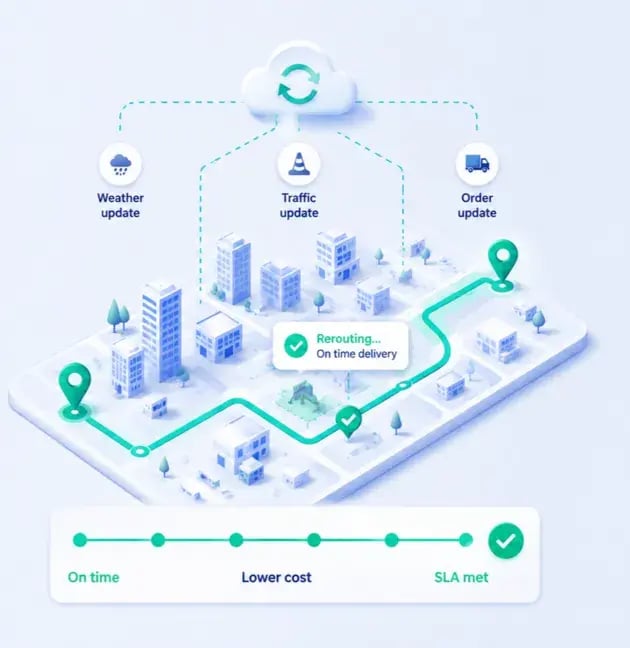
With continuous re-optimization the same event is absorbed a minute later.
→ Remaining jobs re-sequence across the operation
→ Nearest qualified technician picks up displaced work
→ Deadline-driven jobs are prioritized ahead of merely convenient ones
→ Failed visit is rebooked into a future route that already passes the site.
Yes. You can add a dedicated routing and scheduling layer on top of ServiceTitan without replacing it, connected through API and webhooks.
This is the additive model most large field operations end up adopting.
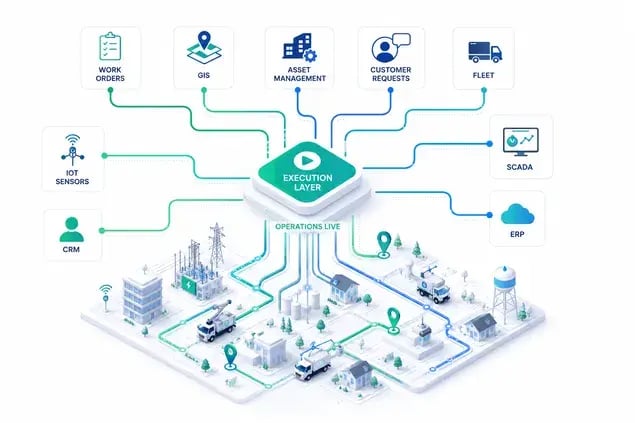
eLogii is a field service execution layer that adds route optimization, dynamic scheduling and dispatch on top of an existing FSM such as ServiceTitan.
ServiceTitan stays the system of record. The execution layer pulls the jobs, optimizes them against your operational rules, dispatches them, and pushes completion data back so the record reflects reality.
To be plain:
eLogii DOESN'T replace ServiceTitan.
eLogii only replaces scheduling, dispatch and field execution a growing operation adds on top.
How does an execution layer integrate with ServiceTitan?
Through API and webhooks, in four steps that run continuously rather than as a nightly batch.
Jobs flow out. Work orders, sites, time windows, required skills and asset details are pulled from the system of record.
Rules are applied. Certifications, statutory deadlines, dependencies, materials availability, home start points and site risk are enforced as scheduling constraints.
Routes are dispatched and re-optimized live. Technicians receive their day in a mobile app, and the plan adapts as the day changes.
Completion data flows back. Timestamps, photos, signatures, forms and GPS evidence return so invoicing and compliance records are accurate.
The same pattern applies across the rest of the stack.
eLogii is a Simpro partner, integrates with FieldRoutes, and works alongside telematics rather than against it.
If you run Samsara for vehicle tracking, that stays, because telematics GPS can power ETAs while the execution layer decides which job comes next.
What to look for in a routing layer for ServiceTitan
If you evaluate options, these are the capabilities that separate a genuine execution layer from a stop-sequencing tool:
Constraint depth. Can it treat certifications, statutory windows, dependencies and materials as hard rules, not preferences?
Intraday recovery. Does it re-optimize the whole remaining operation on a trigger, or only the affected technician?
Bundling. Can it group every outstanding job at one location into a single visit?
Home-start routing. Does it plan from where technicians actually begin?
Subcontractor allocation. Can it schedule in-house and subcontracted resources under the same rules?
Write-back. Does completion data return to the system of record automatically?
Commercial model. Does the price rise every time you add a vehicle or a technician?
ServiceTitan vs a dedicated execution layer
This compares ServiceTitan's built-in and Dispatch Pro routing against a dedicated execution layer, across the constraints that decide whether planning holds at 50-plus people in the field. Read it as complementary, not competitive.
Capability
ServiceTitan
Execution layer (eLogii)
Route sequencing
Strong, drive-time aware; advanced automation requires the Dispatch Pro add-on
Multi-stop optimization as standard, tuned for long, variable service times
Skills, certification and authority-level matching as a core scheduling rule
Statutory compliance windows
Respects arrival windows; deadline-first prioritization is limited
Dynamic SLA and statutory-window prioritization for fire, EICR, gas, water
Live intraday re-optimization
Adjusts for the affected technician; whole-operation recovery is largely manual
Instant re-optimization of the remaining day on any trigger
Job bundling by site or block
Not a native bundling engine
Smart bundling of all outstanding work at one site into a single visit
Home-start routing
Custom start and end points supported
Routes from home, depot or zone start points as standard
Subcontractor scheduling
Typically managed manually or via spreadsheets
Rule-based allocation across in-house and subcontracted resources
Pricing model
Dispatch Pro sold as a Pro Product add-on
Priced by features and scale, from people in the field to tasks completed
Published drive-time impact
6% drive time reduction (ServiceTitan's own figure for Dispatch Pro)
20 to 40% mileage reduction typical across field service deployments
This is ServiceTitan beingf record does, with an execution layer added for the constraints and volatility beyond its original design.
Operations that add eLogii typically see a 20 to 40% mileage reduction, 1 to 3 additional jobs per technician per day, and a 50 to 70% reduction in planning workload, with ROI usually under 30 days.
The platform is proven at 10,000-plus daily tasks.
Does this apply to your sector?
The pattern repeats wherever statutory deadlines and certifications govern who can attend which job.
It shows up in safety and compliance work, where EICR cycles and fire alarm test intervals are legal obligations.
It shows up in facilities management, where multi-trade jobs at one property should be a single visit.
It shows up in commercial HVAC, where planned maintenance contracts collide with emergency callouts.
The common factor is that the day is governed by rules a distance-based optimizer cannot see.
If your operation still fits a single region, a smaller team and mostly planned work, keep ServiceTitan's built-in routing and stop reading vendor comparisons.
If you are past that shape, meaning multiple regions, reactive interrupts, statutory windows and subcontractors, the answer isn't to rip out your system of record.
It's to add the execution layer it was never built to be.
The practical next step is to test it against your own week.
Take a recent day that went sideways: a sick technician, a chain of no-access visits, a missed compliance deadline.
Map how a rule-based, continuously re-optimizing layer would have absorbed it.
You can see how eLogii's route optimization works, or book a demo and have your own data modeled.
FAQ about ServiceTitan
Does ServiceTitan have route optimization?
Yes. ServiceTitan sequences a technician's stops by drive time through its Dispatch Board and map view, and its Dispatch Pro add-on adds automated assignment, skills-based recommendations and custom start and end points. Dispatch Pro is a paid Pro Product rather than part of the base platform.
Is ServiceTitan's route optimization included or an add-on?
Basic dispatching and the Dispatch Board are part of the platform. The advanced routing automation, meaning automatic dispatching, AI recommendations and goal-based optimization, sits in Dispatch Pro, which is a paid Pro Product add-on.
How much does ServiceTitan reduce drive time?
ServiceTitan's own published figure for Dispatch Pro is a 6% reduction in drive time. Dedicated execution layers built for constraint-heavy field operations typically report larger reductions. eLogii's range across field service deployments is 20 to 40% mileage reduction.
Where ServiceTitan teams add a dedicated routing layer at scale
At 50-plus people in the field across regions, the gaps show in certification matching, statutory SLA windows, live intraday re-optimization across the whole operation, multi-trade bundling of jobs at one site, and subcontractor scheduling. Built-in routing optimizes for drive time and job value, so deadline-driven and constraint-heavy work increasingly falls back to manual planning.
Can you add route optimization to ServiceTitan?
Yes. You can add a dedicated execution layer such as eLogii via API and webhooks. It pulls jobs from ServiceTitan, optimizes and dispatches them against your operational rules, then pushes completion data back, all without replacing ServiceTitan as your system of record.
How does eLogii integrate with ServiceTitan?
Through API and webhooks in a continuous loop. Jobs, sites, time windows and required skills flow out of ServiceTitan. eLogii applies your operational rules, optimizes and dispatches the day, then returns timestamps, photos, signatures, forms and GPS evidence so invoicing and compliance records stay accurate.
What are the best ServiceTitan alternatives for routing?
For most large operators the right move is not an alternative to ServiceTitan but an added routing layer on top of it, so work orders, assets and invoicing stay intact. eLogii is the field service execution layer built for operations with 50 to 500-plus people in the field and complex constraints: skills, certifications, SLA windows, bundling and reactive interrupts.
Does eLogii replace ServiceTitan?
No. eLogii replaces only the scheduling, dispatch and routing layer, added as operations grow. ServiceTitan stays the system of record for work orders, assets, contracts, quoting, invoicing and customer history, and eLogii keeps it accurate by pushing completion data back after every job.
How many technicians do you need before route optimization software is worth it?
There is no single number, because the threshold is constraint complexity rather than headcount alone. As a working rule, built-in FSM routing holds up to roughly 25 technicians in one region doing mostly planned work. Past 50 people in the field across multiple regions, with statutory deadlines and certification requirements, a dedicated execution layer usually pays for itself within a month.
We show what to look for in dispatch mapping software for delivery or field service operations with high volume, complex workflows, or changing...
eLogii
Aug 3, 2026
The leading Route Optimization resource
Be the first to know when new articles are released. eLogii has a market-leading blog and resources centre designed specifically to help business across countless distribution and field-services sub sectors worldwide to succeed with actionable content and tips.