Discover why most dynamic field service management tools are NOT dynamic. And if your goal is to improve operations, you need different software instead.
ON THIS PAGE
One of the toughest questions enterprise field services face is:
How do you maintain operational efficiency when the morning plan falls apart by mid-day?
It's a tough question. Especially when one adding one emergency job to your schedule or re-assigning a technician can disrupt your whole day.
The simple fix to the problem is to use dynamic field service management tools.
But are the tools that claim to be dynamic actually dynamic?
Bare in mind, the core issue isn't that FSM tools are bad. They aren't.
The issue is that dynamic field service management means a very different things to software vendors and operations managers.
For FSM software vendors, dynamic means editable.
For field service leaders like you, dynamic means self-correcting (without human intervention).
That's why in this article we're going to expose the true meaning of dynamic field service scheduling and management.
We're also going to show you why this distinction matters. And what are the real consequences of not making that distinction as you scale and invest in tools that aren't really dynamic.
Here's a quick overview of what's to come:
Key Takeaways
- Dynamic for most field service management tools means that a planner must spot the problem, decide how to respond, and manually execute the change. The system facilitates this editing process, but it doesn't make the decision itself.
- True dynamic field service scheduling is system-initiated with an engine that continuously re-evaluates the live state of the day and acts autonomously to correct changes from the plan.
- FSM platforms were designed as systems of record that excel at managing work orders, compliance, and customer data. But they weren't built to optimize execution in real time.
- The distinction between what software vendors claim and true dynamic field service management shows up in manual actions, planner overtime, and their workflows. Not software errors.
- The symptoms of limited dynamic FSM tools looks like operational problems. This includes missed SLAs, planner overload and firefighting, duplicate visits, and midday route collapse.
- Automation and dynamism are NOT the same thing. Rules engines and workflow triggers accelerate tasks. Dynamic execution requires real-time trade-off decisions that no predefined rule can fully cover.

Everyone Claims to Offer Dynamic Scheduling, But Your Planners Are Still Doing Things Manually
"Dynamic scheduling" has become table stakes language in FSM marketing.
Patent filings in 2024 through 2026 center on dynamic routing AI, and modern FSM platforms integrate AI-driven scheduling engines and cloud-native service orchestration.
Every major vendor positions their scheduling module as real-time and adaptive.
But here's what operations leaders keep telling us:
Your planners are still putting out operational fires.
Nearly half of technicians (47%) report that their appointments don't go as planned due to miscommunication, missing parts, or insufficient time allocated, according to Salesforce research. And 74% of mobile workers report increasing workloads.
The fact of the matter is:
Your plans will break. Your planners still absorb the chaos. The system you invested in watches.
This creates a tension that's worth examining honestly:
You and buyers like you were promised live schedule adjustments, but the daily reality is manual intervention, planner overload, and reactive chaos.
The word "dynamic" in a product brochure and the word "dynamic" in a COO's operational vocabulary don't describe the same capability.
What Field Service Management Software Vendors Usually Mean by Dynamic
Most FSM platforms use the word "dynamic" to describe the ability for a dispatcher or planner to manually edit, reassign, or reshuffle jobs within the scheduling interface after something changes during the day.
The features typically cited as evidence of dynamic scheduling include:
- Drag-and-drop rescheduling: Moving a job from one technician's calendar to another's
- Manual route reshuffling: Reordering stops after a cancellation or delay
- Same-day job edits: Changing job details, timing, or assignments mid-shift
- Conflict alerts: Notifications that flag schedule overlaps or SLA risks
Scheduling and routing features are crucial because of the potential for large chunks of a field service technician's workday to be wasted due to idle time, unnecessary driving, and avoidable visits.
Field service management software can be an effective tool to help reduce or eliminate that waste.
That's why these features are genuinely useful. They give planners faster ways to respond when the day shifts.
But every one of these features requires human intervention that follows a predictable pattern:
Recognize the problem → Decide how to respond → Execute the change.
The system facilitates doesn't make the decision. It only facilitates the change.
Human-triggered change is NOT system-driven dynamic scheduling.
Keep in mind, this distinction isn't a criticism.
It's a precision issue that matters when you're making investment decisions based on vendor claims about dynamic field service management tools.
What Dynamic Field Service Management Actually Means in Live Operations
True dynamic field service scheduling is a system that continuously re-evaluates the current state of the day against the plan, identifies deviations, and initiates corrective action without waiting for human instruction.
In practice, that looks like this:
- A job runs 12 minutes over.
- The system recalculates downstream impact across every affected technician.
- It re-sequences stops, rebalances capacity, and notifies the field, all before a planner even opens the dispatch board.
The types of decisions a genuinely dynamic system makes autonomously include:
- Trade-off decisions between SLA risk and travel time
- Priority-based re-sequencing across the full team
- Same-day capacity rebalancing without planner intervention
Here's a table that explains the difference between dynamic scheduling with and without human intervention:
| Human-Triggered Rescheduling | System-Initiated Dynamic Execution | |
|---|---|---|
| Trigger | Planner spots a problem | System detects deviation |
| Decision maker | Human dispatcher | Optimization engine |
| Response time | Minutes to hours | Seconds |
| Scale ceiling | Limited by planner headcount | Scales with fleet size |
| SLA awareness | Manual review per job | Continuous, constraint-aware |
Dynamic systems don't wait to be told the plan is broken.
They detect it, evaluate alternatives, and act.
That's the operational definition that matters for dynamic field operations management.
FSM Tools Aren't Dynamic Because They Were Never Designed to Be Truly Dynamic
FSM platforms were built to solve a specific and valuable problem: creating, storing, and managing work orders, compliance records, job histories, and customer contracts.
They STILL do all of that well.
And the limitations in dynamic execution aren't failures but design choices rooted in the original purpose of the software.
This includes four key design features:
#1 A Job-Centric Data Model
FSM tools organize the world around discrete job records. Each work order is a self-contained entity with its own assignment, time slot, and status. This structure is great for record-keeping and compliance. It's less suited to modeling a live operational day as a continuous flow of interdependent events.
#2 Static Schedule Planning and Optimization
Most FSM scheduling runs optimization at a fixed point: an overnight batch, a morning plan, or an on-demand re-run triggered by a planner. The resulting schedule is treated as operational truth until someone manually overrides it.
#3 Assumptions Around Calendars
FSM systems model the day forward from a stable starting plan. They assume jobs will take the estimated time, technicians will travel at expected speeds, and customers will be ready. When those assumptions break, the system surfaces information, but it doesn't self-correct.
#4 Required Planner Decision-Making
FSM tools were built with planners as the decision layer. The software shows what's happening. Humans decide what to do about it. Field service management software allows companies to more precisely schedule visits by matching skills, certifications, and parts availability.
The scheduling capabilities translate directly into reduced idle time and boosted productivity. That's appropriate for their original purpose, but it creates a ceiling when your operation grows.
FSM tools don't optimize execution, only plans.
Recognizing this distinction is what separates operations teams that scale smoothly from those that keep hiring planners to absorb the growing volume of exceptions.

Where the Limits of Your Dynamic FSM Tool Show Up in Your Operations
If your operation experiences these patterns regularly, the limitation to your FSM software isn't something your team can simply work harder to overcome because they're structural.
- Midday route collapse: A tech runs over. A job cancels. A customer reschedules. Within two hours, three planners are on the phone rebuilding the afternoon. The new plan might work, but there's no guarantee it's optimal. It's just the first arrangement that seemed reasonable under pressure.
- SLA firefighting: Planners spend significant time each day chasing approaching SLA windows that the system didn't flag proactively. By the time the risk surfaces, avoiding a breach often requires expensive workarounds: overtime, emergency dispatches, or skipping lower-priority jobs.
- Planner overload: In operations managing 50 to 200+ technicians, planners run at cognitive capacity. The volume isn't unmanageable in theory, but the system forces every exception through a human decision point. Admin tasks take up 30% of an average technician's working hours, and planners face a similar burden on the coordination side.
- Duplicate and repeat visits: Without system-level bundling logic, jobs on the same site or estate get scheduled independently. Multiple technicians visit the same location on the same day, when a genuinely dynamic system would have combined those visits automatically through dynamic task bundling.
The more changes your operation absorbs, the wider the gap between what the FSM claims to manage and what your planners handle manually.
This is the pattern that signals you've outgrown your system's execution capability without outgrowing the system itself.
Automation vs. Dynamic Field Service Management: Why It's Not the Same
Operations leaders often add automation layers expecting them to close the gap of dynamic field service management.
We've seen this typically through notification workflows, rules engines, auto-assignment triggers, escalation paths.
All of these are sensible additions to how you manage field service operations because they DO reduce manual clicks.
But automation and dynamic FSM solve different problems.
Automation accelerates the execution of predefined tasks. The software fires alerts when conditions are met, pushes assignments based on static rules, and removes manual steps from predictable processes.
A simple example is:
If a job is marked "no access," an automation rule can reschedule it to tomorrow.
That's actually useful.
But dynamic field service routing and scheduling requires something different.
A dynamic system would see the "no access" event and instantly re-evaluate the technician's remaining day.
The software would identify the closest pending job, assess SLA priority across the whole team, and re-sequence accordingly.
That's a trade-off decision.
It isn't a workflow trigger, which is the case with automation.
This difference becomes much clearer at scale because rules engines operate on individual conditions.
Dynamic execution operates on the full state of the operation at any given moment. The system is able to weigh competing priorities against each other in real time.
- Rules-based automation says: "If a job cancels, alert the planner."
- Dynamic execution says: "A job canceled. Here's the optimal redistribution of the next four hours across 12 technicians, factoring in SLA windows, travel time, and skill matching."
Automation accelerates tasks. Dynamic FSM requires decision-making.
Layering more automation onto a fundamentally static scheduling model makes that model faster, but not necessarily smarter.
Cost of Using Dynamic FSM Tools That Aren't Dynamic
Operations teams that assume their FSM handles dynamic scheduling and operations management rarely audit the gap.
To them, firefighting feels like a normal cost of running complex field operations. Especially if they're consistently growing and scaling operations.
That's just how it works with this many techs.
We've heard this time and time again. And it has becomes something of an accepted narrative among field service leaders.
However, this false confidence creates three compounding costs for most field service operations:
- Delayed investment: When leaders believe the system is already dynamic, the real bottleneck gets misdiagnosed. Teams hire more planners. They add more rules. They blame execution quality or technician discipline. The structural limitation in the scheduling layer stays hidden because the label dynamic deflects scrutiny.
- Scaling pain: The cost of operating a human-in-the-loop scheduling model scales directly with technician headcount and job variance. Add 20 technicians and you need another planner. Increase reactive job volume by 15% and your existing planners hit their limit. The inefficiency compounds because each new exception requires the same manual decision process.
- Declining margins: Excess drive miles, repeat visits, SLA breach penalties, and overtime costs are all direct financial consequences of a limited execution-layer. They're often absorbed as unavoidable operational overhead. In reality, they represent the gap between what a genuinely dynamic system would produce and what your current setup allows.
Mislabeling a static-by-design system as dynamic hides the problem and prevents the decisions that would address it.
What True Dynamic Field Service Execution Looks Like
Dynamic execution is a set of capabilities that separates it from plan-level optimization.
Key indicators of true dynamic field service execution include:
- Continuous re-optimization: The system re-runs optimization across the active schedule throughout the day as conditions change. Not just at the start of the day. Not just when a human triggers a refresh. Continuously.
- SLA-aware trade-off decisions: The system understands the relative priority of every job in the live schedule and can make sequencing decisions that protect the highest-risk SLAs, even when that requires reordering other visits.
- Visit-level decisions: Dynamic job bundling combines multiple jobs on the same site without planner instruction. A "no access" job triggers instant capacity redistribution. Conflicts get flagged before they become breaches.
- System-initiated action: This is the defining characteristic. The system acts on the operational state of the day, not on human instruction. Planners get alerted to decisions already made, not problems requiring a decision.
Here's how each of these capabilities compare in typical field service management software and truly dynamic FSM tools:
| Capability | Plan-Level (Typical FSM) | Execution-Level (True Dynamism) |
|---|---|---|
| Optimization trigger | Overnight batch or manual re-run | Continuous, event-driven |
| Response to job overrun | Planner manually adjusts | System re-sequences automatically |
| SLA monitoring | Dashboard alerts for planner review | Autonomous priority-based rescheduling |
| Bundling logic | Manual or none | Automatic, visit-level |
| Planner role | Decision maker | Oversight and exception management |
The key thing to note here is this:
Dynamic execution is continuous, autonomous, and outcome-driven.
It's the difference between a system that shows you what's wrong and a system that fixes what's wrong while keeping you informed.
How eLogii Unlocks Dynamic Field Service Management (Without Replacing Your Current FSM Software)
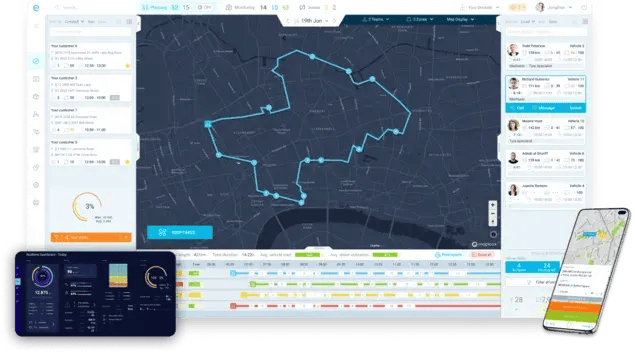
eLogii operates as the execution layer that sits between FSM systems of record and the field. It absorbs the volatility that FSM tools surface but aren't designed to resolve.
This isn't a replacement relationship.
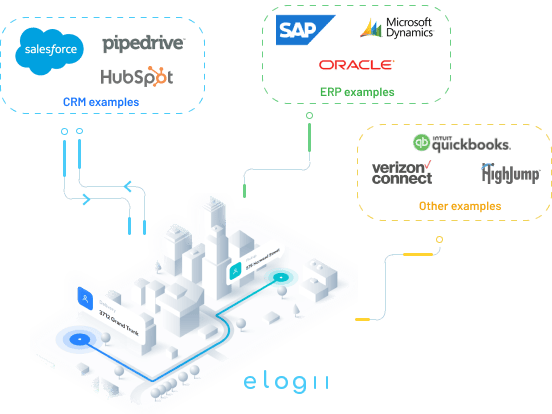
FSM and CAFM platforms own job creation, compliance records, asset management, and customer contracts. They do that well, and they should keep doing it.
eLogii takes over at the point where the schedule needs to become live operational reality: real-time re-optimization, SLA-aware trade-off decisions, dynamic routing, and system-initiated action.
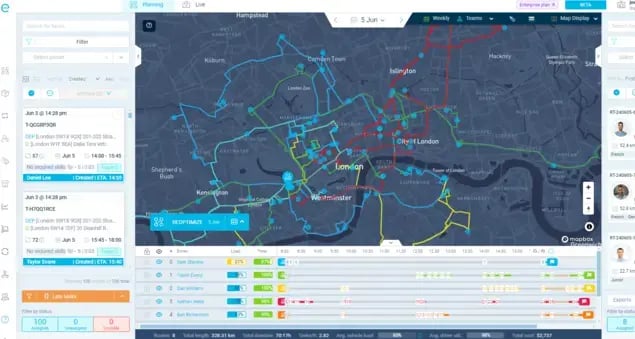
The outcome for operations teams is straightforward:
- Planners shift from reactive decision-making to oversight and exception management.
- The system handles the continuous recalculation that used to consume human cognitive capacity.
- Firefighting drops because the exceptions get resolved before they cascade.
eLogii works best when FSM tools are already in place, because the combination produces the full stack that modern dynamic field service operations need:
A system of record for planning and compliance, and an execution layer for live operational control.
Who This Distinction Matters For
This distinction isn't relevant to every field service operation, and pretending otherwise would undermine the point.
It matters for:
- Operations with 50+ technicians managing multiple jobs per day
- SLA-driven services where breach carries financial or contractual consequences
- Teams absorbing high intra-day change from reactive jobs, cancellations, and overruns
- Operations approaching a scaling limit where hiring planners is the only current lever
It doesn't matter for:
- Businesses running stable, predictable routes with low daily variance
- Teams where the plan rarely changes after morning dispatch
- Operations where manual oversight is genuinely sufficient for the volume and complexity
Recognizing which category your operation falls into is itself a valuable exercise. The answer should drive your evaluation criteria when assessing dynamic field service management software or execution layer tools.
The Bottom Line
The word "dynamic" has been used so broadly in FSM marketing that it's lost its precision. Most tools define it as human-triggered rescheduling.
That's editing, not execution-level intelligence.
For operations leaders running complex, SLA-driven field teams at scale, this gap matters.
It explains:
- Why your team still firefights daily despite having modern software
- Why adding planners feels like the only scaling lever
- Why automation projects deliver incremental improvement but never solve the underlying problem
When evaluating dynamic field service management tools, you need to ask a different question.
Don't ask whether the system can be changed mid-day.
Instead:
Ask whether the system changes itself.
So can it?
If not, see what truly dynamic execution looks like in practice.
FAQ about Dynamic Field Service Management Software
What is the difference between dynamic scheduling and rescheduling in field service?
Rescheduling is human-initiated: a planner spots a problem and manually moves a job. Dynamic scheduling is system-initiated: the software detects deviations and re-sequences work on its own. The key difference is who triggers the change - a human or the system itself.
Can FSM tools handle real-time route changes during the day?
Most FSM tools support human-triggered edits, a planner can reassign technicians, drag jobs, and adjust routes. What they don't do is re-optimize the full schedule on their own when conditions shift. Tools that enable changes still depend on planner capacity. Tools that initiate them don't.
What is dynamic route optimization in field service?
Dynamic route optimization means the system automatically recalculates job sequences as conditions change (traffic, cancellations, overruns, new reactive jobs) without a dispatcher manually triggering it. It weighs SLA priority, technician skills, travel time, and team capacity together, continuously, in real time.
How do I know if my current FSM is truly dynamic?
Ask yourself one question: when conditions change mid-day, does the system respond on its own, or does it wait for a planner to act? If planners are rebuilding schedules manually, SLA risks only surface when someone checks the board, or planning load grows with every technician you add, you have a dynamic gap.
What is the execution layer in field service management?
The execution layer sits between FSM systems of record and the field. It handles live schedule optimization, dynamic routing, and autonomous trade-off decisions throughout the day, complementing FSM platforms rather than replacing them. FSM tools own work orders, compliance, and customer data. The execution layer turns that plan into operational reality.
