Home >
Blog > Field Service Scheduling Software for Complex Operations: Ultimate Guide
Field Service
Field Service Scheduling Software for Complex Operations: Ultimate Guide
This guide covers all of the key features of field service scheduling software for complex and enterprise-level operations, and how to use it effectively.
Field service scheduling software is a digital tool that automates and optimizes the process of dispatching and managing the mobile workforce for on-site jobs.
But it is MUCH more than that:
Yes, field scheduling software can help you to match the skills, location, and availability of your field technicians to customer needs and service requirements on site.
In doing so, these platforms can help your organization to increase the efficiency of your routing, scheduling, dispatching, and communication efforts.
However, the issue goes beyond this.
For complex field service operations, scheduling is NOT the problem. Execution is.
That’s why this guide covers all of the service scheduling software’s key features and functions for complex and enterprise-level field operations.
And how large field service organizations use them to improve efficiency not just when they’re planning schedules, but also when they are executing them in real-world situations.
So if you’re an operations leader, enterprise manager, or software decision-makers who oversees large-scale, complex field operations, this guide is for you.
If you are responsible for multiple service teams, managing multi-site or multi-region service delivery, you’ll find the insights in this guide invaluable.
And if you’re tasked with ensuring operational efficiency at scale, you’ll be able to apply the information from this guide directly to your field service scheduling.
Here’s a quick summary of what’s to come in this guide
Field Service Scheduling Software Guide: Key Takeaways
In complex field service operations, execution is the real challenge, not scheduling. Static plans break quickly due to real-world disruptions like traffic, emergencies, and cancellations, making real-time adaptation essential.
Standard FSM tools, spreadsheets, and calendar-based systems fail at scale because they can’t handle dynamic, multi-variable complexity. They struggle with skills matching, travel time, SLA enforcement, and same-day changes, leading to inefficiency and customer dissatisfaction.
Complex field operations require an “execution layer” that continuously monitors, adjusts, and re-optimizes schedules in real time. This bridges the gap between planning and reality, ensuring that operational value is preserved when conditions change.
High-maturity field organizations outperform others by using continuous re-optimization, rule-based decisioning, job bundling, real-time SLA enforcement, and automation.
The guide provides a framework for evaluating field service scheduling software based on operational fit, scalability, ROI, and execution capability, not just feature lists.
Why is Field Service Scheduling different for complex and enterprise-level operations?
In enterprise-level field service operations, scheduling goes beyond the simple process of assigning tasks to available resources.
It’s a multi-dimensional, dynamic orchestration across geographies, teams, skill sets, equipment availability, and customer commitments.
If you manage hundreds or thousands of field technicians and other field resources, you face an incredible degree of complexity:
Multiple sites with varying operational rules;
Fluctuating demand patterns;
Interdependent work orders, and;
Specialized skill requirements.
And you can’t substitute any of this!
Unlike small or mid-sized operations where schedules are relatively linear, complex field service scheduling requires you to manage constraints concurrently.
Consider a multi-region utility provider:
A single service outage may trigger your dispatchers to coordinate field service jobs across multiple teams. And each team requires specific certifications, equipment types, and local regulatory compliance.
Also, your field service engineers and technicians may be operating under strict SLA windows, while also navigating traffic, weather, or unplanned maintenance issues.
In these situations, scheduling is not static. It’s a continuously evolving puzzle that requires your workforce and operations to adapt in real time.
In this type of context, your operational challenges are numerous and multifaceted.
First, scale issues introduce an exponential increase in changes and variations for task assignments, resource allocation, and routing.
The sheer volume of tasks and resources that you have to plan, schedule, and optimize often overwhelms manual or semi-automated scheduling tools.
Second, coordination between teams, locations, and processes becomes complex as each of them is dependent on the other’s tasks.
If one task is delayed, delays can spill into the entire service schedule. This requires operations managers to do multiple reschedules, while your organization risks multiple SLA breaches.
Third, there is the challenge of data fragmentation. This includes information about customer requests, workforce availability, inventory, and vehicle tracking.
With free or simple field service management tools, this data is often stored across multiple systems. And if they aren’t integrated, field service data is disconnected and inaccessible.
The result is a high-stakes environment in which small inefficiencies multiply quickly. That has an effect on your overall operational costs, customer satisfaction, and compliance.
Why do most Field Service Management Tools fail beyond a certain scale?
Despite the proliferation of field service management (FSM) software, many standard solutions falter when confronted with complex operational realities.
The core issue is rarely the sophistication of scheduling algorithms themselves, but rather the gaps between theoretical optimization and practical execution.
Scalability limitations are among the most common pitfalls.
Tools designed for simple operations struggle when confronted with thousands of work orders per day, dispersed teams, or multi-region coordination.
Computation times lengthen, system responsiveness degrades, and critical real-time adjustments become impractical.
Flexibility constraints also hinder effectiveness.
Off-the-shelf solutions may assume uniform task durations, interchangeable resources, or static routing parameters.
In reality, field operations are fluid: technicians have different skill sets, vehicles have varying capabilities, and customer priorities shift unpredictably.
Tools that cannot incorporate these nuances force teams into suboptimal schedules or require constant manual intervention.
Another frequent challenge is execution fidelity.
Even the most optimized schedule is only valuable if it can be executed reliably in the field.
Many platforms fail to account for human factors, on-the-ground delays, last-minute cancellations, or equipment shortages.
Without robust mechanisms for dynamic adjustment, rescheduling, and exception handling, the operational reality quickly diverges from the plan.
Lastly, real-world constraints often break standard scheduling assumptions.
Geographic limitations, regulatory compliance, union rules, and SLA requirements introduce conditions that cannot be easily encoded into generic software.
Attempting to do so leads to brittle schedules that are either overly conservative or overly optimistic, causing repeated failures in execution.
What Does “Complex Field Service Operations” Actually Mean
In the context of field service scheduling software, “complex operations” refers to service organizations whose day-to-day activities extend beyond routine, predictable tasks.
These operations involve multiple and often overlapping variables, such as:
Technician availability
Skill requirements
Geographic constraints
Service-level commitments
Dynamic customer needs
These and others make simple, manual scheduling impractical or even impossible.
Complexity is not about the size of the team alone. It’s about the interdependent challenges that can derail your operation if not managed with tools that can account for factors like these.
As you know, handling operational challenges effectively is the true road to service efficiency, customer satisfaction, and compliance.
Understanding what defines complexity is the first step toward selecting the right scheduling software.
Below, we break down the factors that elevate a field service operation from standard to truly complex. And show you what implications it has on the software you use:
Multi-Job per Day Scheduling
One of the main drivers of operational complexity is managing multiple jobs per technician per day. Unlike operations where a field technician handles a single assignment daily, complex schedules require balancing overlapping time windows, travel logistics, and job durations.
Example scenario:
A commercial HVAC technician might have three customer visits in a day:
Task #1: A short repair in the morning, Task #2: A 3-hour preventive maintenance check in the early afternoon, Task #3: An emergency call in the late afternoon.
Each job has a different location, priority, and required skill set.
Software implications:
Scheduling tools must have route optimization capabilities to minimize travel time.
Algorithms need to take into account variable job durations and buffer times.
You should be able to make real-time adjustments when delays or cancellations occur.
Without this, field service planners risk overbooking technicians or leaving high-priority work undone. This can have a direct impact on service quality and customer trust.
PPM + Reactive Mix
Field service complexity increases if your organization combines Planned Preventive Maintenance (PPM) with reactive work.
PPM requires a fixed schedule. Operations managers and planners schedule and assign jobs according to previously determined regulatory compliance or contractual obligations to clients.
Reactive jobs require dynamic scheduling. Typically, this includes unplanned work orders, unscheduled jobs, or emergency field service visits to clients.
Example scenario:
A utility company must inspect transformers quarterly (PPM) but also respond to emergency outages immediately. And if a reactive outage does occur, it can disrupt the planned schedule for the preventive maintenance for the entire week.
Software implications:
The system must allow planners to overlay PPM schedules with reactive assignments dynamically.
The software has to take into account job order priority to ensure regulatory compliance without sacrificing responsiveness.
Reporting and tracking must take into account the difference between scheduled and unscheduled field service jobs to maintain operational oversight.
Organizations that fail to integrate these two modes of work risk missed maintenance windows or delayed emergency responses. Both of which carry operational and financial penalties for your field service business.
Multi-Region Operations
Complexity multiplies when your service organization operates across multiple regions or territories.
Different geographic locations and service zones introduce constraints such as travel distance, local labor laws, and regional customer expectations.
Example scenario:
A regional field service provider manages technicians, covering a large geographic area with three different settings.
A service zone is in a city with a high urban density
A service zone in the surrounding area, which is rural and requires long travel
A service zone in an industrial center, which has strict access protocols.
Scheduling without region-specific constraints can result in inefficient routes and technician burnout.
Software implications:
Multi-region field service scheduling capabilities have to include geospatial intelligence and route optimization (with accurate geocoding).
The system has to support multiple territories and field service zones, each with its own rules, travel times, and resource pools.
Centralized visibility allows managers to redistribute workload across regions to meet demand spikes efficiently.
Failing to account for regional variables leads to poor utilization of your resources. Not to mention, higher costs and lower service consistency across the different regions in which your organization operates.
Skills, Certifications, and SLAs Management
Not all field engineers and technicians are interchangeable. Complex operations typically require you to carefully manage their skills and certifications with Service Level Agreements (SLAs) to ensure you match each job to a qualified field service professional.
Example scenario:
A medical equipment service provider must assign only field technicians certified for MRI machines.
Additionally, SLA commitments guarantee a 4-hour response for critical failures. This means that misassignment can breach contractual obligations they have to their clients.
Software implications:
Scheduling engines have to have the ability to filter technicians based on skill, certification, and availability.
SLA-driven prioritization has to be automated to prevent human error when planning service schedules.
Tracking certification expiry dates and skill levels helps you to reduce compliance risks, ensuring workforce availability at all times.
Neglecting this factor can expose your organization to regulatory penalties, reputational damage, or SLA violations.
Same-Day Changes and Rescheduling
Complex field operations rarely follow a fixed plan. Last-minute cancellations, emergency requests, or job overruns demand same-day rescheduling capabilities.
Example scenario:
A telecommunications provider schedules a fiber installation, but the customer cancels 90 minutes before the appointment.
The dispatcher must find a replacement job for the technician in that window to avoid wasted travel and downtime.
Software implications:
Real-time schedule updates are essential for planners to stay on top of any changes.
Mobile access for technicians ensures immediate communication of changes.
The system should automatically suggest optimized replacements to maintain efficiency.
Without robust rescheduling functionality, operations become reactive. Technicians spend more time idle or traveling unnecessarily, which makes your operations inefficient, and costly.
Home-Based Workforce Logistics
Finally, complex operations often involve a home-based workforce rather than centralized depots.
Technicians begin and end their day at home. This adds new variables to travel calculations, shift planning, and workload distribution.
Example scenario:
A home appliance service company employs 50 home-based technicians across a metropolitan area. Jobs are scattered unpredictably.
This requires the system to calculate the most efficient starting point, route, and end-of-day travel.
Software implications:
Route optimization must take into account start and end points for each technician.
Dynamic scheduling ensures even workload distribution across the workforce.
Tracking and reporting must integrate multiple home bases without administrative overhead.
Neglecting these logistics can result in higher fuel costs, longer travel times, and technician dissatisfaction.
Do you recognise 3-4 of these challenges in your own operations?
Here’s the hard truth:
Field service scheduling software that excels in simple scenarios often fails when tasked with the challenges outlined above.
Recognizing the operational complexity is the first step in choosing a platform capable of delivering efficiency for your organization. Not to mention compliance and high customer satisfaction.
And all of this at scale.
With these factors in mind, the next section will dive into how advanced scheduling software addresses each complexity layer.
We’ll provide deep insight into the tools and features necessary to manage complex field service operations effectively.
Why Field Service Scheduling Breaks at Scale
Field service operations look deceptively simple at small scales: A handful of technicians, a few service calls, and minimal travel planning.
However:
When operations expand to hundreds of field agents, thousands of service requests, multiple regions and service zones, the limitations of traditional scheduling practices become glaring.
In complex operations, scheduling is not just about matching people to jobs. It’s about accurately orchestrating time, resources, and customer expectations with precision.
At scale, even minor inefficiencies magnify exponentially.
At the heart of large-scale scheduling failures is the phenomenon our clients like to call the daily replanning problem.
The main issue is that:
No schedule remains static in high-volume operations.
Customer cancellations, emergency service calls, traffic disruptions, and equipment failures force planners to adjust assignments multiple times a day.
Operational Implications:
Field teams quickly become frustrated when their planned routes change mid-day.
A technician expecting a two-hour job in one zone may suddenly be rerouted across town. This doesn’t just disrupt that day’s schedule, but it also impacts personal time and job satisfaction.
On a systems level, constant replanning consumes planning bandwidth. It increases the likelihood of errors, and reduces your planner’s ability to focus on strategic optimizations.
Real-World Example:
Consider a pest control company with 300 technicians handling residential service requests. On a typical day, 10–15% of jobs are rescheduled due to customer availability or emergency calls.
Without dynamic replanning software, planners must manually reassign these jobs, relying on spreadsheets or static scheduling tools.
The result: Overlapping assignments, underutilized technicians, and delayed response times. All of this leads to a cascade of inefficiencies throughout the day. Not just for one technician, but for all of them.
Consequences:
Increased overtime due to last-minute reassignments.
Field technician churn is lower due to frustration and unpredictable workloads.
Missed service windows cause damage to customer trust in your business.
Mitigation Insights:
Advanced scheduling software with dynamic rescheduling and predictive analytics can reduce the replanning burden.
Features like automated conflict detection, priority tagging, and push notifications for field teams help stabilize operations without overloading your planners.
#2 Drive-Time vs. Work-Time Problem
A persistent and often underestimated challenge in large-scale field operations is the drive-time vs. work-time problem.
Many scheduling systems focus on assigning tasks based solely on job duration. This means that these tools ignore the time it takes technicians to reach each location.
That disconnect between travel and work can have significant ripple effects on the productivity of your teams and customer satisfaction.
Operational Implications:
When planners underestimate travel time, technicians either arrive late, rush through jobs, or require unscheduled overtime.
On the other hand, overestimating travel time can leave field teams idle and inflate your operational costs.
And if your organization operates in cities with variable traffic patterns, even small miscalculations compound rapidly.
Real-World Example:
A telecommunications company attempting to service 1,000 installations per week faced repeated delays because planners ignored realistic drive-time buffers.
Jobs scheduled with nominal transit estimates resulted in their technicians frequently missing the next scheduled installation window.
This slowed overall output and led to customer complaints. Not to mention rescheduling costs that exceeded the cost of initial travel inefficiencies.
Consequences:
Reduced technician utilization and productivity.
Increased operational costs from extended work hours or fuel usage.
Erosion of customer satisfaction due to missed or delayed appointments.
Mitigation Insights:
Integrating geographic information systems (GIS) with scheduling software, real-time traffic updates, and route optimization tools allows your planners to align actual travel time with job allocation.
Combining travel-aware scheduling with predictive traffic modeling reduces downstream inefficiencies and improves SLA adherence.
#3 The Planner Headcount Trap
As operations scale, the number of tasks and exceptions grows faster than your team of planners.
This creates what our clients term the planner headcount trap: A situation where a limited planning team is expected to manage an exponentially growing volume of complex scheduling decisions.
Operational Implications:
Relying on a small number of planners for hundreds of field agents creates many operational bottlenecks.
Planners spend excessive time performing routine tasks, leaving little room to handle exceptions or optimization.
In these cases, manual interventions become the norm. Which increases the risk of planners making mistakes and causing additional delays.
It also results in reactive scheduling, where fire-fighting replaces proactive operational management.
Real-World Example:
In a national HVAC company with 500 service technicians, a team of only five planners was responsible for scheduling daily operations.
On peak days, planners faced over 1,200 job changes due to customer cancellations, emergency service requests, and technician absences.
The sheer volume of changes led to frequent scheduling errors, duplicate visits, and unplanned overtime. This directly impacts operational efficiency for the organization.
Consequences:
Increased reliance on ad-hoc communication (emails, calls, texts) to resolve conflicts.
Higher risk of SLA breaches due to delayed or missed jobs.
Mitigation Insights:
Investing in intelligent scheduling software with automated optimization algorithms dramatically reduces manual workload.
Enabling planners to focus on exceptions and strategic decisions rather than routine assignments, your organization can scale without proportionally increasing planning headcount.
#4 Duplicate Visits and Missed Job Bundling
Another significant source of inefficiency in our experience is the problem of duplicate visits and missed bundling opportunities.
At scale, multiple technicians may unknowingly be assigned to nearby or overlapping jobs that could have been consolidated. This increases costs and undermines your service consistency.
Operational Implications:
Duplicate visits occur when a customer receives multiple visits for the same issue. This is often due to lack of real-time visibility or coordination between planning teams and field operations.
Missed bundling refers to situations where multiple service requests in the same area could have been combined into a single route but weren’t. Which wastes travel time for technicians, and resources for the organization.
Real-World Example:
A regional cable company routinely scheduled two technicians for separate service calls at the same customer’s address. Their planning system failed to flag the overlapping work orders.
At the same time, several single-tech jobs in the same neighborhood were scattered across the day. This led to multiple short trips instead of one consolidated route.
The operational fallout included unnecessary fuel expenses, technician fatigue, and frustrated customers seeing multiple visits for related work.
Consequences:
Increased operational cost per job due to unnecessary travel and manpower.
Longer response times and reduced service capacity.
Negative impact on technician morale as they perceive inefficient planning.
Mitigation Insights:
Route and task bundling within advanced scheduling platforms ensures that geographically clustered jobs are grouped together.
Coupled with a unified field service management system that updates in real time, you can minimize duplication, optimize routes, and maximize first-time resolution rates.
#5 SLA Risk and Reputational Damage
Finally, scheduling failures at scale translate directly into SLA risk and reputational damage.
Service-level agreements (SLAs) are more than contractual obligations. They shape customer expectations and brand perception.
Missed appointments, extended wait times, and inconsistent service delivery erode trust and can impact revenue.
Operational Implications:
Scheduling errors may cause delays that breach guaranteed service windows. Even minor deviations can turn into widespread SLA violations.
This is especially true for operations with tight timelines, such as utility restoration or medical equipment servicing.
Over time, these failures create reputational risk, potentially affecting your ability to retain existing customers and acquire new ones.
Real-World Example:
A medical device company servicing critical hospital equipment experienced repeated SLA breaches. This happened because its scheduling system couldn’t account for urgent repairs alongside routine maintenance checks.
These delays caused hospitals to escalate issues publicly, creating reputational damage and contract renegotiations.
Beyond immediate operational headaches, this affected the company’s ability to secure future service contracts.
Consequences:
Financial penalties from SLA breaches.
Loss of client confidence and potential churn.
Increased pressure on planners and field teams.
Mitigation Insights:
Ensuring SLA adherence at scale requires sophisticated scheduling software that’s capable of prioritizing jobs based on contractual obligations, as well as real-time operational constraints.
Predictive modeling, automated escalation protocols, and transparent communication with your customers can preserve their trust. (Even when unexpected disruptions occur.)
Do you recognize these scaling pitfalls?
Addressing these five challenges requires a combination of process redesign, intelligent scheduling software, and data-driven decision-making.
But not all field service scheduling software was built for this. As you’ll see in the next section.
Most Field Scheduling Software Was Never Built for Managing or Scaling Complex Operations
While many organizations rely on standard calendar tools, spreadsheets, or even basic field service management software, these solutions frequently struggle under dynamic conditions.
To optimize workforce efficiency, reduce response times, and improve customer satisfaction, you need to understand the limitations of these tools.
Without this understanding, your organization risks inefficiency, misaligned resources, and failed investments that are difficult to recover from.
FSM / CAFM Tools
Field Service Management (FSM) and Computer-Aided Facility Management (CAFM) tools are often marketed as all-in-one scheduling solutions.
However:
These platforms were designed to support structured workflows rather than dynamic, real-time scheduling.
Their rigid architecture typically handles predefined task sequences, standardized job types, and fixed routing rules.
This is very effective for scheduling routine maintenance calls or repeatable field service tasks.
But when conditions change unexpectedly (as they always do during schedule execution), these systems struggle to adapt.
Consider an analogy: it’s like trying to navigate a city with a map printed last year. The streets exist, but new construction, traffic patterns, or road closures aren’t accounted for.
In FSM terms, this translates into schedules that cannot dynamically reroute technicians or prioritize urgent tasks. Which leads to idle time or unnecessary travel.
When it’s time to scale your operations, these limitations are amplified.
Adding more technicians, locations, or service types often results in increasingly elaborate workflows that the software cannot process efficiently.
Practically, this results in anything from systems taking longer and longer time to generate schedules, to glitching, frozen screens, and complete software failures and shutdowns.
Operationally, this can manifest as missed appointments, longer response times, or staff fatigue. All are outcomes that undermine service productivity and customer satisfaction.
While FSM and CAFM tools provide a foundational structure, their design often prevents them from fully addressing the fluid nature of complex field operations.
Calendar-Based Scheduling
Calendar-based scheduling, whether visual or manual, remains one of the most common approaches in field service planning.
These tools allow planners to drag and drop appointments onto a calendar grid. And offers them a clear overview of assigned tasks.
This simplicity comes at a cost:
Visual calendars don’t inherently optimize schedules for efficiency, resource constraints, or skill matching.
For example, a technician may appear available in the calendar, but the software cannot automatically consider travel time between jobs, required certifications, or equipment availability.
A field manager may unknowingly schedule back-to-back appointments that are geographically distant. Which can result in extended travel time and service delays.
The lack of optimization logic means schedules are often reactive. And they require planners to make frequent manual adjustments as new requests or emergencies arise.
Manual calendar systems are also prone to human error. A simple oversight such as a technician double-booking, or overlooking a critical skill can turn into missed service windows.
In complex operations, where teams are multi-skilled and mobile, relying solely on visual calendars limits planner’s visibility and adaptability.
While these tools provide clarity for basic planning, they cannot dynamically balance workloads, prioritize urgent tasks, or automatically adapt to operational realities when executing schedules.
All of this leaves your organization exposed to inefficiency.
Static Optimization
Static optimization techniques, such as creating a schedule at the start of the day or week, may seem like a logical step to improve efficiency.
In this approach, planners use algorithms to allocate jobs based on current information, such as technician availability and job duration. But operations rarely remain static in dynamic field settings.
Once set, unforeseen events, such as traffic delays, urgent customer requests, or equipment malfunctions can quickly render the schedule ineffective.
A schedule optimized at 8 AM may be entirely impractical by 10 AM. This almost always forces schedule planners to manually adjust assignments, or they’ll risk missed appointments.
The consequences are clear:
Inefficient routing and scheduling increases fuel costs, overburdened technicians experience fatigue, and customers face delays.
For instance, imagine a pest control company planning follow-up service visits across a city. A tool that relies on static optimization might assign three distant sites to a single technician based on shortest overall travel distance.
When a sudden service call occurs nearby, the planner can’t reallocate the technician without disrupting the initial plan. The company risks either a slower response time, burdening the planner with additional work to adjust the schedule, or in the worst case, rejecting the call.
Static optimization is further limited by its inability to consider multi-dimensional constraints. This can include factors like varying skill levels, certifications, and customer preferences.
While it may produce theoretically “optimal” schedules under controlled assumptions, in practice it fails to accommodate the variable reality that defines complex field service operations.
Telematics-Only Routing
GPS and telematics-based routing tools offer real-time tracking and route optimization, but relying solely on location data. This is insufficient for comprehensive field service scheduling.
These systems excel at minimizing travel time and monitoring technician movements. But they lack context about the jobs themselves or the field engineers and technicians that perform them.
For example, a telematics system may route a technician to the nearest job, but it ignores whether the technician possesses the specific skills or certifications required to do the job.
Similarly, telematics systems may overlook customer preferences for time windows or access instructions.
The system treats all jobs as interchangeable points on a map rather than tasks with distinct professional and commercial requirements.
Consider a scenario in a multi-skill service organization:
A technician skilled in HVAC cannot simply substitute for one specializing in electrical work, even if proximity suggests convenience. Telematics-only routing may suggest a path that looks efficient on the map but results in missed or delayed services due to mismatched skillsets.
Operationally, this limitation manifests as increased rework, unscheduled follow-ups, and customer dissatisfaction.
While telematics enhances visibility and can complement intelligent field service scheduling systems, it does not replace the need for a comprehensive solution.
It isn’t a tool that allows your planners to account for the full context of each job, the skills of each technician, and the priorities of your organization.
Spreadsheet-Driven Planning
Spreadsheets remain a common fallback for scheduling in many field service businesses.
Their flexibility and familiarity make them accessible to most office and field staff. But they carry significant limitations when it comes to complex field service operations.
Manual spreadsheet scheduling is error-prone:
A simple missed entry of a date, time, or skill requirement can disrupt the entire schedule. In multi-location operations with dozens of technicians, such errors compound quickly.
Spreadsheets also lack automation. You can’t dynamically adjust assignments in response to unexpected events or optimize for multiple factors simultaneously.
Planners and operations managers have to manually reconcile overlapping appointments, travel times, and skill requirements. All of this is a time-consuming and often inconsistent process.
For example, an operations manager planning service calls for a week may have to juggle hundreds of rows of data to make adjustments based on a new service request or cancellation.
Not to mention that each change requires careful review to avoid conflicts.
Another key issue with spreadsheet schedule planning is that scenario testing is impossible at scale.
If a manager wants to evaluate the impact of adding a new technician, extending service hours, or prioritizing emergency jobs, spreadsheets provide little support for predictive modeling.
The result is schedules that are brittle, reactive, and heavily dependent on human oversight.
While spreadsheets are powerful for basic tracking, they are ill-suited for dynamic, multi-variable scheduling challenges. Especially for complex field service operations and organizations that wish to scale them.
Recognizing these gaps is critical for operations managers who aim to optimize workforce deployment, reduce service delays, and maintain high customer satisfaction.
Understanding what these tools can and cannot do for you is the first step toward selecting a system that’s capable of handling true operational complexity.
The next step?
Realizing that planning alone isn’t enough.
The Gap in Field Service Schedule Execution: Planning vs. Reality
Here’s another truth no one speaks about when it comes to complex field service operations:
There is a big difference between a carefully crafted schedule on your screen and what ACTUALLY happens in the field.
This disconnect is commonly referred to as the execution gap.
It’s the space in your field service management efforts where even the best-laid schedules fail.
It’s where value can be lost and won.
And where customer expectations may go unmet.
Or can be exceeded and bring in repeated and new business.
Understanding this gap is critical if you’re not just seeking to plan a schedule. But to create a reliable, optimized service operation.
The Execution Gap: Defining Core Concepts
To navigate the execution gap, it helps to clarify the four key stages of field service operations:
Planning
Dispatching
Execution
Re-optimisation
Each represents a layer in the operational workflow. But it is their alignment that determines overall performance.
Schedule Planning
Schedule planning involves creating an initial roadmap for field operations. Typically this includes which tasks to perform, in what sequence, and by which resources.
In complex environments, planning considers multiple constraints such as:
Field technician skill sets
Travel time to job site
SLA commitments
Equipment availability and requirements
Customer preferences
And more
Planning is predictive. It sets expectations based on known variables, historical data, and estimated durations.
Schedule Dispatching
Dispatching is the process of translating plans into actionable assignments. It involves sending jobs to technicians, often through field service mobile apps or automated dispatch systems.
Unlike planning, which is strategic, dispatching is tactical. It requires real-time awareness of technician locations, traffic conditions, job readiness, and other dynamic factors.
Schedule Execution
Execution is where field service work is carried out. This includes the field workforce performing tasks, interacting with the customers, managing parts, and logging outcomes.
Execution is where the planned schedule meets reality. And where deviations such as delays, cancellations, unexpected equipment issues can occur.
Schedule Re-Optimisation
Re-optimisation is the process of adjusting schedules and allocating resources in response to real-time events. This can involve re-routing technicians, reprioritizing jobs, or swapping assignments to maintain service levels.
Re-optimisation is critical in environments where unpredictability is high, such as utility repairs, IT infrastructure maintenance, or emergency service work.
Why Planning Alone Isn’t Enough Anymore
It’s easy to believe that a well-constructed plan guarantees operational success. In reality, visibility is not the same as control.
Your field service planner or operations manager can see every job on a Gantt chart, know which technician is assigned where, monitor estimated arrival times… This DOESN’T ensure the work will be completed on time or to standard.
Real-world variables such as traffic delays, unexpected equipment failures, or last-minute customer cancellations can instantly disrupt even the most meticulously planned schedule.
Static Plans Typically Fail by Mid-Morning
Most of our clients plan a full day of service calls across big cities. Their plans used to account for travel, job durations, and technician skill sets.
By 9:30 AM, something occurred: a major emergency diverted one team, another job took twice as long to complete, and a customer rescheduled. By mid-morning, the original schedule is effectively useless.
What we’ve found is that this scenario is typical in complex field operations.
Pre-made schedules are static. They assume a level of predictability that almost never exists.
Minor deviations from a schedule compound quickly, and turn a perfectly balanced plan into a source of frustration, idle time, and service-level breaches.
Without a mechanism to adjust in real time, static plans fail to deliver their intended value.
Execution: Where Value Is Created, or Lost
The execution phase is critical because it determines whether operational plans translate into actual business outcomes.
A well-designed plan can optimize routes and match the right technician to the right job. But if it fails in execution, customer satisfaction drops, SLAs are missed, and operational efficiency suffers.
For example:
A technician arriving late or unprepared for a task can lead to multiple negative ripple effects, such as extended service time, additional trips, or even lost revenue from uncompleted jobs.
On the other hand:
Real-time guidance, dynamic prioritization, and quick problem resolution lead to an effective execution. This can turn a challenging day into a showcase of efficiency and responsiveness.
Introducing the Execution Layer to Field Service Scheduling
To close the execution gap, leading field service organizations implement an execution layer:
A real-time operational framework that sits between planning and the field. This layer acts as a bridge, continuously monitoring the plan and live field activity to ensure alignment and enable immediate adjustments.
Key Functions of the Execution Layer:
Real-Time Visibility and Decision Support: While “visibility” alone doesn’t create control, the execution layer uses live data to provide actionable insights. Managers can see not just where technicians are, but whether they are on track, facing delays, or encountering roadblocks. This allows for informed decisions, such as rerouting a technician or rescheduling a job without cascading failures across the day.
Dynamic Re-Optimization: The execution layer enables automated or semi-automated re-optimisation. When a plan is disrupted, it recalculates routes, job priorities, and technician assignments based on current conditions. This ensures that resources are used efficiently and service commitments are maintained even under unpredictable circumstances.
Feedback Loop for Continuous Improvement: Data collected during execution, such as actual job durations, travel times, and completion rates feeds back into planning and dispatching algorithms. Over time, this reduces the gap between predicted and actual outcomes, improving accuracy for future schedules.
Value Preservation: Perhaps most importantly, the execution layer safeguards the value created by planning. By bridging the gap between strategy and reality, it ensures that the efficiencies, cost savings, and customer satisfaction gains envisioned during planning are realized in the field.
Think of it in terms of Air Traffic Control…
An analogy that we often use in field service is air traffic control.
Pilots plan their routes before takeoff, but en route, controllers manage real-time events: weather changes, airspace congestion, and emergencies. This ensures safety and efficiency of the entire flight.
In this analogy:
Planning = flight plan
Dispatching = clearance to depart and route assignment
Execution = actual flying
Re-optimisation = air traffic control adjustments in response to conditions
Without active monitoring and adjustment, flights can be delayed, diverted, or even canceled.
Similarly, field service operations need an execution layer to actively manage deviations and preserve operational performance.
Execution Layer Is the Key to Operational Excellence
The execution gap is not merely a planning problem. It’s an operational reality that requires intentional management.
Complex field service operations cannot rely on static schedules or dashboards alone anymore.
By defining planning, dispatching, execution, and re-optimisation clearly, you can better understand where failures occur.
Recognizing that visibility does not equal control, and that static plans often fail within hours, underscores the necessity of an execution-focused approach for your company.
Implementing an execution layer enables real-time adjustments, resource optimization, and continuous feedback.
It transforms planning from a theoretical exercise into tangible, measurable outcomes.
Simply put:
The execution layer is where field service operations translate intent into action, ensuring that value envisioned on the screen becomes value realized in the field.
For operations managers, field service leaders, and companies looking to invest in field service management software, embracing this paradigm is essential.
Investing in tools and processes that close the execution gap doesn’t just improve efficiency. It protects customer satisfaction, reduces operational risk, and turns your field service into a true competitive advantage.
Here’s how that looks in real life.
What High-Maturity Field Operations Do Differently
In complex field service environments:
Operational maturity is what makes the difference between average performance and industry-leading efficiency. High-maturity operations exhibit a set of advanced practices that go beyond basic field service scheduling and reactive management.
Leading field service companies focus on predictive, dynamic, and automated approaches to managing their field operations.
These capabilities aren’t just incremental improvements. They help organizations transform the way they plan, execute, and continuously optimize their field operations.
And if you’re wondering what they are, we’ve outlined five key practices that distinguish high-maturity field operations from the rest.
#1 Continuous Re-Optimisation
High-maturity field service organizations treat scheduling as a dynamic, ongoing process.
Continuous re-optimisation involves the frequent reassessment of job assignments, routes, and resource allocations based on incoming data, performance feedback, and real-time operational changes.
At the heart of this practice is dynamic scheduling.
Dynamic field service scheduling involves using advanced algorithms and decision logic to continually evaluate current schedules against evolving conditions. And can include field technician availability, traffic, parts availability, and emergency service requests.
For instance, if a critical service request arises mid-day, a dynamically optimized system can reassign tasks, reschedule non-urgent jobs, and identify the closest qualified technician to handle the emergency. In doing so, the system minimizes downtime and service disruption.
High-maturity operations also employ iterative improvement cycles. This involves reviewing schedule outcomes, analyzing key performance indicators (KPIs) such as first-time fix rates or average travel time, and adjusting operational rules to incrementally enhance efficiency.
Over time, this creates a feedback loop where historical performance informs future scheduling decisions. This feedback loop leads to measurable gains in productivity, reduced travel costs, and improved customer satisfaction.
The benefits of continuous re-optimisation are significant:
Technicians spend less time idle or in transit
Service levels improve due to faster response times
Organizations adapt more readily to unexpected disruptions
And all of this without relying solely on human intervention.
#2 Rule-Based Decisioning
Another hallmark of high-maturity operations is the systematic application of rule-based decisioning.
Rule-based decisioning involves codifying operational policies, business logic, and compliance requirements into a set of automated rules. It’s these rules that guide decision-making throughout the field service lifecycle.
For example:
Job prioritization rules might automatically elevate high-severity service requests. This ensures that you maintain critical assets within regulatory intervals, or route urgent tasks to the nearest certified technician.
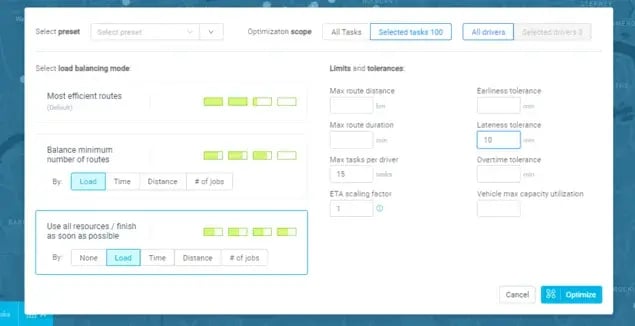
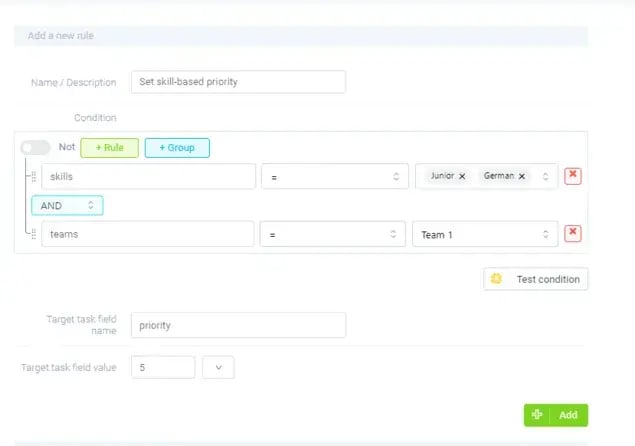
Conditional routing rules can factor in technician skill sets, certifications, vehicle capabilities, and even real-time location to determine the optimal assignment for each job:
But also route optimization goals:
Automated approval rules further streamline operations by enforcing compliance protocols without manual intervention, reducing errors and ensuring consistent decision-making across the organization.
Rule-based decisioning provides three strategic advantages:
It reduces human error.
It ensures adherence to internal policies and regulatory requirements.
It standardizes operations across regions, sites, and teams.
In complex environments with multiple technicians, variable workloads, and diverse service types, rules act as a safeguard.
This is what enables high-maturity field service organizations to scale operations while maintaining consistency and quality.
#3 Grouping Jobs by Site or Service Zone
Efficient field operations are also about smartly organizing work by location.
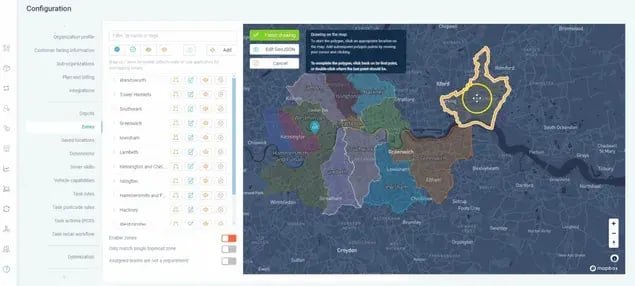
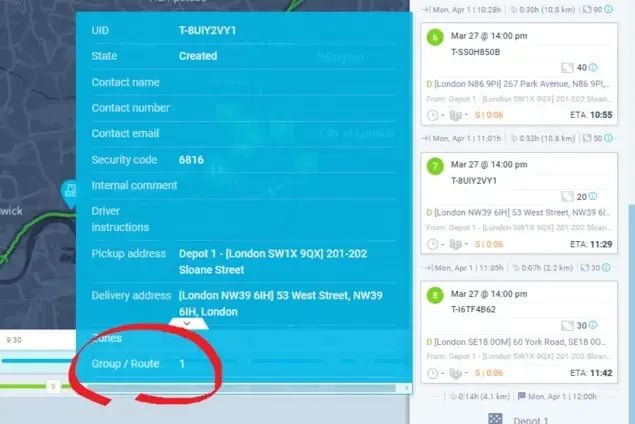
High-maturity organizations frequently employ bundling strategies, grouping service jobs by geographic proximity, customer site, or service zone.
Grouping service jobs minimizes travel time, consolidates trips, and allows technicians to complete multiple tasks at a single location during one visit.
For example:
A technician servicing a large corporate campus can address all pending maintenance requests in one tour rather than returning multiple times. This improves operational efficiency and customer experience.
When coupled with capacity planning, bundling helps to ensure that all of your available resources are used optimally. All the while avoiding idle time while preventing overloading of technicians.
The practice also positively impacts customer satisfaction.
In our clients’ experience, their service users experience fewer disruptions and faster turnaround times when they service them in coordinated blocks rather than sporadic visits.
From a strategic perspective, bundling and grouping by site or service zone enables your organizations to align workforce planning, route optimization, and inventory management.
In doing so, this yields cumulative efficiency gains across the entire operation.
#4 Real-Time SLA Enforcement
Service level agreements (SLAs) are a cornerstone of field service operations. High-maturity organizations actively monitor SLA adherence in real time rather than retrospectively.
Advanced operations deploy monitoring tools that track each service request against SLA targets. This allows them to flag potential breaches before they occur and trigger automated corrective actions.
For example, if a high-priority job is at risk of exceeding its response window, the system can:
Automatically escalate the task
Reassign it to a more proximate technician
Adjust the schedule to prioritize SLA compliance
Automated alerts and dashboards allow managers and planners to intervene proactively. On the other hand, real-time performance tracking provides a clear view of operational health.
These capabilities ensure that service commitments are consistently met, reduces the risk of penalties, and strengthens customer trust.
By embedding SLA considerations into scheduling and route planning decisions, you can achieve a balance between operational efficiency and contractual accountability.
This is a combination that distinguishes high-performing field service teams from their peers.
#5 Reduced Planner Dependency
Traditional field operations rely heavily on human planners to coordinate schedules, handle exceptions, and respond to last-minute changes.
On the other hand:
High-maturity organizations, however, leverage technology and standardized processes to reduce planner dependency without compromising control or flexibility.
Automation and intelligent field service scheduling tools handle routine and complex tasks. This includes tasks such as job assignment, route planning and optimization, performance tracking, and SLA monitoring.
Automation allows planners to focus on higher-value activities like strategic workforce planning, resource allocation, and performance analysis.
This shift doesn’t just accelerate scheduling but it also enhances operational resilience for your organization.
If a planner is unavailable or a sudden surge in service demand occurs, the system can continue operating with minimal disruption.
Reducing reliance on human planners lowers the risk of inconsistent decision-making and fatigue-driven errors.
Automating repeatable tasks and providing visibility into real-time operational conditions, you ensure planners and operations managers spend their time where it truly matters: shaping long-term strategy, optimizing resource deployment, and driving continuous improvement.
Synthesis: Driving Operational Excellence
High-maturity field operations combine these capabilities into an integrated approach that transforms service delivery.
Collectively, this enables them to adapt rapidly to changing conditions, optimize resource utilization, and maintain high service standards.
The net effect is a competitive advantage rooted in operational excellence.
High-maturity organizations achieve higher productivity, lower operational costs, and superior customer satisfaction, because they:
Dynamically adjust schedules
Enforce rules consistently
Consolidate work efficiently
Monitor performance in real time
Minimize human bottlenecks
These practices turn field service management from a reactive, tactical function into a strategic driver of business performance. And that can position your organization to thrive in complex, high-demand environments.
How to Evaluate Field Service Scheduling Software
Selecting the right field service scheduling software is more than a technology decision. It’s a strategic operational choice with significant implications for efficiency, customer satisfaction, and financial performance.
Despite the stakes, many organizations fall into common pitfalls when evaluating vendors:
Overemphasis on features rather than operational fit. Many evaluations focus on checklists of capabilities, ignoring whether the software aligns with existing workflows and field realities.
Underestimating integration complexity. Scheduling tools rarely operate in isolation, they must work seamlessly with ERP, CRM, inventory management, and workforce systems. Failing to assess this early can lead to costly customizations.
Ignoring total cost of ownership. Licensing fees or monthly subscriptions are visible. But implementation, training, support, and change management costs often exceed the initial spend.
Neglecting stakeholder engagement. A solution that works in theory but lacks buy-in from dispatchers, technicians, and management is unlikely to deliver promised efficiency gains.
A structured, multi-perspective evaluation approach reduces this risk.
It can help you to compress decision cycles, and ensures you select a software solution that drives measurable operational and financial outcomes.
Questions COOs Should Ask: Operational Fit and Efficiency
Chief Operating Officers are primarily concerned with how scheduling software affects service delivery, resource utilization, and field performance. Key questions include:
Operational Efficiency and Optimization
How does the system optimize technician assignments and routes in real time?
Can it dynamically adjust schedules in response to last-minute cancellations, emergency requests, or traffic disruptions?
Does the software provide visibility into SLA compliance and on-time arrival performance?
Resource Utilization
Can the tool balance workload across teams to prevent over- or under-utilization?
Does it support skill-based routing, ensuring the right technician is assigned to each job?
Are labor and equipment costs modeled to identify efficiency improvements?
Scalability
Can the system handle your current volume of jobs and projected growth without performance degradation?
How flexible is it in supporting new service lines, geographies, or operational models (e.g., hybrid in-house and contracted workforce)?
Impact on Field Operations
Does the interface empower field technicians with mobile tools for real-time updates, job notes, and customer signatures?
Are dispatchers able to quickly see and act on schedule conflicts?
Does the system support proactive maintenance scheduling to reduce unplanned service calls?
Actionable Tip: Conduct shadowing sessions with dispatchers and technicians to test the software in realistic conditions. Observe usability gaps early to prevent operational bottlenecks after you implement the software.
Questions CFOs Should Ask: ROI, Cost, and Financial Risk
For CFOs, the evaluation must connect operational improvements to measurable financial outcomes. Key areas of focus:
Return on Investment
How quickly will efficiency gains translate into labor savings or increased revenue capacity?
Are there historical benchmarks from comparable organizations that demonstrate ROI?
Cost-to-Serve Analysis
Does the software help model and reduce cost per job, including labor, travel, and materials?
Can it forecast the financial impact of missed SLAs or delayed service?
Total Cost of Ownership
Beyond licensing, what are the projected costs for implementation, training, support, and upgrades?
Are there recurring hidden costs, such as third-party connectors, API fees, or data storage charges?
Financial Risk Assessment
How does the vendor handle contract flexibility—are there penalties for scaling down or early termination?
Does the solution provide sufficient reporting to satisfy audit requirements and regulatory compliance?
Real-World Insight: A mid-sized utility provider saw a 15% reduction in overtime costs and a 12% improvement in first-time fix rates after implementing a scheduling solution. But only because the CFO insisted on modeling labor savings against total implementation costs, ensuring the investment delivered net benefit.
Questions IT Should Ask: Integration, Security, and Maintainability
IT leadership focuses on minimizing technical risk and ensuring the software can operate securely and reliably within the enterprise ecosystem.
Integration Capabilities
Does the system have pre-built connectors for ERP, CRM, inventory, and HR systems?
Can it handle real-time data exchanges without custom middleware?
How mature is the API documentation and support?
Security and Data Protection
What data encryption protocols are in place for storage and transmission?
How does the vendor handle user authentication, role-based access, and audit logging?
Are there SOC 2, ISO 27001, or other compliance certifications relevant to your industry?
Maintenance and Support
How are updates and patches delivered? Are they automatic or manual?
What is the vendor’s track record for uptime and incident response?
Can the system scale without heavy customizations that create technical debt?
Actionable Tip: Have IT perform a “sandbox integration test” with representative data from ERP and CRM systems to uncover hidden dependencies or data mapping issues before full-scale deployment.
Red Flags in Vendor Demos
Vendor demos are high-stakes events. Executives often rely too heavily on presentations, overlooking subtle warning signs. Things you should watch out for:
Overpromising Capabilities
Claims of “fully automated scheduling with zero human intervention” are rarely achievable in complex operations.
Unrealistic promises about ROI timelines or first-time fix rates should trigger deeper questioning.
Lack of Clarity
Ambiguous answers to “how it works” questions often indicate gaps in functionality.
Avoid vendors who cannot clearly explain configuration versus customization.
Hidden Limitations
Some systems require additional modules for key features (e.g., route optimization, SLA tracking) not mentioned upfront.
Mobile interfaces may be limited, slow, or incompatible with field devices.
Demo Bias
Vendors often tailor demos to “perfect scenarios.” Ask for a demonstration using real operational data or case-specific scenarios.
Pro Tip: Request multiple demos with different stakeholders (dispatch, field techs, finance, IT) and compare feedback. Misalignment across perspectives is a red flag.
Why Proofs-of-Concept Often Fail
Even with a careful demo process, proofs-of-concept (PoCs) frequently fail to deliver meaningful insight. Typical causes include:
Unrealistic Expectations
Executives may expect PoCs to fully replicate operational complexity, but limited pilot scope can lead to misleading results.
Avoid treating PoCs as “production-ready trials”—their goal is validation, not full deployment.
Poor Stakeholder Engagement
PoCs often fail when field teams and dispatchers are minimally involved. Without frontline input, key workflows are overlooked.
Finance and IT should also participate to validate ROI assumptions and integration feasibility.
Technical Gaps
Lack of access to live operational data, incomplete integrations, or insufficient training for pilot users can skew results.
Avoid PoCs where the vendor does all the work and the client sees only the polished output; hands-on participation is essential.
Practical Tip: Structure PoCs with clear success metrics, realistic datasets, and active engagement from all relevant departments. Document lessons learned and validate assumptions before committing to a full implementation.
Executive Evaluation Checklist for Field Service Scheduling Software
To compress sales cycles and ensure rigorous assessment, you can use the following checklist during software evaluation:
Field Service Scheduling Software Checklist
Operational Fit (COO Lens)
Supports real-time scheduling and dynamic adjustments
Balances workload and supports skill-based routing
Mobile capabilities for field technicians
Scalable to future service volumes and geographies
Financial Assessment (CFO Lens)
Clear ROI model with benchmarked results
Total cost of ownership accounted for, including training and support
Cost-to-serve analysis for jobs, SLA compliance, and labor
Contract terms and financial risk reviewed
Technical and Security (IT Lens)
Verified integration with ERP, CRM, inventory, and HR systems
Meets enterprise security and compliance standards
Maintainable with predictable updates and low technical debt
Supports auditability and role-based access controls
Vendor Evaluation
Demos reflect realistic scenarios, not idealized workflows
Red flags such as overpromising or unclear functionality addressed
References and case studies validated
Proof-of-concept metrics and stakeholder engagement defined
If you adopt a structured approach that asks the right questions, probes vendor claims, and engages stakeholders, you reduce risk and accelerate decision-making.
And in making an informed decision, you position your company to align its technology investment with its long-term operational and financial objectives for your field service.
Where Does eLogii Fit Within the Framework of Field Service Scheduling for Complex Operations
Field service operations today are far from simple.
We understand this from experience.
Our clients manage sprawling fleets, distributed workforces, and a growing spectrum of customer expectations.
Beyond just sending a field technician to a site, users contend with multiple layers of complexity:
Unpredictable schedules: Appointments shift due to traffic, customer availability, or unexpected service needs.
Diverse resources: Teams may include full-time staff, contractors, and subcontracted specialists with varying skill sets and certifications.
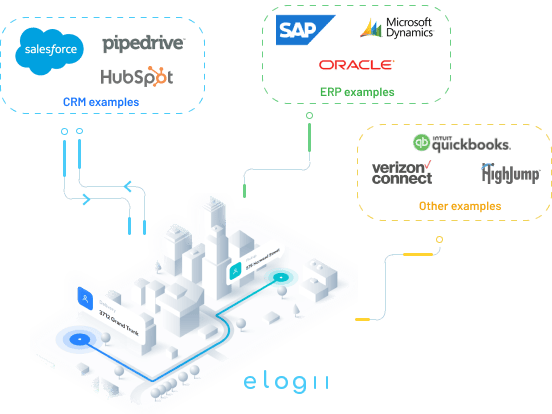
Fragmented data: Information lives across multiple systems including ERP platforms, CRM systems, Fleet Telematics, and Field Service Management tools.
Dynamic operational constraints: Vehicle capacity, technician location, and regulatory compliance all influence who can do what, where, and when.
Within this environment, operational leaders have to orchestrate resources efficiently while maintaining high service quality.
All across the field service industry, the challenge is no longer just planning. It’s executing plans in a way that adapts fluidly to real-world disruptions.
The Operational Ecosystem
Field service organizations rarely rely on a single system to manage these complexities.
Instead, they operate within an ecosystem of specialized platforms:
FSM systems handle work orders, task assignment, and basic dispatching.
ERP systems govern inventory, billing, and procurement.
CRM systems maintain customer records, service histories, and engagement tracking.
Telematics and IoT solutions track vehicle location, condition, and utilization in real-time.
Each system serves a distinct purpose.
However:
These tools are not always synchronized in ways that match the unpredictable realities of fieldwork.
The result is a gap between strategic planning and operational execution. A gap that requires a practical, agile layer to bridge it.
Introducing eLogii: An Execution Layer for Field Service Management
This is where eLogii finds its place.
Instead of replacing existing ecosystems, eLogii functions as an execution layer. It’s the connective tissue between planning systems and real-world operations.
eLogii’s value lies in enabling your organization to respond to variability without discarding investments in existing technology.
If ERP, CRM, FSM, and telematics systems are the individual sections in an orchestra: strings, brass, percussion, each plays a part of a score.
eLogii is the conductor in this analogy. It ensures the orchestra plays in harmony despite changes in tempo, missing musicians, or unexpected soloists.
By focusing on execution rather than replication of upstream systems, eLogii addresses the practical challenge of converting plans into adaptive action on the ground.
Why eLogii Exists: Operational Pain Points
At the heart of eLogii’s purpose are the everyday challenges that field operations face. These challenges that go beyond what static planning or conventional FSM platforms offer or can fully manage:
Scheduling unpredictability: Even with optimized routes and resource allocation, field conditions change continuously. Traffic delays, equipment failures, or urgent service requests require fast, coordinated adjustments.
Execution visibility: Operations often lack real-time insight into work progress across teams. Without accurate, up-to-the-minute information, decisions are reactive rather than proactive.
Adaptation without disruption: Organizations need mechanisms to reroute resources, reassign tasks, or adjust schedules without causing ripple effects across other systems or workflows.
Operational accountability: With distributed teams and multiple stakeholders, tracking who is doing what, where, and when becomes crucial for both service quality and regulatory compliance.
Simply put:
eLogii translates your planning efforts into action that is robust, responsive, and grounded in operational reality. Its role isn’t to redefine strategy, but to ensure that strategy survives, and thrives amid uncertainty.
Real-World Relevance: Bringing Operations to Life
To illustrate, imagine a typical day in a utility company with a large service network:
A technician is dispatched to repair a faulty transformer. En route, a water leak is reported elsewhere, requiring immediate attention.
Without an execution layer, planners must manually reassign work, update schedules, and communicate with field teams. All while accounting for traffic, vehicle capacity, and skill matching.
Delays and errors are almost inevitable.
With eLogii in place, the organization can dynamically adjust assignments, update technicians with revised routes, and maintain continuity across existing FSM and CRM systems.
The same resources are utilized more effectively, and response times improve. Not because the systems are reinvented, but because execution adapts in real time.
Another scenario:
A national pest control company juggling hundreds of service deliveries daily. Vehicle breakdowns, last-minute customer requests, and driver availability constantly threaten the schedule.
eLogii acts as the operational buffer. It allows planners to respond swiftly, while ensuring that upstream planning and reporting remain intact.
These examples highlight that the value of an execution layer is situational and operational rather than purely technological.
Its impact is measured in smoother workflows, reduced disruptions, and more predictable outcomes in environments that are inherently unpredictable.
How eLogii Complements the Broader Stack
eLogii brings several practical benefits without requiring organizations to replace their existing systems:
Preserves existing investments: Companies retain their FSM, ERP, and CRM platforms while adding operational agility.
Enhances data flow: Real-time updates improve situational awareness across the organization, bridging gaps between planning and execution.
Supports hybrid workforces: Dynamic task reassignment works across full-time, contract, and subcontracted personnel.
Enables scenario planning: Planners can model “what-if” situations to anticipate operational bottlenecks or resource shortages without disrupting live operations.
Viewed strategically, eLogii acts as the execution amplifier: it leverages existing planning intelligence and enhances the organization’s ability to respond effectively to real-world variability.
Practical Takeaways for Field Service Leaders
For operational leaders exploring complex scheduling solutions, the key insight is that technology alone doesn’t solve your operational complexity.
Success emerges from the interaction of planning, real-time data, and adaptive execution. Some practical principles include:
Think in layers: Distinguish between strategic planning systems and execution layers that operate in real time.
Prioritize flexibility: Operational tools should accommodate the unexpected without requiring wholesale redesign of existing workflows.
Focus on outcomes, not features: The measure of success is smoother operations, faster response times, and higher service reliability, not the number of bells and whistles a platform offers.
Leverage ecosystem synergies: Integrating execution layers with FSM, ERP, and CRM platforms can amplify the value of each system rather than fragment it further.
These principles provide a framework for understanding where solutions like eLogii fit within the broader landscape of your field service technology.
Who This Approach Is Right For (And Isn’t Right For)
Adopting a sophisticated field service scheduling platform is not a one-size-fits-all decision.
The success of implementation depends heavily on aligning software capabilities with organizational complexity and operational needs.
Choosing the right tool ensures adoption delivers measurable efficiency gains. On the other hand, avoiding mismatched implementations prevents wasted resources and pipeline dilution.
Understanding who benefits most, and who may struggle, protects operational performance and long-term ROI.
It's Right For
This approach is ideally suited for organizations with complex, high-volume, or geographically distributed operations.
These environments face unique scheduling, compliance, and optimization challenges that advanced software like eLogii is specifically designed to address:
Multi-region operations: Companies operating across multiple cities, states, or countries must balance technician availability, travel times, and local service regulations. Field service software with dynamic routing and territory management reduces scheduling conflicts and minimizes downtime.
Example: A telecom provider managing technicians in three states can automatically allocate appointments based on travel efficiency and service priority, saving hours of manual coordination each week.
Regulated industries: Organizations in healthcare, utilities, or energy sectors must adhere to strict compliance rules for safety, certifications, and reporting. Software that tracks licenses, certifications, and mandatory checks ensures technicians are compliant before dispatch.
Example: A utility company can prevent fines by automatically assigning only certified personnel to high-risk equipment maintenance.
High-volume operations: Businesses handling hundreds or thousands of service calls daily benefit from automation to manage load balancing, route optimization, and customer notifications.
Example: A nationwide appliance repair network with access to automated scheduling reduces missed appointments and prevents technician overbooking, directly improving customer satisfaction and operational throughput.
Dynamic or variable workloads: Operations with unpredictable or emergency service requests gain agility through real-time dispatching and AI-driven prioritization.
Example: An HVAC company dealing with storm-related surges can automatically reassign technicians to urgent jobs while maintaining coverage for scheduled work.
In all these scenarios, the software acts as a force multiplier. eLogii reduces manual scheduling errors, optimizing resource allocation, and ensuring compliance, all while providing visibility and analytics for continuous improvement.
It's Not Right For
Some organizations may find advanced field service scheduling software unnecessary. Or even burdensome. This can be due to size, simplicity, or cost sensitivity:
Small teams: A company with a handful of technicians covering a single service zone doesn’t need sophisticated routing or AI-driven scheduling. Manual methods or simpler tools like spreadsheets often suffice. For a three-person utilities team servicing one city, investing in a complex platform adds overhead without significant efficiency gains.
Static or predictable routes: Businesses with fixed, repeatable schedules, such as weekly route-based servicing drives limited value from dynamic optimization features. The software’s flexibility may go unused, turning the investment into sunk cost. A lawn care company with pre-defined seasonal routes can maintain efficiency using basic scheduling spreadsheets or lightweight apps.
Price-driven buyers: Advanced platforms carry higher upfront and ongoing costs. Organizations prioritizing cost minimization over efficiency gains struggle to justify the investment, particularly if operational complexity doesn’t demand it. A small appliance repair startup will find subscription fees for AI scheduling excessive to its revenue.
Low scalability needs: Companies unlikely to expand beyond a single region or modest technician base may never fully leverage advanced capabilities, leaving features unused. The ROI diminishes as operational complexity remains low.
Choosing a software solution misaligned with organizational needs can introduce unnecessary complexity, training demands, and administrative burden.
The key is to balance capability requirements with your operational fit. This ensures the platform enhances productivity rather than creating friction.
In short, advanced field service scheduling software like eLogii that excels in complex, dynamic, and regulated environments is an overkill for small, static, or cost-sensitive operations.
Recognizing this alignment protects your pipeline by guiding you toward solutions that genuinely improve efficiency and service quality. (Rather than stretching your resources on unnecessary implementations.)
Aspect
Right For
Not Right For
Organization Size
Medium to large teams with many field technicians and field teams
Small teams (1–5 technicians)
Geographic Scope
Multi-region, national, or international operations
Single city or local area operations
Workload Type
High-volume, dynamic, or unpredictable service calls
Little incremental efficiency; features underused; potential training overhead
This Is a Shift in Mentality…
Adopting field service scheduling software for complex operations requires more than simply installing a tool.
It demands a shift in mentality.
Teams must move from reactive scheduling habits toward a proactive, data-driven approach.
This means trusting the software to optimize assignments, rather than relying solely on manual knowledge or intuition.
For many organizations, this transition can feel uncomfortable at first. You may be accustomed to spreadsheets or whiteboards, and you may worry about losing control.
But embracing this shift unlocks efficiency gains, reduces downtime, and provides visibility across the entire service network.
Even with the best software, challenges inevitably arise.
Common pitfalls often stem from mismatched expectations, inconsistent data, and rigid processes.
Scheduling “breaks” frequently occur when incomplete customer records, unrecorded technician skills, or outdated availability information create conflicts.
Similarly, teams can struggle if they try to mirror old workflows exactly, rather than leveraging the software’s automation and optimization features.
It’s time to overcome the uncomfortable reality of field service automation
Another common stumbling block is underestimating change management. This is the human side of software implementation:
Without proper training and buy-in, even the most capable platform can sit underutilized.
Fortunately for you, certain practices consistently drive success in complex scheduling.
Maintaining clean, accurate data is foundational. Reliable customer, asset, and workforce information ensures the software can optimize effectively.
Teams that define clear priorities, such as SLA compliance, travel minimization, or first-time fix rates, see better outcomes because the system understands what truly matters.
Encouraging cross-functional collaboration, where dispatchers, field technicians, planners, and managers share real-time insights, smooths operations and prevents misalignment.
Finally, operational refinement by adjusting rules, territories, and workloads based on analytics helps teams continuously improve without major disruptions.
Next step is to choose the software that’s the best fit for your business
When evaluating software, focus on practical considerations that impact long-term adoption and ROI.
Key factors which you should consider include scalability, integration capabilities with existing CRM or ERP systems. Others involve the ability to handle complex constraints like certifications, equipment dependencies, or multi-step service flows.
Flexibility in rules configuration is crucial: the platform you choose should adapt to your operational realities. Not force you to redesign workflows to fit its logic.
User experience matters too, and intuitive interfaces and mobile accessibility increase adoption across dispatchers and technicians.
And finally, robust analytics and reporting are non-negotiable. Without actionable insights, scheduling remains reactive instead of predictive.
The path to effective field service scheduling is as much about people and processes as it is about technology.
Embracing data-driven decision-making, addressing common pitfalls proactively, and committing to disciplined practices, you can unlock significant operational efficiencies.
Choosing the right software, one that aligns with your complexity, integrates smoothly, and supports iterative improvement, is critical.
Conclusion
Modern field service operations are complex, unpredictable, and increasingly demand operational excellence.
Organizations do rely on an array of specialized systems for planning, customer engagement, and fleet management. But the gap between planning and real-world execution still persists.
eLogii addresses this gap as an execution layer:
A neutral, complementary technology that ensures plans translate into action while allowing organizations to respond to dynamic, unpredictable conditions.
eLogii’s purpose is clear:
To help field service operations adapt, coordinate, and execute effectively without disrupting existing systems or processes.
By understanding the role of execution layers in context, you can make informed decisions that balance strategic planning, technological investments, and the realities of the field.
The result isn’t just optimized field service schedules, but resilient, agile field service operations capable of delivering consistent service even in the face of uncertainty.
So, what next?
If you’re looking to dive deeper into field service schedule execution, explore how it works with real data. See how teams like yours can use eLogii according to your operational setup.
It’s time to understand the practical impact of field service scheduling software. And within the context that matters the most: yours.
Take the first step to transform scheduling from a daily challenge into a strategic advantage.
A complete guide to scaling up your pest control operations, including appointment planning and scheduling, execution, efficiency and more.
eLogii
Feb 19, 2026
The leading Route Optimization resource
Be the first to know when new articles are released. eLogii has a market-leading blog and resources centre designed specifically to help business across countless distribution and field-services sub sectors worldwide to succeed with actionable content and tips.